
Livraison le jour même ou le lendemain

Qualité garantie

Débloquez vos offres de bienvenue: Livraison GRATUITE | Jusqu'à -80 % | 30 jours d'essai gratuits à JoyPlus
Téléchargez l'application
By Joybuy, your product expert – August 27, 2026
MacBook, iPad, iPhone… The minimalist design of Apple devices has a downside: the ubiquity of USB-C and the disappearance of legacy ports. To connect an external display, a simple USB drive, or charge your device during a presentation, a multiport adapter has become an essential accessory. The problem? The market is a jungle where it's easy to get a bad deal. A seemingly savvy purchase can quickly turn into a nightmare.
To ensure you don't regret your purchase, here are the 3 pitfalls to avoid at all costs:
To make the right choice, there's no secret: you have to know how to read a spec sheet. Here are the features that truly make the difference between a good adapter and a bad one.
For a fluid and comfortable viewing experience, only one standard matters: 4K (3840 x 2160 pixels) at 60 Hz. This is a non-negotiable feature, especially with modern monitors and TVs. A 60 frames-per-second refresh rate guarantees perfect smoothness for browsing, working, or gaming. Be aware that your entire setup must be compatible: your device (Mac, iPad), the adapter, the HDMI cable (minimum HDMI 2.0 standard), and your display. An apple 4k 60hz adapter that meets this standard is a promising sign.
A versatile adapter should offer this trio of ports at a minimum to handle 99% of use cases:
connecting macbook to tv, a monitor, or a projector.A usb-c to hdmi and usb-a adapter with integrated PD charging is the ultimate Swiss Army knife.
The Apple ecosystem is unforgiving of half-measures. The adapter must be advertised as 100% compatible with your specific Mac, iPad, or iPhone model. The official Apple MW5M3ZM/A adapter is the gold standard in this category. For third-party brands, carefully review the list of compatible devices. A good ipad pro usb-c accessory, for instance, must interface perfectly with iPadOS.
Instead of an impersonal list, we've matched products to specific use cases to help you find the adapter that's truly right for you.
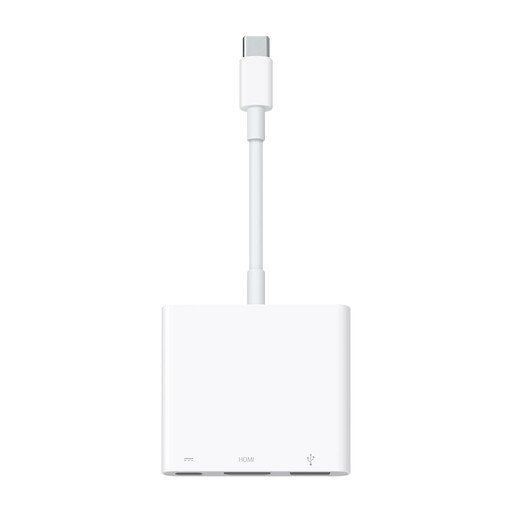
Why we chose it: For those who swear by the Apple ecosystem and demand absolute peace of mind. Designed by Apple for Apple, it offers a perfect "plug-and-play" experience without worrying about drivers or compatibility.
It provides flawless 4K 60 Hz support on compatible devices, a point where many competitors struggle. Its thermal management is optimised, and its PD port is calibrated for Apple chargers.
Maximum reliability and compatibility. Impeccable build quality and official manufacturer support. It's the safe bet.
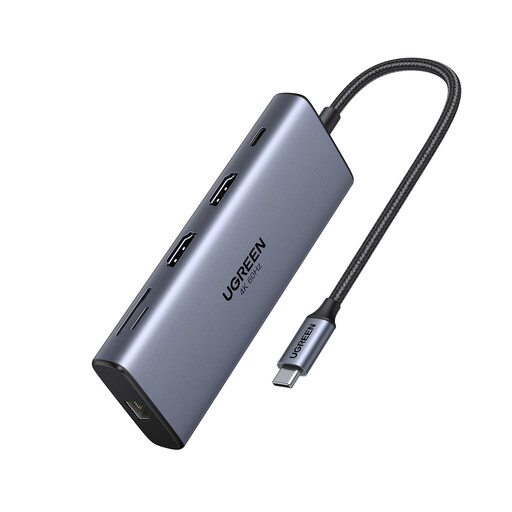
Why we chose it: For those who need to connect everything, all the time. This hub transforms a single laptop into a complete workstation with dual HDMI outputs, SD/TF card readers, an Ethernet port, and high-speed USB ports.
UGREEN has established itself as a reliable brand. This hub is built from aluminium for better heat dissipation, and its 100W PD passthrough handles the power draw of even the most demanding MacBook Pros without breaking a sweat.
Ultra-comprehensive connectivity (dual 4K HDMI, Ethernet, card readers). USB 3.2 ports at 10 Gbps for lightning-fast file transfers.
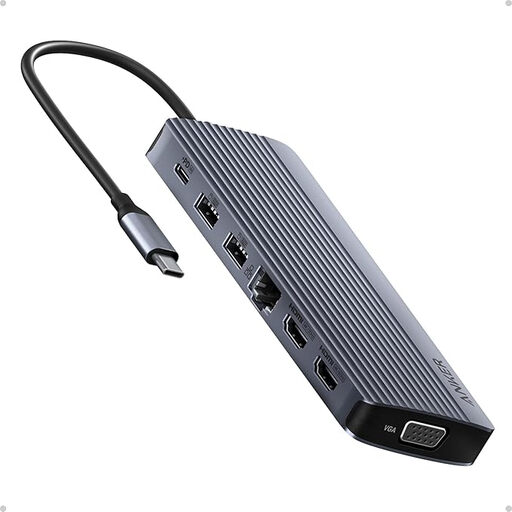
Why we chose it: The ultimate docking station for multi-monitor pros and peripheral collectors. This hub supports up to three external displays (2x HDMI, 1x VGA) and turns a simple laptop into a true command centre.
Anker is a heavyweight in the accessories market. The brand is transparent, clearly specifying display capabilities and limitations (especially on macOS), which prevents unpleasant surprises. Its robust construction is designed for intensive use.
Triple-display capability for maximum productivity. A total of 14 ports to meet every conceivable connection need.
We've curated a complete range of products that meet our strict selection criteria and European safety standards.
Getting slightly warm is normal, especially when streaming 4K video or during a large data transfer. It means the adapter is working. However, if it becomes so hot that it's difficult to touch, it's often a sign of a poor-quality product or a flawed design. As a precaution, it's best to unplug it to avoid damaging your hardware.
For the 4K 60 Hz magic to happen, your entire setup must be compatible:
The Apple adapter guarantees perfect compatibility. It's a risk-free choice. However, excellent third-party brands like Anker and UGREEN offer high-quality alternatives, often with more ports for a more attractive price. The most important thing is to stick to reputable brands and carefully check the spec sheet before you buy.