
Livraison le jour même ou le lendemain

Qualité garantie

Débloquez vos offres de bienvenue: Livraison GRATUITE | Jusqu'à -80 % | 30 jours d'essai gratuits à JoyPlus
Téléchargez l'application
A US QWERTY mechanical keyboard can be an excellent choice for gaming, development, working from home or everyday typing, provided you check a few details before ordering. The American layout is not simply about the order of the keys: it also changes the position of symbols, certain shortcuts and compatibility with the way you use Windows or macOS.
On the French market, three mistakes come up time and again: a product listing that confuses a mechanical keyboard with a mere ‘mechanical feel’, a compact format that removes useful keys, or a wireless connection whose real-world battery life drops sharply as soon as the backlight is switched on. Here are the criteria to consider so you can buy with confidence.
A membrane keyboard can offer a defined keystroke without containing genuine mechanical switches. This is notably the case with the MageGee TS91, described as having a ‘mechanical feel’. It may be suitable for a limited budget, but it should not be compared directly with a true hot-swappable mechanical keyboard.
To identify a mechanical model, check the type of switch specified: blue with an audible click, linear, tactile, or a specific reference such as Gateron or Kailh. The presence of a hot-swap PCB is also a good indication, although on its own it does not guarantee keyboard quality.
A 60 % keyboard generally retains the main alphanumeric keys, but removes the function row, arrow keys and numeric keypad. These commands remain accessible via the Fn key, at the cost of a short adjustment period.
The 65 % format generally adds arrow keys and a few navigation keys. The 75 % retains a compact function row, while the 98 % comes close to a full-size keyboard by removing some unnecessary gaps. For spreadsheets, accounting or regular number entry, a 96/98 % or 100 % model will be considerably more practical.
A RGB mechanical keyboard can offer numerous lighting effects without necessarily allowing you to customise every key. So check the type of lighting — RGB, white or rainbow — as well as the adjustment options available: built-in shortcuts, compatible software and brightness levels.
On a wireless mechanical keyboard, battery life depends in particular on Bluetooth, the 2.4 GHz receiver, the selected brightness and the battery capacity. For long sessions without recharging and a hassle-free setup, a wired USB-C connection remains the simplest option.
The US QWERTY layout places the @ key and several special characters in different positions from those on a French AZERTY keyboard. It is particularly popular with some developers, gamers and users of software configured in English. Before buying, check that the markings on the keys match the way you intend to use them.
Models compatible with Windows and macOS may use different shortcuts. If you plan to connect the keyboard to a phone, tablet, console or Apple computer, check the stated compatibility as well as the connection types available.
Blue switches generally produce an audible click and pronounced tactile feedback. They may appeal to users who like to feel every activation, but their noise could disturb others in a shared office or bedroom.
Linear switches provide a smooth keystroke without a pronounced click. They are often preferred for gaming and quieter typing. However, the feel varies depending on the actuation force, travel and factory lubrication. It is therefore better to consult the technical specifications rather than relying on the commercial name alone.
PBT keycaps generally resist developing a polished shine better than ABS keycaps, depending on how they are made and used. A hot-swappable keyboard allows you to replace compatible switches without soldering, provided you follow the specified number of pins, usually 3 or 5.
A ‘gasket’ structure and layers of foam can alter the flexibility and sound of the keystroke. However, they are no substitute for good posture or correctly adjusting the keyboard height. Finally, ‘spill-resistant’ does not mean that the keyboard is waterproof: if liquid is spilt, unplug it immediately.
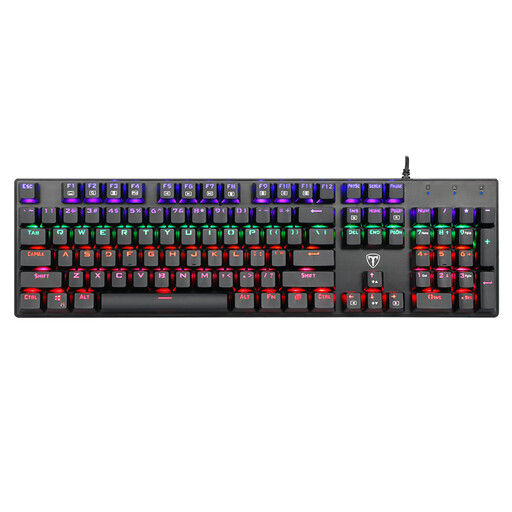
Why this choice suits this profile: With 104 keys and a numeric keypad, this model is suitable for students, PC users and anyone looking for a conventional US QWERTY layout.
The listing specifies mechanical blue switches, a wired USB connection and a full-size format, clearly distinguishing the essential features from a simple mechanical effect.
Numeric keypad, backlighting, multimedia keys and anti-ghosting functionality stated for Windows, macOS and certain consoles.
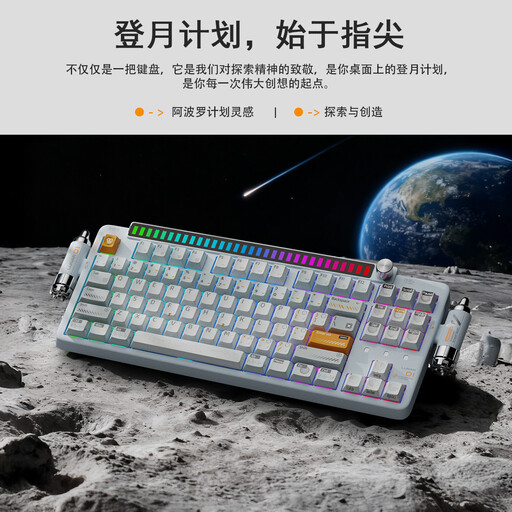
Why this choice suits this profile: Customisation enthusiasts benefit from an 80 % format, three connection modes and a hot-swap system for adapting the switches to their preferences.
The listing provides details about compatibility with 5-pin switches, Bluetooth, 2.4 GHz and USB-C connections, as well as the 4,000 mAh battery.
PBT keycaps, programmable rotary knob, linear switches and detachable reactive lighting, with compatibility for Windows, macOS, iOS and Android.
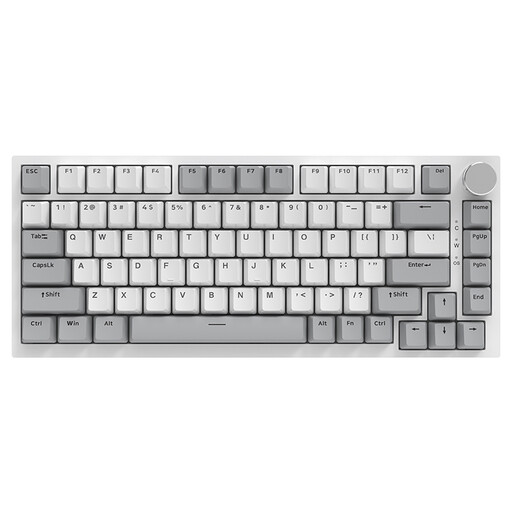
Why this choice suits this profile: Its compact 82-key format frees up space for your mouse while retaining useful functions for both work and play.
The wired Type-C connection avoids recharging and variations in latency associated with wireless use. The model is specified as hot-swappable for 3- and 5-pin switches.
Volume knob, PBT keycaps, gasket structure, sound-dampening foam and RGB backlighting with 20 stated modes.
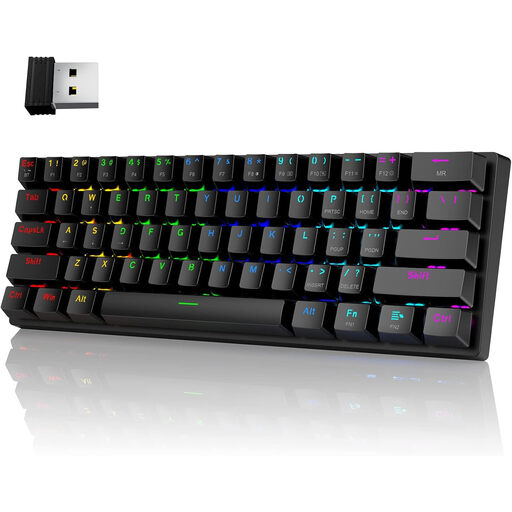
Why this choice suits this profile: With 61 keys and Bluetooth, 2.4 GHz and USB-C connections, it is easy to carry between home, study and your gaming setup.
The listing clearly states that there is no numeric keypad or function row, so you know exactly what to expect from a 60 % keyboard.
Clicky blue switches, 1,600 mAh battery, 16 RGB modes and stated compatibility with PCs, Macs, phones, tablets and Xbox.
We have brought together a complete, real-time updated selection of products that meet these strict criteria, as well as European safety requirements.
Yes. It works with Windows, macOS or Linux, but the layout selected in the operating system must match the keys being used. In the language settings, select the US layout if you want to type the symbols printed on the keyboard.
The 75 % format offers a particularly practical compromise: it retains the function keys while freeing up space on your desk. If you frequently use the numeric keypad, choose a 98 % or full-size keyboard. For a very limited workspace, a compact 65 % mechanical keyboard may be suitable, provided you are happy to use Fn shortcuts.
They can be enjoyable for users who appreciate a click and tactile feedback, but they are still clearly audible. In a shared space, linear switches or a model with sound reduction will help minimise disruption. Also remember to check the backlight settings and unplug the keyboard before cleaning it or replacing any switches.