
Livraison le jour même ou le lendemain

Qualité garantie

Débloquez vos offres de bienvenue: Livraison GRATUITE | Jusqu'à -80 % | 30 jours d'essai gratuits à JoyPlus
Téléchargez l'application
An US QWERTY gaming mechanical keyboard can be used for gaming, working from home, studying or creating content. However, product listings sometimes focus on backlighting or the number of features, at the expense of far more important criteria: the actual key layout, connection type, noise level, compatibility and upgrade options.
Before placing your order, take the time to check these common pitfalls.
A US QWERTY keyboard does not use the same layout as a French AZERTY model. The Enter, Shift, symbols and some characters may be located in different places. So check for the wording “QWERTY US Layout” in the product listing, as well as looking closely at the key photos.
On both Windows and macOS, you can change the software keyboard layout. However, the legends printed on the keys will remain those of the keyboard you bought. Whether you are coding, gaming or using shortcuts, this difference needs to be accepted from the outset.
An RGB mechanical keyboard may offer a wide range of lighting effects, but the lighting does not change the typing feel or the stability of the keys. Instead, check whether the backlighting can be customised, whether it can be switched off and whether the settings are accessible directly from the keyboard or through compatible software.
When a listing states a long lifespan, this generally refers to the switches or keycaps under specific usage conditions. This figure does not guarantee that every component will work identically throughout the entire period.
Blue switches provide pronounced tactile feedback and an audible click. They may appeal to someone who games alone or enjoys audible feedback, but they are less suitable for a shared office, library or bedroom occupied by someone else.
Linear switches generally offer a smoother keystroke. A gasket mount design and layers of foam can also alter the feel under your fingers and the keyboard’s resonance. These features do not automatically make it quiet: the noise also depends on the keycaps, how hard you press and the surface it is used on.
The layout determines both how much desk space the keyboard takes up and which functions are available.
For spreadsheets, accounting or numerical shortcuts, a 98- or 104-key keyboard will be more suitable. By contrast, a 60%, 65% or 75% layout frees up space on a narrow desk and gives you more room for mouse movements.
A wired USB-C keyboard does not require charging and provides a direct connection. It is particularly suitable for fixed workstations, competitive gaming and long typing sessions.
A wireless mechanical keyboard gives you greater freedom. Bluetooth is convenient with a laptop, tablet or phone, while a 2.4 GHz connection with a USB receiver is generally preferred on a PC for cable-free gaming. A tri-mode mechanical keyboard usually combines wired, Bluetooth and 2.4 GHz connectivity.
Check how many devices can be stored in memory, the type of receiver supplied, whether there is a power switch and the battery details. For a rechargeable model, use a USB-C cable and charger in good condition, in line with the manufacturer’s recommendations.
Hot-swapping allows you to replace switches without soldering, provided you follow the stated compatibility requirements, generally 3- or 5-pin. This is a valuable feature if you want to gradually change the typing feel or easily replace a faulty switch.
PBT keycaps are generally more resistant to developing a shine through use than some ABS keycaps. However, their profile and printing method should still be checked. An OEM, Cherry or low-profile design will not feel the same beneath your fingers. A volume knob, display or RGB lighting can be useful, but these features should not distract from the essentials: the key layout and compatibility with PC and Mac.
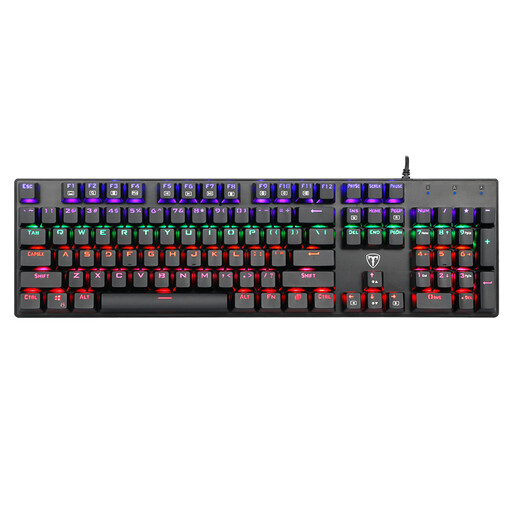
Why this choice suits this profile: Its 104-key layout with numeric keypad makes it easy to switch to a mechanical keyboard, whether you want to game on a PC or handle everyday typing.
The wired USB connection means there is no need to recharge, and the listing clearly specifies the US QWERTY layout. The blue switches are audible, so bear this in mind before buying.
Full-size layout, multimedia keys, multi-mode backlighting and advertised anti-ghosting functionality.

Why this choice suits this profile: It combines a 98% layout, tri-mode connectivity, a TFT display depending on the version and a programmable metal knob.
The listing distinguishes between wired, Bluetooth and 2.4 GHz modes. Battery capacity varies depending on whether the display is included, so check the selected version carefully.
Hot-swap PCB, gasket mount, advertised five-layer dampening and Windows/macOS compatibility.
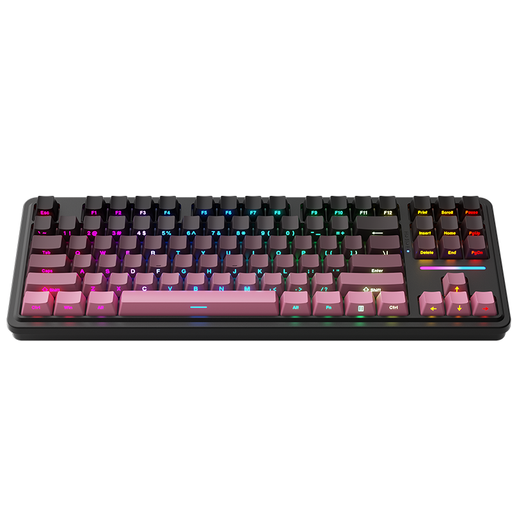
Why this choice suits this profile: Its 80% layout retains the essential functions while leaving more room for your mouse. It also offers three connection modes.
Hot-swapping lets you replace the switches without soldering. The listing specifies wired, Bluetooth or 2.4 GHz use, so you can choose the connection that suits the situation.
Gasket mount, interchangeable switches and RGB backlighting adjustable using shortcuts.

Why this choice suits this profile: Easy to carry, it frees up space on a small desk while offering Bluetooth, 2.4 GHz and USB-C connectivity.
The listing details which keys are omitted by the 60% layout. As the blue switches are clicky, check that their noise level is suitable for your environment.
61 keys, 16 advertised RGB modes, rechargeable 1,600 mAh battery and compatibility with PC, Mac, phone and tablet.
We have put together a complete, real-time updated list of products that meet these demanding selection criteria and European safety standards.
Yes, provided the model states that it is compatible with macOS. You will then need to select the layout that matches your usage in the system settings. The legends on the keys will nevertheless remain in US QWERTY.
This depends on the switches, keycaps, the battery in wireless models and the conditions of use. Some listings advertise up to 50 million keystrokes, or even more for certain components. This figure should be viewed as information provided by the manufacturer, not as a guaranteed operating lifespan for the keyboard as a whole.
Bluetooth or 2.4 GHz connectivity generally involves no recurring costs. However, you will need to recharge the battery and, if the cable or receiver is lost or damaged, you may need to replace it. To avoid interruptions, a tri-mode keyboard can be used via USB-C when the battery is nearly flat.