
Livraison le jour même ou le lendemain

Qualité garantie

Débloquez vos offres de bienvenue: Livraison GRATUITE | Jusqu'à -80 % | 30 jours d'essai gratuits à JoyPlus
Téléchargez l'application
In the ultra-competitive world of esports, where every millisecond counts and every gram matters, the choice of hardware is no longer a detail—it's a strategic imperative. The lightweight wireless gaming mouse has established itself as the weapon of choice for players seeking the perfect combination of responsiveness and precision. But faced with a jungle of spec sheets and marketing promises, it's hard to sort through the noise.
This guide is here to decode the criteria that truly matter and present our selection of the best models of 2026. Our mission?is to give you all the keys to make an informed choice that matches your playstyle, grip, and ambitions.
Before diving into our selection, let's review the technical specifications that separate a simple mouse from a true pro-grade gaming mouse.
In fast-paced games like FPS, an ultralight mouse (often under 60 grams) provides an undeniable advantage. Less weight means less inertia. In practice, this translates to more explosive movements, more instinctive aiming micro-adjustments, and reduced wrist fatigue after hours of play. To achieve this, manufacturers focus on design (solid or perforated "honeycomb" shells) and materials, with increasingly popular magnesium alloys.
A gaming mouse's core is its sensor. Its performance is primarily measured by two indicators:
Forget the old clichés about latency: modern wireless technologies (via a 2.4 GHz dongle) now easily rival wired connections. The real challenge has therefore become battery life. A good wireless mouse for FPS must provide several dozen hours of gameplay to ensure it never lets you down in a crucial match.
Here are three models that tick all the boxes for lightness and raw performance.
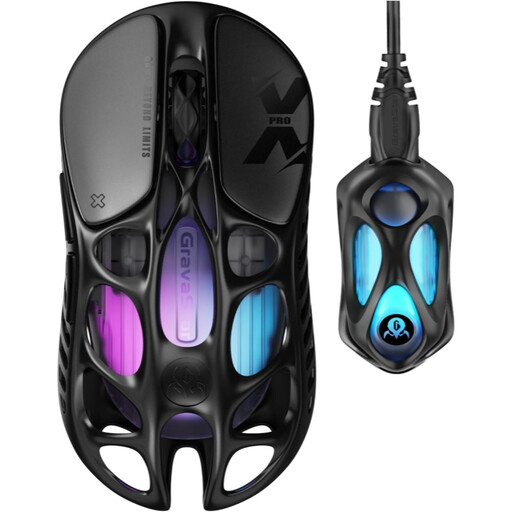
Why it stands out?: With its featherlight weight and magnesium alloy exoskeleton, the Mercury X Pro is an ode to extreme lightness without sacrificing rigidity.
Pros:
Who is it for? For speed-obsessed competitors who want the most cutting-edge spec sheet available in a design that turns heads.
See the GravaStar Mercury X Pro on Joybuy.fr
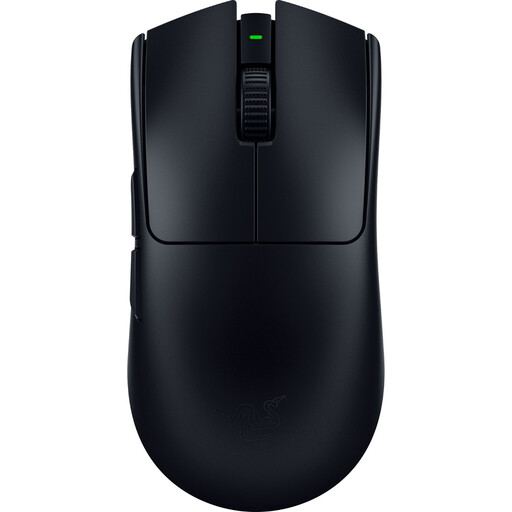
Why it stands out?: Designed with and for esports pros, the Viper V3 Pro is the culmination of Razer's quest for the perfect competition mouse. It embodies the ideal balance of lightness, ergonomics, and raw performance.
Pros:
Who is it for? For competitive players who trust proven performers and a shape tested on the esports stage. A benchmark for those seeking an ambidextrous mouse without any compromise.
Discover the Razer Viper V3 Pro on Joybuy.fr
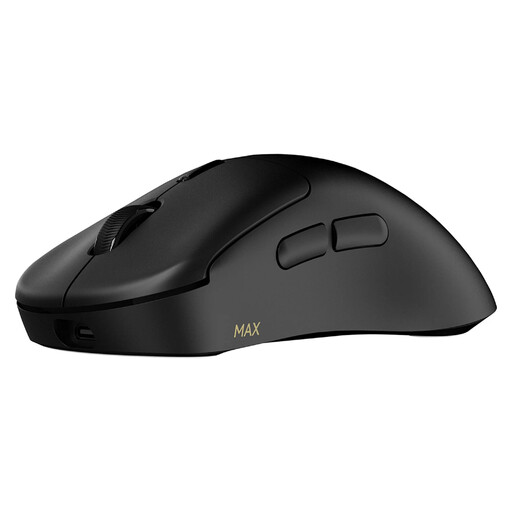
Why it stands out?: The VT3 MAX packs a punch with record-breaking battery life: up to 750 hours (at 1000 Hz) according to the manufacturer! All while maintaining a featherlight weight and top-tier performance.
Pros:
Who is it for? For marathon gamers who refuse to choose between lightness, performance, and battery life. Also ideal for those who like to have numerous shortcuts and macros at their fingertips.
Check out the RAPOO VT3 MAX on Joybuy.fr
Our selection highlights ultralight models with cutting-edge features. If you prefer ergonomic shapes for right-handers, more side buttons for your MMOs, or other specific functionalities, feel free to explore our full catalogue.
Explore our range of wireless gaming mice with side buttons
A featherlight weight (under 60g) is a major asset in games that demand quick and precise movements. By reducing inertia, it allows you to start and stop your movements with greater responsiveness. The result: better mobile target acquisition and easier-to-execute flick shots. Another significant benefit is that an ultralight mouse limits wrist and arm fatigue during long gaming sessions.
An 8000?Hz polling rate means the mouse communicates its position 8000 times per second, dropping latency from 1?ms (the standard at 1000?Hz) to just 0.125?ms. The effect is most noticeable on a very high refresh rate monitor (240?Hz and above), where cursor movement becomes smoother. For a pro or a very demanding player, this latency gain, however small, can represent a real competitive advantage by almost perfectly synchronising hand movement with on-screen action.
DPI defines the sensor's sensitivity. Be careful, a high number doesn't mean a better mouse. The choice of DPI is primarily a matter of personal preference. Most professional FPS players opt for low sensitivities (between 400 and 1600 DPI) for more stable and precise control, especially for long-range aiming. They compensate by making larger arm movements on a large mouse pad. An optical gaming mouse with a very high maximum DPI is mainly proof that it features a modern and reliable sensor that will perform flawlessly, no matter which setting you adopt. The best advice is to experiment to find the sweet spot between speed and precision that works for you.