
Livraison le jour même ou le lendemain

Qualité garantie

Débloquez vos offres de bienvenue: Livraison GRATUITE | Jusqu'à -80 % | 30 jours d'essai gratuits à JoyPlus
Téléchargez l'application
Is your new TV the centerpiece of your living room, but its stand has a massive footprint? Switching to a TV wall mount is the ideal solution. Not only will you reclaim valuable floor space, but you'll also modernise your interior and enjoy optimal viewing comfort. The problem? With the overwhelming number of models available, making the right choice can quickly become a headache.
Our mission at Joybuy is to give you the keys to confidently choose the perfect mount for your TV, your wall, and your viewing habits. This guide is designed to enlighten you and simplify the process, step by step.
Before you start, there are three essential criteria to check for a safe and successful installation.
The VESA (Video Electronics Standards Association) standard defines the distance in millimetres between the four screw holes on the back of your TV. It's THE most crucial compatibility factor. You can find this information in your TV's user manual or, more simply, by measuring the horizontal and then the vertical distance between the holes (for example, 400?x?400?mm).
Next, ensure the mount is compatible with the weight and diagonal size (in inches) of your screen. Every TV wall mount clearly displays a maximum load capacity and a range of compatible screen sizes, such as for 32 to 75-inch TVs. Never exceed these limits—the safety of your setup depends on it!
This choice depends on your room's layout and the flexibility you need.
Warning: The safety of your installation depends entirely on the type of wall. Installing on a concrete wall, solid brick, or wood studs are the only truly safe options. Plasterboard (drywall) or hollow brick walls should be avoided: they are not designed to support the tension and weight of a TV, especially one on an articulating arm. You must consult the manufacturer's instructions, where compatible wall types are always specified.
Here are three models we've selected for their reliability, ease of use, and excellent value for money.
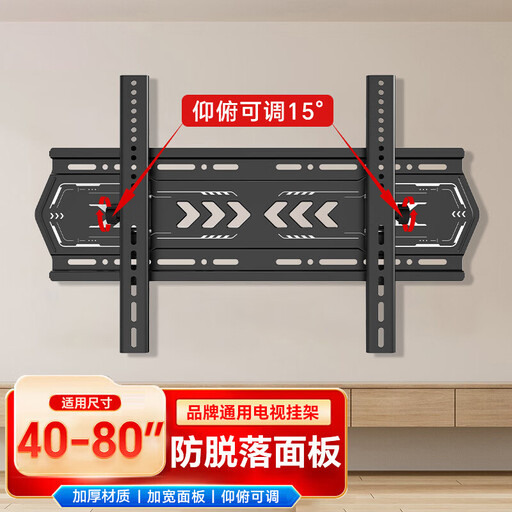
Highlights: This model is a no-nonsense solution, offering simple and effective vertical tilt. Its robust design and well-engineered mechanism help combat glare and adjust the viewing angle to perfection.
Pros:
Who is it for? For anyone installing their TV a little high up (e.g., above a fireplace) who simply wants to tilt it down towards the sofa for optimal comfort, without needing to worry about side-to-side swivelling.
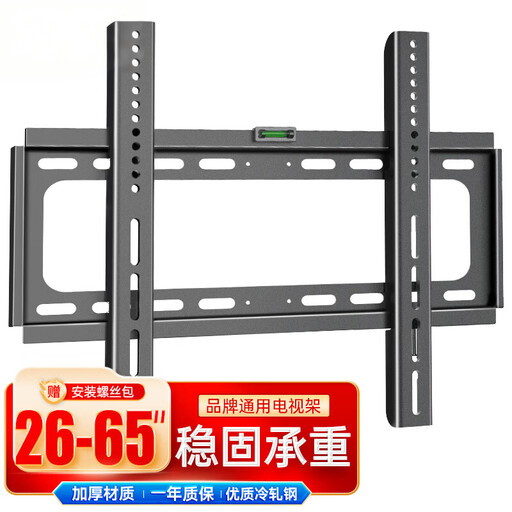
Highlights: Here, the priority is absolute discretion. This fixed mount places your TV as close to the wall as possible for an ultra-modern, minimalist "picture-frame" effect.
Pros:
Who is it for? For the purists who have a fixed viewing position and prioritise aesthetics and space-saving. If you want your TV to blend into your decor, this is the model for you.
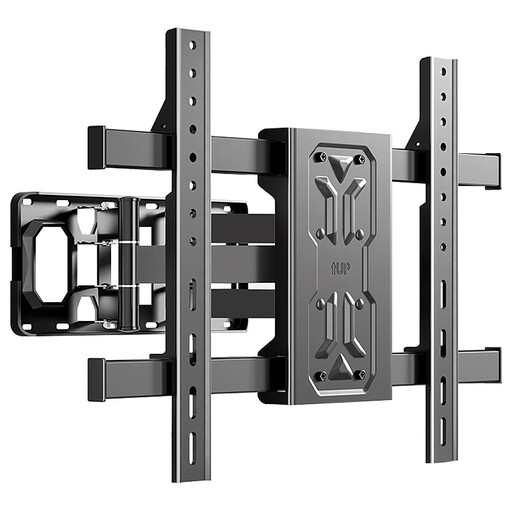
Highlights: The Swiss Army knife of TV mounts! This tilting and swivelling model offers complete freedom of movement. Its articulating TV arm allows you to extend, pivot, and tilt the screen to get the perfect angle, no matter where you are in the room.
Pros:
Who is it for? For those who demand maximum versatility. Ideal for a large living room with multiple sofas, an open-plan kitchen and living room, or simply for those who want to easily access the cables on the back of the TV without taking everything apart.
Our selection covers the most common needs, but your project might be unique. For more specific requirements (corner mounts, very large screens...), feel free to browse our full catalogue.
Discover our full range of Full-Motion TV Mounts
This standard is almost always indicated in your TV's user manual. Don't have it anymore? Don't worry. Simply measure the horizontal distance (in mm), then the vertical distance (in mm) between the centres of the four screw holes on the back of the screen. The result (e.g., "400?x?200") is your VESA standard.
This is a very bad idea. A simple plasterboard wall is absolutely not designed to support the weight and tension exerted by a TV, especially with an extended arm. For a 100% secure installation, you must screw the mount into the studs (wood or metal) within the wall's structure, or into a load-bearing wall (concrete, solid brick). Always follow the mount manufacturer's recommendations—it's a matter of safety.
It's simple: a tilting mount moves on the vertical axis (up and down), which is ideal for adjusting the angle and counteracting glare. A swivelling mount pivots on the horizontal axis (left to right), perfect for aiming the screen towards different areas. The most versatile models, known as "full-motion" or "articulating," combine both movements.