
Livraison le jour même ou le lendemain

Qualité garantie

Débloquez vos offres de bienvenue: Livraison GRATUITE | Jusqu'à -80 % | 30 jours d'essai gratuits à JoyPlus
Téléchargez l'application
Buying a Turtle Beach Stealth 700 wireless gaming headset might seem straightforward at first glance. However, the spec sheets often mix up theoretical battery life, partial compatibility and features reserved for certain platforms. For a gamer in the UK, the most important thing is to check how the headset performs day to day: connection stability, comfort after several hours, microphone quality and how easy it is to switch between devices.
The phrase "multi-platform compatible" doesn't necessarily mean all features are available everywhere. Some headsets work wirelessly on PC but only with a cable on a given console. Others require an additional adapter.
The Turtle Beach Stealth 700 Gen 3 is advertised as compatible with PS5, PS4, PC, Steam Deck, mobile devices and Nintendo Switch 2, thanks to two dedicated USB transmitters. For Xbox Series X|S, however, check the exact configuration listed on the product page and make sure the necessary accessories are included before placing your order.
A claimed battery life of up to 80 hours depends on many factors: volume level, Bluetooth usage, any lighting effects and battery ageing. The charging speed deserves just as much of your attention.
The model featured promises up to 80 hours of battery life, with a quick 15-minute charge giving you around 3 hours of gameplay. Handy when an impromptu gaming session comes up, but it doesn't let you off the hook from regularly charging the headset with the supplied USB-C cable.
A microphone that can isolate ambient noise doesn't automatically turn the headset into one with active noise cancellation for listening. Here, the spec sheet mentions a flip-to-mute unidirectional microphone, paired with software-based noise isolation and a mute control.
For Discord or voice chat, this system can reduce sounds picked up around your voice. However, conversations in the room, a mechanical keyboard or a nearby TV may still be audible depending on your environment.
For gaming, a wireless 2.4 GHz connection via USB transmitter is generally preferable. It's designed to minimise the perceptible delay between action and sound. Bluetooth 5.2, on the other hand, is most practical with a phone, tablet or for listening to music.
The Stealth 700 lets you use 2.4 GHz and Bluetooth simultaneously. So you can game on a console or computer while taking a call or listening to content from a mobile device. A particularly useful feature for Discord users who juggle multiple audio sources.
The spec sheet mentions two 60 mm Eclipse transducers, with a claimed separation between woofer and tweeter. The diameter of the speakers obviously isn't enough to predict sound quality, but it does give an indication of the product's design.
The Swarm II software offers a 10-band equaliser, several sound profiles and various microphone settings. Enough to adjust the bass, voices or game sounds to your liking, without pretending any single setting is a one-size-fits-all solution.
For long sessions, make sure to check:
The featured model uses memory foam ear cushions with ProSpecs technology, designed to leave more room for glasses frames. Its reinforced steel headband and flat-folding design make it easy to store, but comfort will always depend on your own head shape.
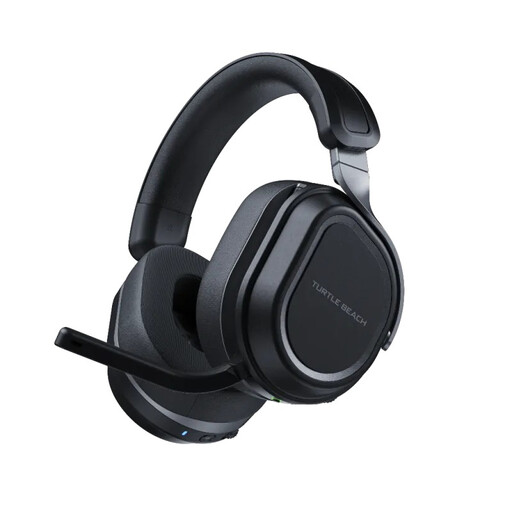
Why this choice suits this profile: For getting started with a gaming headset on PC and Xbox, or with a PS5 and PC setup, this model brings together the essential features without piling on extra audio accessories.
The two USB transmitters and simultaneous Bluetooth reduce the risk of buying a model limited to a single source.
2.4 GHz connection, Bluetooth 5.2 and flip-to-mute microphone.
Why this choice suits this profile: Gamers who want to customise the sound output and controls have far more comprehensive tools at their disposal than with a headset that lacks companion software.
The 10-band equaliser lets you change profiles instead of being stuck with a fixed sound signature that's presented as suitable for everyone.
Two 60 mm speakers, Swarm II settings and customisable wheel.
Why this choice suits this profile: Regular gamers, voice chat users and those who switch between console, computer and mobile benefit from a claimed battery life of up to 80 hours.
The quick charge and dual audio connection minimise interruptions from a low battery or switching devices.
Up to 80 hours claimed, microphone with noise isolation and CrossPlay button to switch between compatible devices.
We've put together a comprehensive list, updated in real time, of products that fully meet these strict selection criteria and European safety regulations.
To set up the Turtle Beach Stealth 700 wireless gaming headset:
Clean the ear cushions and headband with a soft, dry cloth. Avoid liquids, prolonged exposure to heat and dismantling the lithium-polymer battery. These precautions help preserve the equipment, without guaranteeing a specific lifespan.
The product page indicates compatibility with the PS5 via the wireless 2.4 GHz connection and USB transmitter. Check the available ports and the CrossPlay setup before installation.
Yes, the model is presented with a simultaneous 2.4 GHz + Bluetooth 5.2 connection. You can therefore pair a mobile device for Discord or music while keeping game audio on the main device.
The spec sheet states a quick 15-minute charge for around 3 hours of gameplay, as well as a battery life of up to 80 hours. Actual battery life depends on volume level, connection mode and battery condition.