
Livraison le jour même ou le lendemain

Qualité garantie

Débloquez vos offres de bienvenue: Livraison GRATUITE | Jusqu'à -80 % | 30 jours d'essai gratuits à JoyPlus
Téléchargez l'application
Buying a Turtle Beach gaming headset is about more than simply choosing between a black or white finish. Compatibility, connection type and comfort can make all the difference between a great deal and a disappointing purchase. A wireless model may require a USB transmitter, while a wired headset is often simpler to use, at the expense of freedom of movement in the living room.
Before placing your order, here are the main pitfalls to avoid and the criteria to check when choosing a headset with microphone for use with a PC, PS5, Xbox Series X|S, Nintendo Switch 2 or mobile device.
The term ‘multiplatform’ does not necessarily mean that every function is available on every device. A wireless gaming headset may use 2.4 GHz on a console and Bluetooth on a smartphone, while the supplied USB transmitter may only be compatible with certain platforms.
For a PS5 headset, check that a compatible transmitter is included and confirm the intended connection mode. On Xbox Series X|S, compatibility may depend on the exact model or the port being used. With a Nintendo Switch 2, wireless operation can also vary depending on whether the console is being used in handheld mode or in its dock.
40 or 60 mm speakers do not automatically guarantee more accurate sound reproduction. Perceived sound quality also depends on audio tuning, passive isolation, the equaliser and the comfort of the ear cushions.
Spatial audio, bass amplification and detail-enhancement features should be viewed as adjustment options, not as a guarantee of identical results for every player.
Even a gaming headset with long battery life can become uncomfortable if the headband is too tight or the ear cushions get hot. Glasses wearers may also feel pressure around the arms of their glasses. When integrated, ProSpecs technology is designed to reduce this discomfort with specially developed foam that leaves more room for glasses.
Maintenance is important too: wipe surfaces with a soft, dry cloth, avoid liquids and never excessively bend the cable or microphone boom.
A wired gaming headset with a 3.5 mm jack is generally very easy to set up. It can be connected to an Xbox or PlayStation controller, a compatible computer or a mobile device with the appropriate headphone output. It requires no battery and is ideal for players looking for an affordable, reliable and hassle-free solution.
Wireless models offer greater freedom of movement. A 2.4 GHz connection is generally preferred to minimise audio latency while gaming, whereas Bluetooth is better suited to calls, music and certain mobile devices. However, check whether both connections can be used simultaneously.
A flip-up microphone with flip-to-mute functionality lets you mute yourself quickly without having to find a button. For team chat, check its position and orientation, as well as whether microphone monitoring can be adjusted.
Controls positioned directly on the earcup make it easy to adjust the volume or mute the microphone during a game. On PC, companion software may also add an equaliser, audio presets and firmware updates.
The quoted battery life always refers to specific usage conditions. Volume level, active connection and the audio features in use can reduce actual runtime. A fast-charging feature can be particularly useful when you want to get back into a game after just a few minutes of charging.
Also compare the weight, headband shape and ear cushion material. Faux leather can improve passive isolation, while a fabric covering often feels more breathable. Finally, remember to check the cable length and whether a PC adaptor is included.
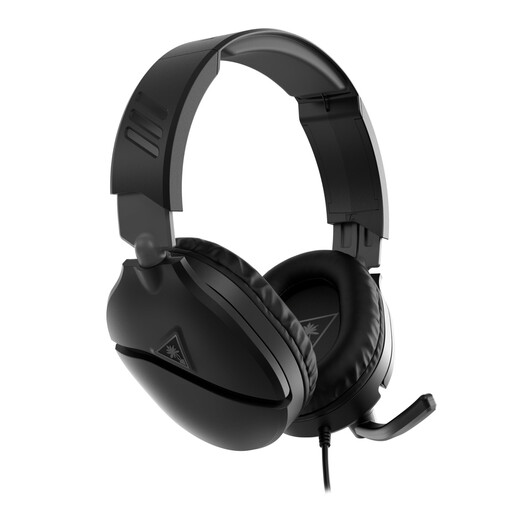
Why it suits this user profile : Its 3.5 mm jack lets you connect it directly to a controller, compatible PC, Switch 2 or mobile device with the appropriate headphone output.
It does not rely on a battery or software to work. The cable also reduces pairing and latency issues.
40 mm speakers, flip-up microphone, volume dial and compatibility with several platforms via the 3.5 mm jack.
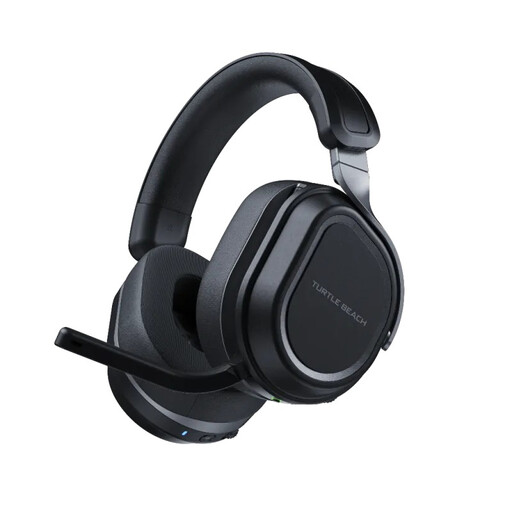
Why it suits this user profile : This wireless headset is designed for users who switch between PC or console and mobile devices, while keeping two sources connected.
The two USB transmitters and the CrossPlay button reduce the need for adjustments when switching from one compatible device to another.
Simultaneous 2.4 GHz and Bluetooth 5.2 connections, dual 60 mm speakers, memory foam ear cushions and quoted battery life of up to 80 hours.
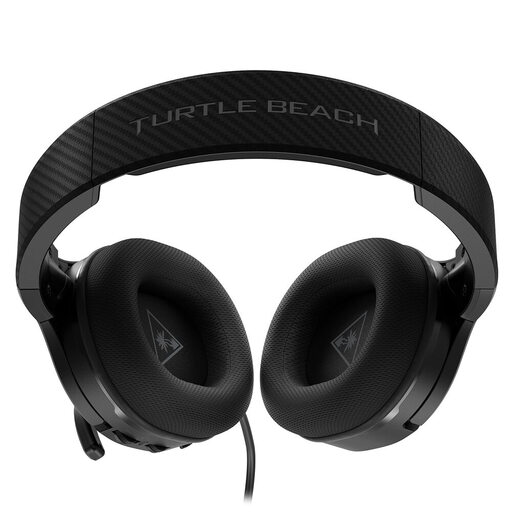
Why it suits this user profile : Its amplification and ProSpecs technology are ideal for long sessions, particularly if you wear glasses.
It retains certain basic audio functions when the battery is flat, reducing interruptions caused by charging.
3.5 mm wired connection, bass amplification, quoted battery life of up to 12 hours and reinforced metal headband.
We have brought together a complete, real-time-updated selection of products that meet these strict criteria, while complying with European safety regulations.
Not necessarily. The controller or device must have a compatible output and use the correct wiring. On PC, an adaptor that separates the audio and microphone signals may be required if the computer has two separate sockets.
It depends on how it is used, the built-in battery, the number of charging cycles and how the USB cable is handled. Avoid high temperatures, knocks and charging in a damp environment. For a device fitted with a lithium-ion battery, follow the safety instructions and local recycling rules at the end of its life.
Bluetooth is convenient for calls, music and mobile devices. To reduce the delay between an action and the corresponding sound, a 2.4 GHz transmitter will often be better suited when the headset supports one. Always check compatibility with your platform before buying.