
Livraison le jour même ou le lendemain

Qualité garantie

Débloquez vos offres de bienvenue: Livraison GRATUITE | Jusqu'à -80 % | 30 jours d'essai gratuits à JoyPlus
Téléchargez l'application
A tri-mode wireless gaming mechanical keyboard can replace several peripherals: a fast connection for gaming, Bluetooth for a laptop or tablet, then USB-C for recharging the battery and keeping latency to a minimum. The problem is that product listings often mix verifiable specifications, marketing claims and promises that are difficult to compare.
Before placing your order, three common pitfalls are worth bearing in mind:
A tri-mode model should offer three types of connection:
Also check how many devices can be saved. Some models offer multiple Bluetooth channels, allowing you to switch from one device to another. Compatibility with Windows, macOS, iOS, iPadOS and Android is a real advantage for anyone who alternates between working from home, creative work and gaming.
A 75% mechanical keyboard generally retains the function row and arrow keys while removing some of the unused space found on a standard model. The 80% format, often with around 87 keys, remains compact without changing your usual habits too drastically.
Pay attention to the layout: several models in this selection use a US QWERTY mechanical keyboard, rather than a French AZERTY layout. This changes the characters printed on the keys, keyboard shortcuts and typing habits. For professional use in France, it is best to check this before placing your order.
A compact mechanical keyboard is ideal for small desks and gamers who want to free up more room for their mouse. However, if you frequently use numbers, calculations or business software, a 96% model or full-size keyboard will probably be more comfortable.
Linear switches provide a smooth, consistent press without a pronounced tactile click. Tactile switches offer more noticeable feedback, while silent models are often better suited to an open-plan office or a shared room. The right choice mainly depends on the level of noise you are comfortable with and the feel you want beneath your fingers.
A hot-swappable mechanical keyboard allows you to replace compatible switches without using a soldering iron. This is useful for gradually customising the typing experience, provided you check the socket type and compatibility with 3-pin or 5-pin switches.
Finally, a rechargeable battery with a capacity of 4,000 mAh or 8,000 mAh is not enough on its own to distinguish between two models. Check the quoted battery life with and without lighting, charging time and whether the keyboard can be used while charging. The OE914, for example, quotes approximate battery life of one to two weeks and a charging time of around five hours. These figures should be compared with your own usage patterns.
The models below are aimed at different types of user. The information provided here reflects the specifications supplied for each product; availability, box contents and prices may change.
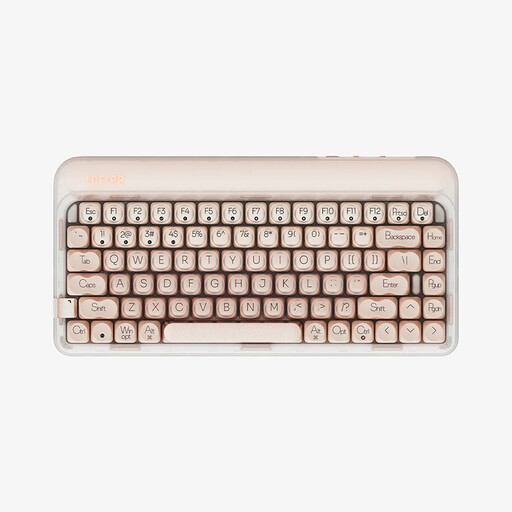
Why this choice suits this user profile: its 84-key layout, three connection modes and pre-installed linear switches make it a versatile solution for beginners, gaming and working across multiple devices.
Hot-swap capability across all keys lets you upgrade the switches without soldering. The USB-C connection remains available while the 4,000 mAh battery is charging.
Bluetooth 5.3, 2.4 GHz connection, warm monochrome backlighting with seven effects and multi-system compatibility.
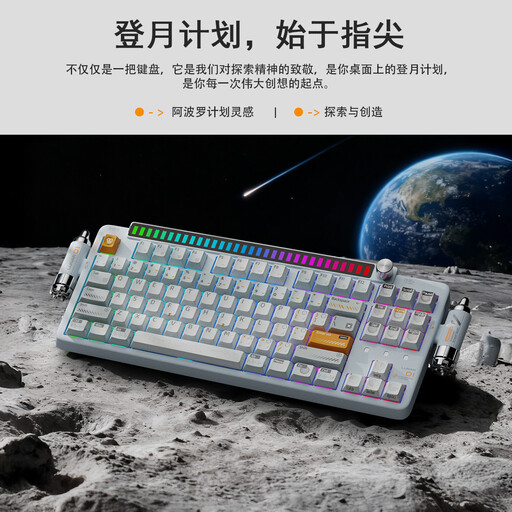
Why this choice suits this user profile: its gasket-mounted construction, PBT keycaps and programmable knob are designed for users who value comfort, sound and customisation.
5-pin hot-swap capability means you are not limited to the original switches. The software lets you remap keys and macros, customise the lighting and configure the knob’s functions.
Sublimation-printed PBT keycaps, 4,000 mAh battery, three Bluetooth connections and a removable light bar.

Why this choice suits this user profile: its full-size 108-key layout, 8,000 mAh battery and aluminium chassis make it suitable for creators, home workers and gamers who regularly use the number pad.
Choosing between silent tactile and linear switches lets you adapt the typing experience to a shared office or a more expressive style of use.
108-key layout, tri-mode connection, customisable display, RGB backlighting and hot-swappable design.
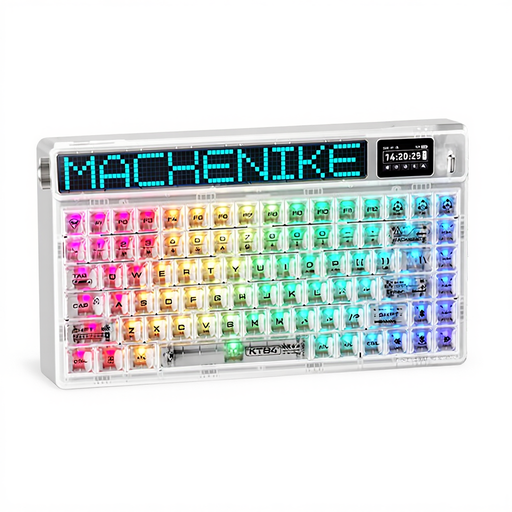
Why this choice suits this user profile: its 84-key layout, smart display and Gateron yellow switches are aimed at users who want to keep a compact layout while still having key information visible at a glance.
The listing details the three connection modes, the number of keys and the inclusion of hot-swap capability. These are all features to check rather than judging the keyboard by its appearance alone.
TFT display, customisable lighting, Gateron North Pole 2.0 Yellow switches and wired, Bluetooth and 2.4 GHz connectivity.
Start by charging the keyboard with the supplied USB-C cable, then select the mode that corresponds to your device. For PC gaming, the 2.4 GHz receiver is generally the most convenient option. Bluetooth is better suited to mobile devices, while wired mode lets you continue using the keyboard during charging.
Clean the surface with a dry or slightly damp cloth, taking care not to let liquid seep between the keys. With a model fitted with a lithium battery, avoid disassembly, excessive heat and unsuitable chargers. Keep magnetic accessories away from metal dust and powerful magnets.
We have put together a complete, real-time updated list of products that fully meet these strict selection criteria and European safety regulations.
Yes, provided the manufacturer states that it is compatible with macOS and Windows. However, check the US QWERTY layout, the shortcuts specific to each system and whether programming software is supported.
Battery life depends on the battery capacity, backlighting and connection mode used. On some models, a 4,000 mAh battery is quoted to last one to two weeks, while an 8,000 mAh capacity may be better suited to intensive use. These figures are estimates and are directly linked to the conditions of use.
Yes, if you want to gradually change the typing feel or noise level. This feature lets you replace compatible switches without soldering. Before buying, however, check compatibility with 3-pin or 5-pin switches, as well as the types of switches supported.