
Livraison le jour même ou le lendemain

Qualité garantie

Débloquez vos offres de bienvenue: Livraison GRATUITE | Jusqu'à -80 % | 30 jours d'essai gratuits à JoyPlus
Téléchargez l'application
An uncluttered gaming desk is fundamental to racking up wins. The problem? A full-size keyboard quickly becomes an obstacle, limiting your mouse movement and monopolizing precious space. If you're looking to optimize your setup without sacrificing performance, a TKL (Tenkeyless) gaming keyboard or an even more compact form factor is the way to go.
This guide is here to help you navigate the essential criteria for choosing the perfect compact gaming keyboard for you. From switch types and form factors to game-changing features, we'll cover it all, whether you're a PC, PS5, or Xbox gamer. The goal is simple: to empower you to find the ideal AZERTY gaming keyboard for your playstyle.
Before diving into our top picks, let's review the key factors that will guide your choice.
The primary advantage of a compact keyboard is, of course, the space it saves. Two main form factors dominate the market:
The typing feel and responsiveness depend directly on the technology hidden beneath the keycaps.
Always check that the keyboard is compatible with your gaming platform. While most wired USB models work driver-free on PC, compatibility for a PS5 or Xbox gaming keyboard should be confirmed. Finally, features like the backlighting on an RGB gaming keyboard, anti-ghosting (which allows multiple keys to be pressed simultaneously), and programmable macros are significant advantages for customizing your gaming experience.
Here are a few models that caught our attention for their form factor, features, and value for money.
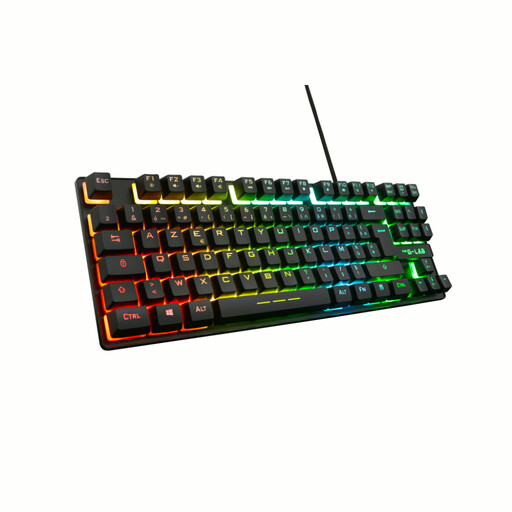
Why it stands out: The Keyz Caesium TKL is an excellent entry point into the world of TKL keyboards. Its membrane technology ensures a keystroke that is both responsive and quiet, while its compact format frees up considerable desk space. It doesn't skimp on gaming essentials, like customizable RGB backlighting and anti-ghosting.
Key features:
Who is it for? This model is ideal for casual gamers or those who share their space and want a high-performance keyboard without the noise of a mechanical one. Its attractive price also makes it an excellent choice for a first gaming setup.
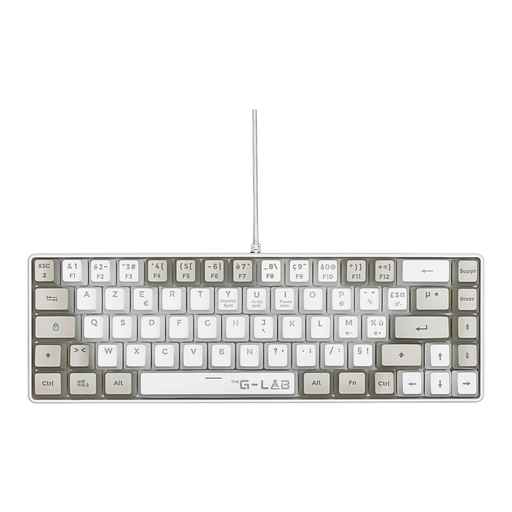
Why it stands out: With its 60% format, the Keyz Hydrogen takes compactness to the extreme. It's designed for gamers who prioritize mouse movement space above all else. Its semi-mechanical technology provides a pleasant tactile feedback that mimics the feel of a mechanical keyboard, but without the noise.
Key features:
Who is it for? This keyboard is aimed at FPS players who use a low mouse sensitivity and need a massive surface for gliding. Its minimalist format and light weight also make it a perfect companion for on-the-go gamers or minimalist setups.
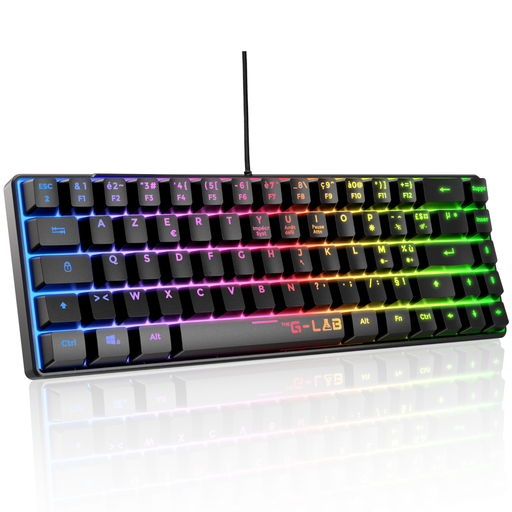
Why it stands out: The Keyz Mercury TKL is a true mechanical gaming keyboard built for performance. Equipped with linear red switches, it guarantees formidable responsiveness and execution speed—decisive advantages in competition. Its full anti-ghosting and programmable macros make it a precision weapon for demanding gamers.
Key features:
Who is it for? This keyboard is for competitive players and e-sports fans who demand the reliability and speed of a mechanical keyboard. Its red switches are perfect for games that require fast, repeated actions.
Our selection focuses on TKL and compact models that offer an excellent balance between performance and ergonomics. But the world of gaming peripherals is vast. If you're looking for keyboards with other types of switches, integrated wrist rests, or more unique designs, the possibilities are endless.
To explore further, browse our complete collection of Assembled Custom Keyboards and find the model that perfectly matches your playstyle.
Absolutely. The vast majority of wired USB keyboards, including TKL models, are automatically recognized by PS5 and Xbox Series X/S consoles. You just need to plug them in to navigate menus and type text. In-game support then depends on the developers, but more and more titles support a keyboard/mouse combo. Rest assured, the models in our selection are all compatible.
The main difference is the number of keys sacrificed for the sake of compactness. A TKL keyboard (around 87 keys) simply removes the number pad. A 60% keyboard (around 68 keys) goes further by also removing the function row (F1-F12) and the navigation cluster (arrow keys, Delete, etc.). These functions remain accessible via a combination with the "Fn" key, which requires a short adjustment period.
Choosing an AZERTY gaming keyboard is not a minor detail; it's crucial for a comfortable gaming experience in France. Most games are configured by default for movement with the Z, Q, S, D keys, the natural layout of our keyboards. Using a QWERTY keyboard would force you to reconfigure the controls for every game or get used to an unnatural hand position (W, A, S, D), not to mention the nightmare of typing text in everyday use.