
Livraison le jour même ou le lendemain

Qualité garantie

Débloquez vos offres de bienvenue: Livraison GRATUITE | Jusqu'à -80 % | 30 jours d'essai gratuits à JoyPlus
Téléchargez l'application
Whether you're preparing for your first takeoff in Microsoft Flight Simulator or already weaving effortlessly through the asteroids of Star Citizen, choosing the right flight gear is a crucial step. With a jungle of available models, it can be tough to navigate the options. The Thrustmaster brand has established itself as a benchmark, often offering an excellent balance of immersion, precision, and affordability.
This guide is here to help. We've broken down the key criteria for choosing the perfect PC flight stick or Xbox controller for your playstyle, platform, and expectations—all without the unnecessary marketing jargon.
Before diving into our top picks, let's review the key criteria that will guide your decision.
This is arguably the most important factor, as your choice will directly depend on the type of simulation you play.
This is a crucial point: always check the equipment's compatibility with your system. While most Thrustmaster models are designed for PC, certain products like the T.Flight Hotas One are officially licensed and fully compatible with Xbox consoles. To work on a console, an Xbox joystick must explicitly carry this designation.
Sensor technology has a direct impact on your joystick's precision and lifespan. Thrustmaster heavily relies on its H.E.A.R.T (HallEffect AccuRate Technology), which uses contactless magnetic sensors to eliminate friction and, therefore, wear and tear. Finally, don't overlook the ecosystem and modularity: some bundles allow you to later add components like rudder pedals or throttle modules to build a complete, custom flight sim bundle.
We have selected three flagship models, each catering to a specific pilot profile.
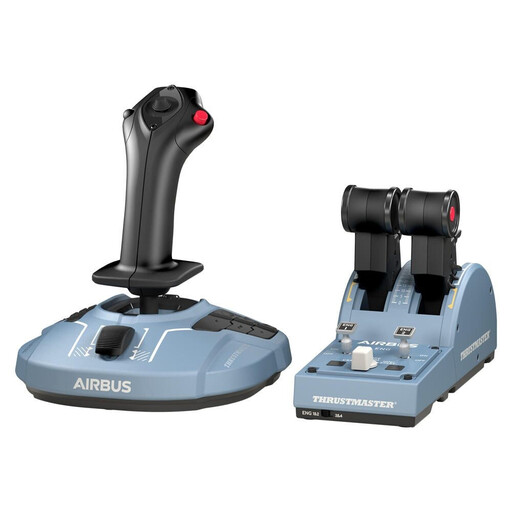
Why it stands out: This pack is a 1:1 scale ergonomic replica of the Airbus A320 sidestick and throttle quadrant. It offers simply stunning immersion for civil aviation enthusiasts.
Advantages:
Who is it for? This Thrustmaster Airbus is for die-hard civil simulation fans on PC who are eager to experience the feeling of piloting a modern airliner. Its modular design makes it an excellent foundation for building an expandable cockpit.
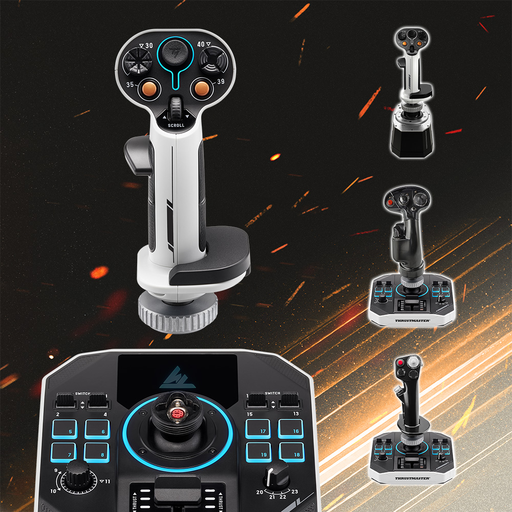
Why it stands out: Specifically designed for space simulation, this joystick duo offers absolute control over all six degrees of freedom, which is essential for complex maneuvers and space combat.
Advantages:
Who is it for? This bundle targets PC space pilots who are veterans of Star Citizen or Elite Dangerous. It's tailor-made for those who demand absolute mastery of their vessel, whether for exploration, mining, or dogfighting.
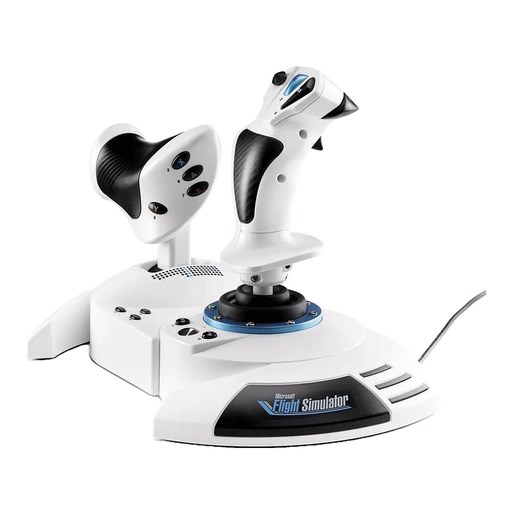
Why it stands out: This is THE quintessential all-in-one PC HOTAS and Xbox solution. Easy to get started with and officially licensed, its "plug-and-play" philosophy makes it the ideal companion for beginners.
Advantages:
Who is it for? This Xbox joystick is the perfect option for players just getting started with flight simulation or who play on console. Its versatility and ease of setup make it an excellent first flight sim bundle for conquering the skies in Microsoft Flight Simulator.
The world of simulation peripherals is vast. If our selection doesn't perfectly match your needs, know that there are a multitude of other configurations available, with levels of finish and features to suit every preference.
? Discover Our Entire Collection of Joysticks
For a realistic experience at the controls of an airliner, the Thrustmaster TCA Officer Pack Airbus Edition is unmatched in terms of immersion. If you're looking for a more versatile and accessible solution, especially on console, the T.Flight Hotas One is an excellent choice that is simple and immediately compatible.
A HOTAS (Hands On Throttle And Stick) combines a joystick (the stick) and a throttle. It's the gold standard setup for aircraft, where thrust management is a key element. A HOSAS (Hands On Stick And Stick), on the other hand, uses two joysticks. This configuration offers much finer control over movement on all axes, which is a major advantage for maneuvering a spacecraft.
Not at all for most models! They are "plug-and-play," meaning they are automatically recognized by Windows and the major simulators on the market. For expert pilots who want to go further, Thrustmaster's T.A.R.G.E.T. software allows you to create highly advanced configuration profiles, but its use is completely optional.