
Livraison le jour même ou le lendemain

Qualité garantie

Débloquez vos offres de bienvenue: Livraison GRATUITE | Jusqu'à -80 % | 30 jours d'essai gratuits à JoyPlus
Téléchargez l'application
The idea of swapping your notebooks for a tablet is certainly appealing: no more paperwork, notes accessible everywhere, and incredibly powerful organizational tools. However, the market for tablets for writing and note-taking is saturated with marketing promises that often lead to disappointment. As a product expert at Joybuy, my role is to help you decode the spec sheets to make a truly informed choice.
Before you dive in, watch out for these two common pitfalls:
To avoid unpleasant surprises, focus on three technical points that make all the difference in practice.
The choice of screen is arguably the most crucial. There's no perfect technology; it all depends on your needs.
LCD/OLED Screens: These are the screens found on most conventional tablets.
E-Ink Screens: This is the technology used in e-readers, but optimised for writing.
A good stylus is essential for a good writing tablet. Beyond the marketing hype, here are the three things to check:
The software is just as important. A closed operating system can lock you into proprietary apps and inconvenient file formats. Conversely, a tablet running Android with access to the Google Play Store offers maximum flexibility to install your favourite apps (Evernote, OneNote, etc.). Some even offer AI-powered features, like voice-to-text transcription or handwriting conversion, which can be a real game-changer in daily use.
To illustrate these criteria in action, here are a few user profiles and the tablets that suit them.
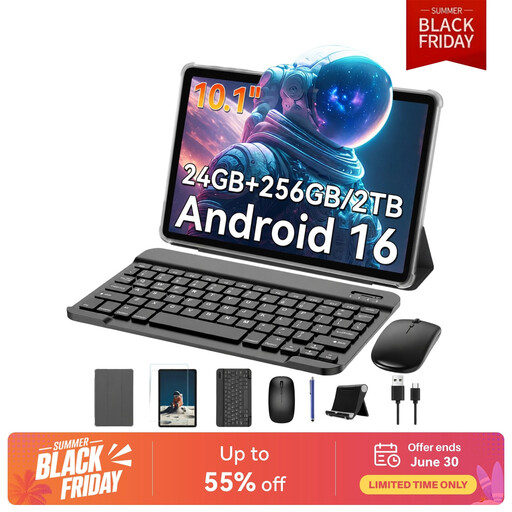
Why we chose it: Ideal for students or mobile professionals looking for a complete solution without breaking the bank. The included bundle with a keyboard, mouse, and stylus turns it into a capable secondary laptop.
By providing an all-in-one bundle, it saves you from the unpleasant surprise of hidden costs and compatibility headaches with separately purchased accessories.
All-in-one bundle (keyboard, mouse, stylus). Ample storage (256 GB expandable). Open Android ecosystem for maximum versatility.
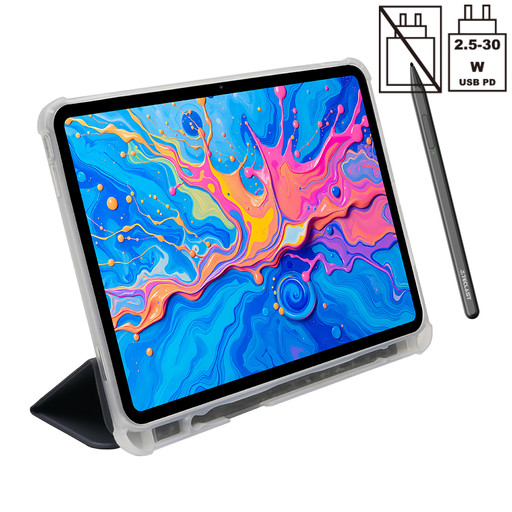
Why we chose it: Perfect for artists, designers, or anyone who demands a premium writing and display experience. Its large 2K screen and high-sensitivity stylus guarantee precision and comfort.
It delivers on the "natural feel" promise by backing it up with concrete technical specs: a large, high-resolution screen and a stylus with 4096 levels of pressure for perfect line control.
Extra-large 12.7-inch 2K display. Sensitive stylus (4096 pressure levels). High-capacity 10,000 mAh battery to go the distance.

Why we chose it: The tool of choice for those who want to focus on the essentials: writing, reading, and annotating. Its E-Ink screen is designed for eye comfort and record-breaking battery life, far from the digital noise of conventional tablets.
It completely solves the problem of overstated battery life. Thanks to its E-Ink screen, it provides weeks of use where an LCD tablet struggles to last a single intensive day.
10.65-inch E-Ink screen (300 PPI) for optimal reading comfort. AI transcription features (16 languages). Ultra-slim (4.2 mm) and feather-light (295 g) design.
Discover our full selection of products that meet our quality criteria and European safety standards.
A graphics tablet for drawing is typically a peripheral device that connects to a computer. Entry-level models don't have their own screen and serve simply as a drawing surface. In contrast, a tablet for writing and note-taking is an all-in-one, standalone device (screen, OS, storage), like the ones in this guide. It is designed for mobility and versatility.
Yes, and the difference is huge. An LCD or OLED screen must constantly power its backlight and refresh the image, which is very energy-intensive. An E-Ink screen, on the other hand, only consumes power when changing what's displayed (turning a page, writing a word). Once the image is set, power consumption is almost zero. The result: battery life measured in weeks, not hours.
For simple note-taking, no, it's not a decisive factor. However, if you draw, do calligraphy, or simply enjoy finely controlling the thickness of your lines, high sensitivity (4096 levels, for example) offers stunning comfort and precision, very close to that of traditional tools.