
Livraison le jour même ou le lendemain

Qualité garantie

Débloquez vos offres de bienvenue: Livraison GRATUITE | Jusqu'à -80 % | 30 jours d'essai gratuits à JoyPlus
Téléchargez l'application
Preparing for the 2026 academic year is a crucial step. Between the excitement of a fresh start and the pressure to get organised, choosing the right gear can quickly become a headache. Faced with an overwhelming number of options, it's easy to fall into common traps that drain your budget and hinder your efficiency. This guide is here to help you identify genuinely useful equipment and make the right choices.
Before you fill your basket, beware of these frequent mistakes that can cost you dearly in the long run.
For a stress-free academic year, some parameters are simply non-negotiable. Here's how to decode them.
The computer is the centrepiece of the modern student's arsenal. For a worthwhile investment, check these points:
The quality of your supplies has a direct impact on your working comfort.
Every student has different needs. Here are a few recommended options, chosen for their relevance and their ability to meet specific use cases.
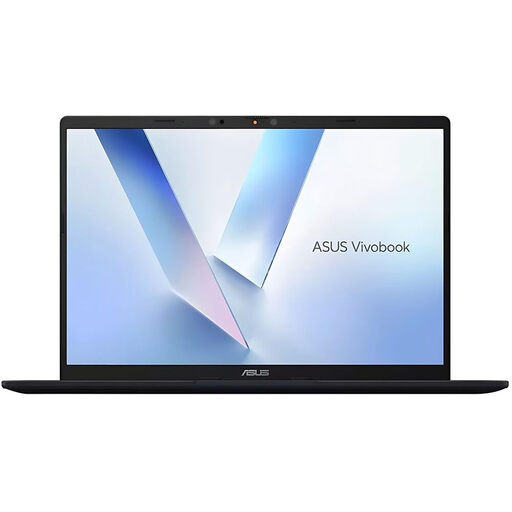
Why we recommend it: This machine is built for performance and the future. With 16 GB of RAM, a speedy SSD, and crucially, a Qualcomm processor with an NPU, it's ready for intensive multitasking and the new AI features of Copilot+ PCs. A real asset for research and complex projects.
It sidesteps the trap of rapid obsolescence by integrating cutting-edge technologies (NPU, Wi-Fi 6E). This isn't just a laptop; it's a long-term investment that won't be outdated by tomorrow's software.
Dedicated AI performance thanks to the Qualcomm Hexagon NPU. High repairability score (9.5/10), a true guarantee of durability.

Why we recommend it: For those who love to plan everything in detail, this daily planner offers a full page for each day. Moleskine's reputation speaks for itself: the quality of the paper and the sturdiness of the cover make it a reliable companion for the entire year.
It bypasses the pitfall of cheap planners that fall apart quickly. Its hardcover, elastic closure, and 70 g/m? acid-free paper are designed to withstand intensive daily use.
Dated from January to December 2026, it offers a complete daily view. Its 180° lay-flat opening makes writing much easier.
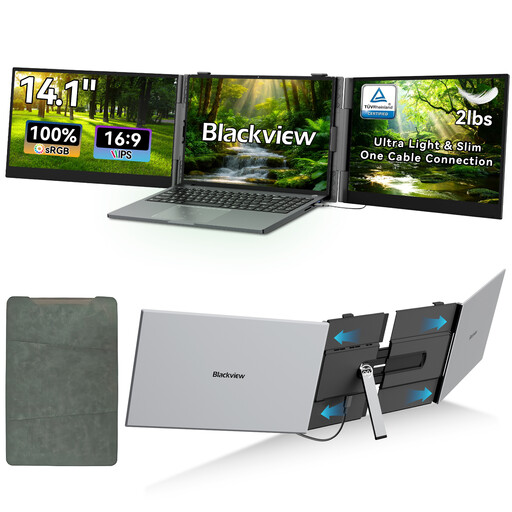
Why we recommend it: For those who often work in the library, on the go, or in a small flat, this portable monitor expands your workspace. It allows you to display your research on one side and your writing on the other. A real productivity booster.
It avoids the trap of being a superfluous gadget by meeting a real need for productivity. Unlike other accessories, its wide compatibility (for 13 to 17.3-inch laptops) and Full HD resolution make it a practical and versatile tool.
Enables a dual or triple-screen setup anywhere. Full HD display quality for optimal viewing comfort.
Discover our full selection of products that meet our strictest quality criteria, especially in our Books and Stationery department.
For higher education, a laptop must be both powerful and long-lasting. In 2026, a model with at least 16 GB of RAM and a 512 GB SSD provides a solid foundation. If your budget allows, a Copilot+ PC certified model with an integrated NPU will guarantee better longevity and optimised performance for the increasingly common AI tools. Also, consider the repairability score, an excellent indicator of the product's durability.
There's no magic formula, but a hybrid approach is often the most effective. Use a laptop or tablet for live note-taking, which makes searching and editing easier. Complement this with a quality notebook, like a Moleskine or Koverbook, to summarise your lectures, draw diagrams, or list your tasks. The simple act of rewriting by hand helps commit information to memory.
Yes, absolutely! Poor quality paper (often less than 80 g/m?) can ruin the writing experience. Ink might smudge or bleed through the page, making the back side unusable and your notes illegible. Thicker paper, like the renowned 90 g/m? Clairefontaine Vellum paper, offers an incomparably smooth glide and perfect opacity. It makes note-taking more pleasant and cleaner. It's a small detail that makes a huge difference every day.