
Livraison le jour même ou le lendemain

Qualité garantie

Débloquez vos offres de bienvenue: Livraison GRATUITE | Jusqu'à -80 % | 30 jours d'essai gratuits à JoyPlus
Téléchargez l'application
A Stranger Things wired gaming headset is appealing for both its distinctive style and practical features. But showing off your Hellfire Club colours does not necessarily guarantee comfort after several hours of gaming. To avoid disappointment, start by checking the connection type, earcup comfort and compatibility with your equipment.
Whether you play on PC, PS5, Xbox or Nintendo Switch 2, here are the key criteria to review before choosing a gaming headset for PC or a console headset with microphone.
Some headsets focus entirely on a recognisable design, but their connection or software may not work with every platform. A USB model may require driver installation, while a 3.5 mm jack gaming headset will generally connect directly to a compatible controller or audio port.
Before ordering, check for a 3.5 mm jack connector, the cable length and the type of port available on your device. On PS5 and Xbox, connecting directly to the controller is often the simplest solution. On PC, you may need a combined audio port or an adapter, depending on your computer’s configuration.
The term “sound isolation” generally refers to a passive barrier created by the cushions and the shape of the earcups. It reduces some ambient noise, but does not automatically indicate active noise-cancellation technology.
A circumaural headset, with cushions that completely surround the ears, helps provide this passive isolation. The result nevertheless depends on your head shape, the pressure exerted by the headband and how well the cushions fit. In a shared room, this can help you stay focused, without eliminating every surrounding sound.
A poorly positioned built-in microphone can make conversations difficult to understand. Similarly, a cable that is too short can restrict movement or pull on the controller. For longer sessions, choose a comfortable gaming headset with an adjustable headband, soft cushions and a design that does not place excessive pressure on the ears.
The 1.5-metre cable on the model featured below is suitable for connecting to a controller or using the headset near a PC. However, you will need to route it carefully to prevent it catching on your desk or chair.
A wired headset with a 3.5 mm jack does not require a battery. Simply connect it to a compatible port and start using it. Plug-and-play operation generally avoids driver installation and makes it easy to switch between a console and a computer.
For Nintendo Switch 2, check that the console or controller port in your setup is actually compatible. The headset must also have a microphone recognised by the device for online communication.
Earcups that completely surround the ears provide a more immersive feel than an on-ear model. Look for soft padding, headband adjustment options and the overall weight, even when these details are not listed extensively on the product page.
A secure fit should not come at the cost of excessive pressure. If you wear glasses, the thickness and flexibility of the cushions can also make a significant difference to comfort.
For gaming, enjoyable sound is about more than bass that dominates the mix. Balanced reproduction across low and high frequencies lets you enjoy dialogue, sound effects and music without tiring your ears.
Marketing claims should be viewed with a degree of caution: phrases such as “exceptional quality” are not objective measurements. Instead, focus on verifiable information about the connection, microphone, earcup design and materials.
The cards below feature the Konix headset inspired by Stranger Things and the Hellfire Club. It is a wired model with an integrated microphone, designed to work across multiple platforms. Do not consider it “official” unless this is explicitly stated by the manufacturer or seller.
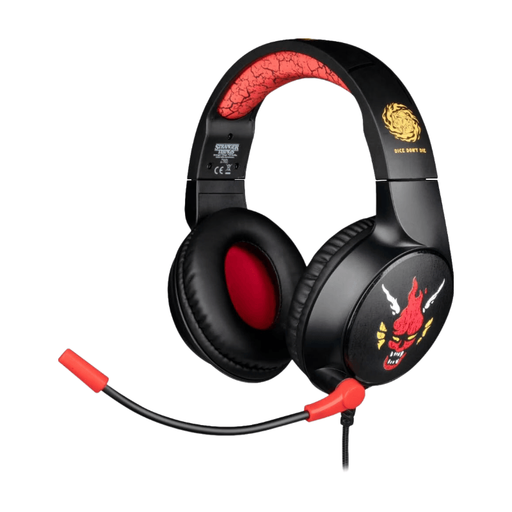
Why it suits this profile: its 3.5 mm jack connection and driver-free setup make it a practical first headset for PC or console gaming.
The product page lists a 1.5-metre wired connection, with no driver or software configuration mentioned.
Built-in microphone, enclosing earcups and advertised compatibility with PC, PS5, Xbox and Switch 2.
Why it suits this profile: its retro 1980s look and Stranger Things references place visual identity at the heart of the design.
The design does not compromise on the essentials: the headset retains an integrated microphone and a standard connection.
Soft-touch finish, circumaural design and detailing directly inspired by the series’ universe.
Why it suits this profile: not having to recharge a battery makes it easier to switch frequently between a computer, PS5 controller, Xbox and handheld console.
The cable eliminates reliance on battery life, while the enclosing earcups help reduce distracting background noise.
1.5-metre cable, integrated microphone and sound reproduction advertised as balanced across low and high frequencies.
Connect the 3.5 mm jack to the controller, PC or compatible device. No driver is listed as necessary. Adjust the headband, then position the microphone close to your mouth without pressing it against your lips.
To protect the headset, store it in a dry place away from direct sunlight and moisture. Avoid pulling on the cable and do not disassemble the product. Lower the volume before connecting it and avoid listening at high levels for extended periods. Do not use the headset in situations where you need to remain fully aware of surrounding sounds.
Browse our updated selection to compare formats, accessories and equipment based on your needs.
The Konix model’s product page states that it is compatible with PC, PS5, Xbox and Nintendo Switch 2 via its 3.5 mm jack connection. On console, connect it directly to the compatible controller whenever possible. Microphone detection may vary depending on the controller and audio settings.
The product is presented as compatible with Nintendo Switch 2. However, check the port available in your setup and make sure the microphone is enabled in the game or console settings.
No. The model described here draws power from the device to which it is connected and does not contain a rechargeable battery. This design reduces maintenance requirements, but the cable remains the component that requires the most careful handling.