
Livraison le jour même ou le lendemain

Qualité garantie

Débloquez vos offres de bienvenue: Livraison GRATUITE | Jusqu'à -80 % | 30 jours d'essai gratuits à JoyPlus
Téléchargez l'application
Are you looking for a Stranger Things Hellfire Club wired gaming headset to accompany your gaming sessions on PC, PS5, Xbox or Nintendo Switch 2? Its Hellfire Club-inspired design immediately catches the eye, but looks alone aren't enough to guarantee a great gaming experience. Compatibility, comfort and microphone quality are all points to check before you place your order.
A gaming headset with a microphone can also spring a few unwelcome surprises. Here are the criteria to examine when choosing a model that suits your needs, without paying for features you'll never use.
A wired over-ear headset surrounds your ears and passively blocks out some external noise thanks to its ear cushions. That doesn't mean it has active noise cancellation, though. This distinction matters if you play in a busy room or simply want to stay focused.
Passive isolation depends largely on the shape of the cushions, how well they fit, and the pressure exerted on your head. It won't eliminate all surrounding sounds and isn't suitable for situations where you need to stay aware of what's happening around you.
A gaming headset with a 3.5 mm jack typically needs neither drivers nor software. That's a real advantage on console, but advanced features — equaliser, virtual surround sound or lighting — may require a USB connection and a dedicated app.
Before ordering, check the connector type and whether an adaptor is included. A model with a single 3.5 mm plug generally connects to a controller, whereas a headset with two separate plugs may need distinct audio and microphone ports on a computer.
A gaming headset's comfort can't be judged by its appearance. Its weight, the shape of the headband, the softness of the cushions and the type of fit — supra-aural or circum-aural — make a noticeable difference after a long session.
The over-ear format completely covers your ears and limits direct contact with the outer ear. On the downside, it can feel warmer. Adjust the headband properly and take regular breaks, especially if you play at high volume.
For gaming across multiple platforms, go for a 4-pole 3.5 mm jack, which is generally suitable for transmitting both audio and microphone signals through a controller or compatible device. On PC, it all depends on whether you have a combined socket or two separate sockets.
The Konix Stranger Things Hellfire Club wired gaming headset comes with a 3.5 mm connection, a 1.5 m cable and plug-and-play setup. It can be connected to a controller, PC or other compatible device with no additional configuration required, as advertised.
An integrated or boom microphone should be placed close to your mouth, without touching your lips. Voice clarity also depends on background noise, the connection and the settings on your console or game. A microphone mute function can be handy, but not all models have one.
For co-op games, also check whether the microphone is fixed, foldable or removable. This detail affects storage, but also whether you can use the headset for listening to music.
The softness of the cushions, the headband covering and the headset's weight all have a direct impact on comfort. The 'soft touch' finish advertised on the Konix model may feel more pleasant, but the headset should still be stored in a dry place, away from direct sunlight and moisture.
Also remember to check the cable length. A 1.2 m cord works well with a controller, while a 2.35 m cable gives you more freedom in front of a computer, at the cost of slightly less compact storage.
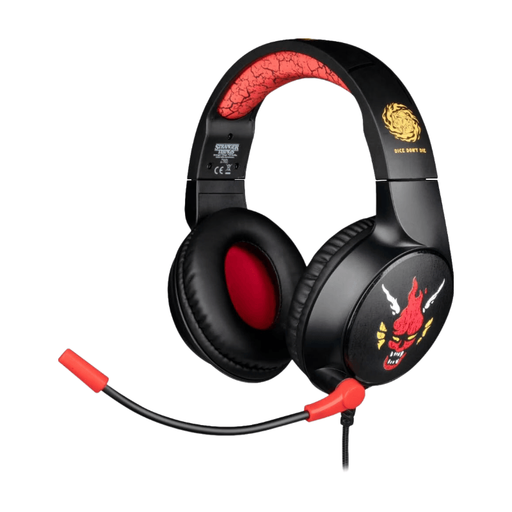
Why this choice suits this profile: This Stranger Things headset combines a 3.5 mm jack connection, an integrated microphone and an instantly recognisable Hellfire Club design. It's aimed at those who want to start gaming without installing any software.
The wired connection and plug-and-play operation avoid the hassle of battery or software setup. The over-ear design also promotes passive noise isolation.
1.5 m cable, integrated microphone, soft touch finish and advertised compatibility with PC, PS5, Xbox and Switch 2.
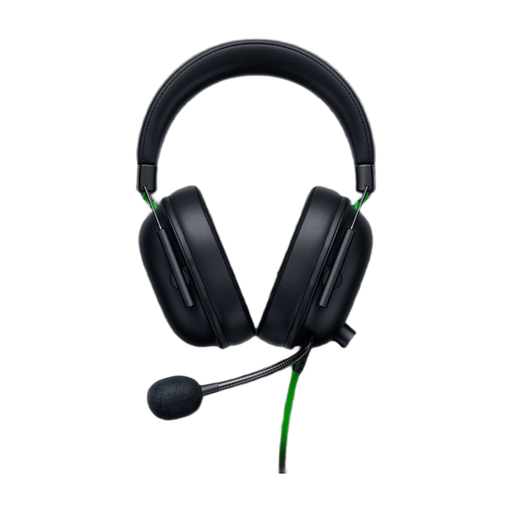
Why this choice suits this profile: This model is aimed at gamers looking for a dedicated gaming design, a cardioid microphone and an advertised weight of 240 g.
The product page clearly distinguishes the wired connection, passive isolation and cardioid microphone, without presenting these features as active noise cancellation.
50 mm drivers, cardioid microphone, on-cable audio controls and advertised compatibility with PS5.
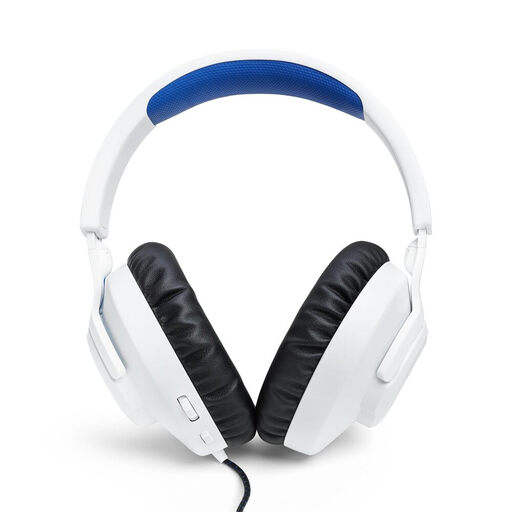
Why this choice suits this profile: Its adjustable headband, memory foam ear cushions and removable microphone make it suitable for repeated sessions on PS5, PC and Nintendo Switch.
The microphone can be removed when not in use. The volume control and mute button mean you don't have to go through the game menus every time.
40 mm dynamic drivers, 1.2 m 3.5 mm jack cable, removable microphone and advertised weight of approximately 220 g.
We've put together a comprehensive, real-time updated selection of products that meet these strict selection criteria and European safety requirements.
The headset's lifespan depends on how often you use it, where you store it, and the strain placed on the cable. A wired model doesn't need charging, but its connectors and cord still need to be handled with care.
The Konix model is advertised as compatible with PCs, PS5, Xbox and Switch 2 thanks to its 3.5 mm jack connection. Just make sure your controller or device has a compatible socket. On PC, a combined socket may be needed to use both audio and microphone simultaneously.
It avoids the need for charging and offers a direct connection, which simplifies everyday use. On the other hand, the cable can restrict movement and may wear out if regularly bent or pulled. The choice therefore depends on your setup and how much you mind having a cord.
Start at a moderate volume, take regular breaks and avoid prolonged listening at high levels. Don't use the headset in situations where you need to hear external sounds, especially near traffic.