Which option suits your needs?
Your choice mainly depends on how you want to deal with debris between full cleans: tackle it yourself straight away, or prepare your floors for automated cleaning runs.
For cleaning a small area straight away
A cordless stick vacuum is easy to take out and put away for a quick clean, as UFC-Que Choisir points out. If you often clean the same area, check its weight, the attachment suited to your floor and its runtime in the mode you use.
For automating cleaning on clear floors
A robot vacuum can keep to a regular routine if you can prepare its route. Before choosing a model, check how it performs on your floor coverings, as well as along edges and in corners: UFC-Que Choisir assesses these situations separately in its tests.
For keeping your appliance in good condition over time
If longevity is important to you, first identify the appliance’s exact model. Then check which batteries and chargers are compatible with a stick vacuum, or which brushes, filters and bins fit a robot vacuum. Dyson and Rowenta’s parts catalogues can be searched by model.
How do you compare the key features?
Cordless stick vacuum
Choose this if: you want to pick up debris in a specific spot straight away, without waiting for a scheduled cleaning run.
Bear in mind: you’ll need to guide the appliance, and its runtime may limit how long you can clean. UFC-Que Choisir describes it mainly as a handy extra.
Robot vacuum
Choose this if: you can prepare the space and would rather leave regular cleaning runs to a robot.
Bear in mind: performance varies depending on the floor and any tricky areas, and you’ll still need to keep an eye on the bin. A dock can take care of some of this maintenance.
For regular cleaning between full cleans, start by identifying your main priority, then check the requirements of the model and your home. A cylinder vacuum can still be useful for deeper cleaning sessions.
| Priority |
What to check |
Who it suits |
| Cleaning straight away |
How heavy it feels in your hand and its runtime with the intended mode and brush, rather than just the maximum runtime advertised. |
When crumbs fall in a small area, I want to vacuum them up straight away without having to prepare my home. This is the top priority for around 31% of consumers. |
| Scheduled cleaning runs |
How the robot performs on your floor coverings, along edges and in corners; and whether it can reach the areas it needs to clean. |
If I can clear the floors, I’d rather leave regular cleaning to a robot than get the vacuum out every time. Around 31% of consumers favour this kind of automation. |
| Everyday maintenance |
How the bin is emptied, what the dock actually does and which consumables fit the exact model. |
I can prepare for the robot’s cleaning run, but having to empty its bin often would make the routine a hassle. Reducing these tasks is a priority for around 23% of consumers. |
| Product lifespan |
Compatible parts and batteries; for a connected robot, the app and the model’s update requirements. |
Before settling into a long-term routine, I want to know how to maintain the appliance and keep the features I need. Around 15% of consumers put these checks first. |
Brands to consider
These brands are a useful starting point for checking compatibility and maintenance requirements for a specific model. Their inclusion here is no guarantee of how a particular model will perform on your floors or whether it’s available among the products featured below.
Dyson
Worth considering for a cordless stick vacuum if battery, charger or accessory compatibility is an important part of your decision.
- Dyson France lists replacement batteries and accessories for models that need to be identified precisely.
- Check the model or SV code before choosing a part. This catalogue doesn’t provide information on how well the stick vacuum you choose will clean.
Rowenta
Worth considering for a robot or stick vacuum if access to parts and repairability matter to you.
- Rowenta France lets you search for robot parts by model. The brand says it keeps technical parts available for 15 years after purchase for almost all products covered by its commitment.
- Check whether your model is covered and whether each accessory is compatible: the stated commitment doesn’t apply to every product.
iRobot
Worth considering for a connected robot if the app and update management are part of your routine.
- iRobot France explains app compatibility by series, along with the update requirements for its connected robots.
- Check the exact series, the relevant app and Wi-Fi coverage near the Home Base. This information doesn’t tell you how the robot will perform on your floors.
Roborock
Worth considering for a robot or stick vacuum if you want to check the support resources and app associated with the appliance.
- Roborock’s French-language support covers both robot and cordless vacuums, and provides access to the app download.
- Check the documentation for your chosen model to find out about its features and parts. The general support pages don’t provide these details.
Joybuy products for these needs
These models offer two ways to look after your floors between full cleans: clean manually with a cordless stick vacuum or schedule a robot with a dock. For each one, compare the advertised features with your floor coverings, available space and how much maintenance you’re happy to do.
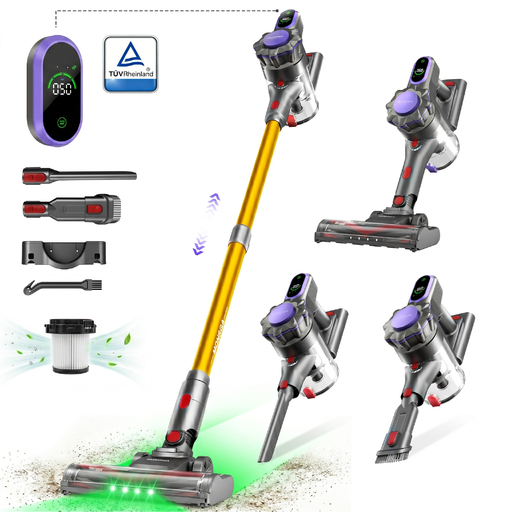 Image unavailable
Monsga ME03 cordless stick vacuum with charging dock
For cleaning a specific area by hand, the ME03 converts into a handheld vacuum and has modes designed for hard floors and carpets.
The product listing states 55 kPa, 550 W and up to 55 minutes in bare-floor mode, as well as a 0.7 L bin. Check the runtime for the mode and brush you’ll use, then look for results specific to your floor coverings.
View on Joybuy
 Image unavailable
Dreame X40 Ultra Complete white robot vacuum with dock
For scheduled cleaning runs, its dock empties the bin and cleans the mop pads. You’ll still need to refill the water and keep an eye on consumables.
The product listing specifies a 3.2 L bag, 2.4 GHz Wi-Fi and a 220–240 V power supply. Allow for the recommended clearance around the dock: 1.5 m in front, 0.5 m on each side and 0.8 m above. Check separately how the robot performs on your floors, along edges and in corners.
View on Joybuy
 Image unavailable
Eureka E20 Plus black robot vacuum with bagless dock
For repeated cleaning runs with less manual emptying, the E20 Plus combines scheduling, keep-out zones and an auto-empty dock.
The product listing states 8,000 Pa, up to 180 minutes and a 2 L bagless dock; these figures don’t replace cleaning results on your own floors. 2.4 GHz Wi-Fi is specified. Before each run, the model’s instructions recommend removing cables, small toys and lightweight rugs with tassels.
View on Joybuy
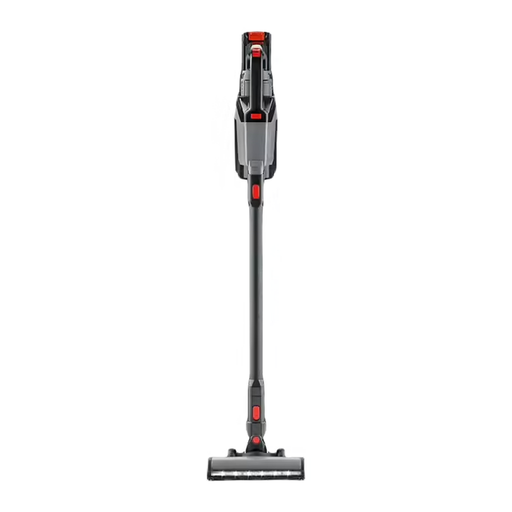 Image unavailable
Severin HV7185 grey cordless stick vacuum
For switching from floor cleaning to tackling a specific spot on furniture, the HV7185 converts into a handheld vacuum. Its product listing mentions a motorised brush for tiles, parquet and carpets.
It states up to 60 minutes of runtime, four power levels and a 1 L bin: check the runtime for the power level you want. The description says this model doesn’t include a parking stand or wall mount.
View on Joybuy
 Image unavailable
Eureka J15 Pro Ultra robot vacuum and mop with dock
For scheduled cleaning on prepared floors, its dock empties the bin and washes the mop pads. You’ll still need to keep an eye on the brushes, filters and other consumables.
The product listing states 16,200 Pa and mop pad washing with water at up to 75 °C. Neither the advertised suction figure nor the temperature tells you how it will perform on your floor coverings. Also check the space needed for the dock, the connection requirements and the model’s runtime for your intended use.
View on Joybuy
Frequently asked questions
Can a cordless stick vacuum or robot replace your main vacuum?
Not automatically: it depends on your floors and what you expect from a deep clean. UFC-Que Choisir generally describes cordless stick vacuums as handy extra appliances for everyday cleaning. If you’re considering a robot, check how it performs on your floor coverings, along edges and in corners before changing your cleaning routine.
Which runtime should you compare for a cordless stick vacuum?
Compare the runtime in the mode and with the brush you plan to use, not just the maximum figure advertised. UFC-Que Choisir notes that real-world runtime can be disappointing compared with the figure shown. Also check the recharge time and, if needed, which replacement battery fits the exact model.
What should you check before choosing a connected robot?
First, confirm that the model works with the app whose features you want to use. For the connected iRobot models it covers, iRobot Assistance France says automatic updates require, among other things, a network or internet connection and a correctly positioned Home Base. Check the requirements for any other model rather than assuming they’re the same across brands.
Does an auto-empty dock mean the robot needs no maintenance?
No. It can take care of some bin-related tasks, but both the robot and its dock still need to be maintained according to their instructions. Before buying, check which brushes, filters and other parts fit the exact model. For example, Rowenta France lets you search for robot parts by model.


