
Livraison le jour même ou le lendemain

Qualité garantie

Débloquez vos offres de bienvenue: Livraison GRATUITE | Jusqu'à -80 % | 30 jours d'essai gratuits à JoyPlus
Téléchargez l'application
Spending long hours sitting, whether at home or in the office, eventually takes a toll on your comfort and concentration. To boost your daily energy, one solution is gaining more and more traction: the sit-stand desk. This clever piece of furniture allows you to effortlessly switch between postures, creating a healthier and more active work environment.
But with an overwhelming number of options on the market, how do you choose? This guide is here to provide clear benchmarks and practical advice to help you select the perfect model for your needs, cutting through the marketing jargon.
Before diving into our selection, let's review the essential criteria for making the right choice.
The core mechanism is the heart of any height-adjustable desk. Manual models, operated with a crank, are the most affordable but require a bit of elbow grease for each adjustment.
In contrast, an electric desk offers unparalleled ease of use. A simple press of a button is all it takes to adjust the desktop height. The most sophisticated models go even further by integrating position memory: save your preferred heights (sitting and standing) to return to them in an instant.
A good sit-stand desk must be perfectly stable. Check the quality of the frame (usually steel) and the maximum supported load. A capacity of 70 kg is a good starting point for a standard setup with a computer, one or two monitors, and a few documents.
The desktop size is just as crucial.
Also, consider the available space in your room. A corner desk with storage can be an excellent solution for optimising a corner while providing a very large work surface.
It's often the details that change everything. Integrated cable management is essential for keeping your workspace clean and organised. A USB-C port on the control panel is a real plus for charging your smartphone or tablet without tying up a wall outlet. Hooks for hanging headphones, a bag holder, or fabric storage baskets are all additions that significantly improve the daily experience.
Our team has analysed the market to bring you models that stand out for their features and value for money.

Highlights This model offers an excellent balance of modern features and a sleek design. Its 140 x 60 cm surface is ideal for most modern remote work setups. Its motor ensures a smooth and quiet transition between different heights (from 72 to 120 cm), while its control panel includes not only memory presets but also a handy fast-charging USB-C port.
Pros
Who is it for? Ideal for remote workers and students looking for a complete, well-equipped first sit-stand desk that fits easily into a contemporary interior.
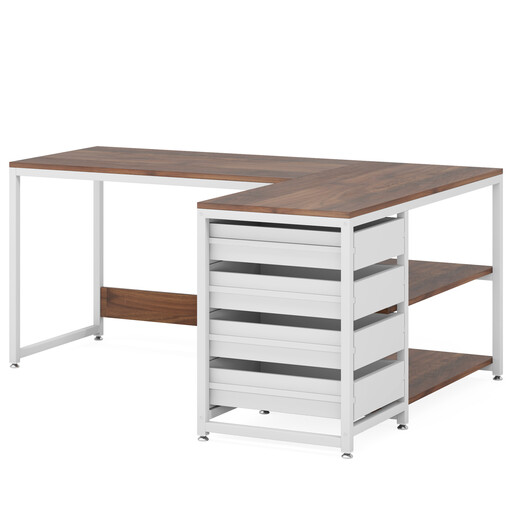
Highlights For those who prioritise space and organisation above all, this corner desk with storage is a compelling option. Although it is a fixed-height desk, its L-shaped design offers a particularly generous work surface. Its 4 drawers and 2 shelves help keep your workspace perfectly tidy. Its reversible design is a real bonus, allowing you to place the storage unit on the left or right to suit your room's layout.
Pros
Who is it for? Perfect for those who juggle multiple projects, do creative work, or simply need a lot of space, and for whom storage is a non-negotiable priority.
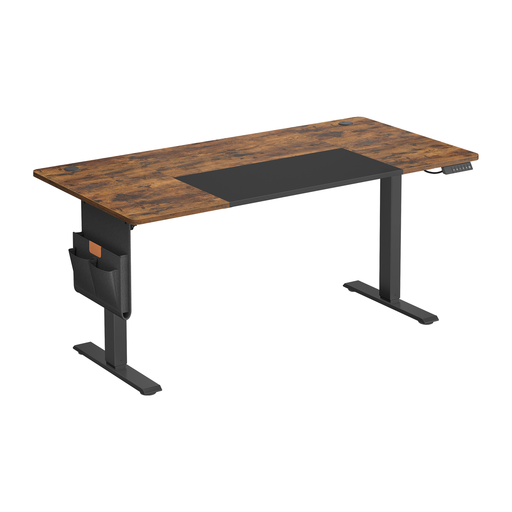
Highlights This XL version of the Ochama desk features a very spacious 160 x 70 cm desktop, perfect for multi-monitor setups or for those who like to spread out. It has all the strengths of its smaller counterpart: a quiet motor, position memory, sit-stand reminders, cable management, and, of course, the USB-C port. Its two-tone brown-black design gives it a very professional, elegant touch.
Pros
Who is it for? For demanding professionals, creatives, or gamers who swear by multi-monitor setups and want maximum surface area on their ergonomic desk, without compromising on features.
If the models in our selection don't quite meet your needs, or if you have specific space constraints, don't worry: other solutions exist. For smaller spaces, for example, a compact model would be a smarter choice.
Discover our wider selection of space-saving desks and tables to find the perfect piece of furniture for your home.
Changing your posture throughout the day helps break the monotony of prolonged sitting. Many users report a boost in energy and better overall comfort. The goal isn't to stand for eight hours a day, but to find the balance that works for you.
It all depends on your body type.
There's no hard and fast rule: the most important thing is to listen to your body. A good approach is to start with 30-minute standing sessions, alternating with periods of sitting. You can then adjust this duration based on how you feel. The key is to switch positions regularly.