
Livraison le jour même ou le lendemain

Qualité garantie

Débloquez vos offres de bienvenue: Livraison GRATUITE | Jusqu'à -80 % | 30 jours d'essai gratuits à JoyPlus
Téléchargez l'application
Buying a Sony DualSense PS5 wireless controller might seem straightforward: pick a colour, check the price, and you’re done. However, a few details can turn a great deal into a disappointing purchase. Missing cable, limited features on PC, variable battery life, or a special edition that’s hard to replace – the differences between models and how you use them are worth a closer look.
This guide will help you compare the options available, steer clear of overly vague marketing claims, and choose an official PS5 DualSense controller that suits your everyday gaming in the UK.
A controller may be advertised as compatible with PS5, Windows, macOS, iOS and Android. This usually means it can be connected to these devices, but not that all its features will work everywhere.
On PS5, haptic feedback and adaptive triggers are supported in compatible games. On a computer, some features depend on the game or system, and may require a USB-C connection. So, if you’re gaming on PC, think about whether you prefer the flexibility of Bluetooth or the reliability of a wired connection.
Not all models include a USB-C cable. Some listings clearly state it’s sold separately, while others include a charging cable. A rechargeable PS5 controller without a cable is still perfectly usable, but you’ll need to buy a compatible accessory.
Before you order, always check:
Models like Midnight Black, Cosmic Red, Chroma Teal, Galactic Purple or Nova Pink all share the same core features when it comes to standard DualSense versions. A limited edition DualSense may offer a unique design, but it doesn’t necessarily justify a price difference if looks aren’t your priority.
Instead, start by looking at compatibility, what’s in the box, the stated battery life, and how often you’ll use it.
Haptic feedback replaces traditional vibrations with more precise sensations that vary depending on the actions in the game. PS5 adaptive triggers can, for example, offer different levels of resistance when braking, firing, or performing an action that requires gradual pressure.
These features, however, depend on the game you’re playing. On PC, they may be limited or require a USB-C connection. If you mainly play compatible PS5 titles, a standard DualSense will generally meet your needs without needing an extra module.
An official Sony PS5 controller typically uses Bluetooth for wireless connection and USB-C for wired gaming or charging. Bluetooth works with the PS5, as well as with some compatible computers, phones and tablets.
On PC, the most practical choice depends on your setup:
Most DualSense versions also include a microphone, a 3.5 mm headphone jack, a speaker and the Create button.
Product listings often state a battery life of around 8 to 10 hours, depending on the intensity of vibrations, microphone use and brightness. This is only an estimate: it can vary from game to game and will decrease over time.
To look after the built-in lithium-ion battery:
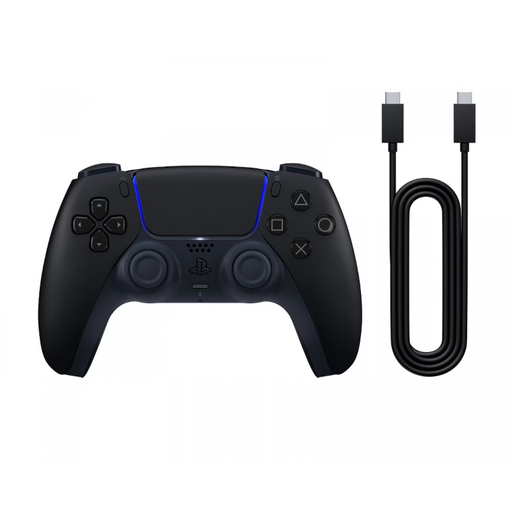
Why this suits this profile: This Midnight Black version works well as a first extra controller or for gamers who want to use their DualSense on both PS5 and PC with a cable included.
The listing confirms the USB-C cable is included, so you won’t need to buy an extra accessory for wired gaming or charging.
Bluetooth and USB-C, built-in battery, microphone, 3.5 mm headphone jack and Midnight Black finish.
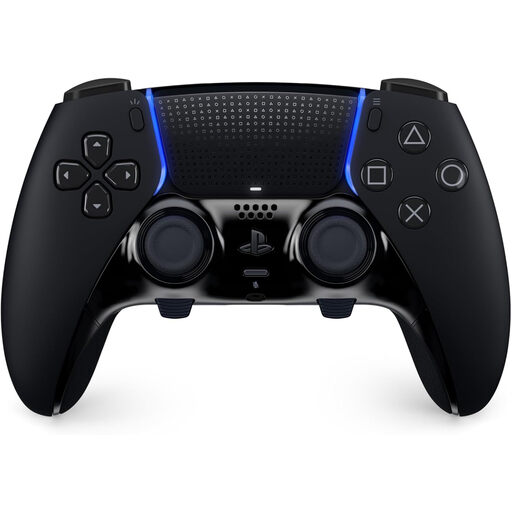
Why this suits this profile: The DualSense Edge is designed for gamers who want to customise controls, stick sensitivity and trigger response depending on the game.
It doesn’t just offer a premium finish – its customisable profiles and interchangeable parts genuinely meet a need for fine-tuning.
Programmable buttons, savable profiles, multiple stick caps, adjustable triggers and a carry case.
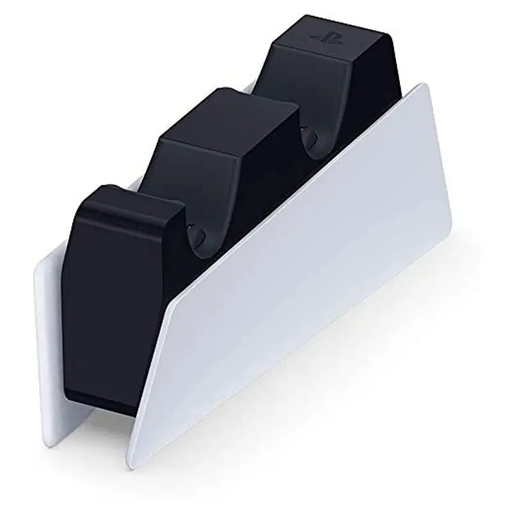
Why this suits this profile: This accessory is especially handy in households with two controllers or for gamers who like to store and charge them between sessions.
It frees up the console’s USB ports and reduces the risk of finding a flat controller just before a multiplayer session.
Simultaneous charging of two DualSense controllers, click-in docking system, status indicators and included European power adapter.
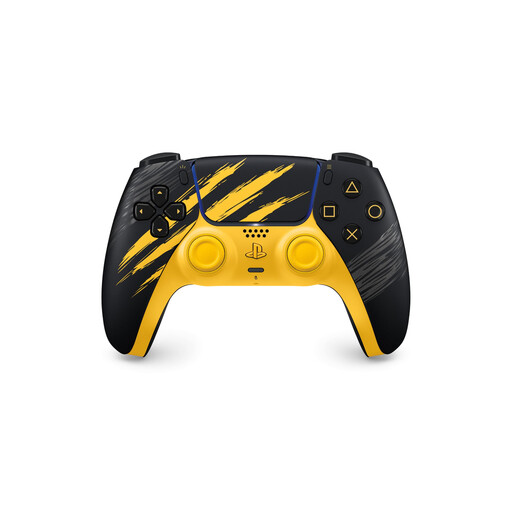
Why this suits this profile: Its yellow and black Wolverine-inspired design is aimed at gamers who want a visually distinct controller to complement their PS5 setup.
The listing clearly distinguishes the special edition from the console and game: Marvel’s Wolverine is not included.
Haptic feedback, adaptive triggers, built-in microphone, Create button and Bluetooth or USB-C connection.
We’ve put together a complete, real-time updated selection of products that meet these exacting standards, while complying with European safety regulations.
Plug the controller into the console using a USB-C cable, then press the PlayStation button. Once paired, you can unplug the cable and play wirelessly. On PC or mobile, hold down the PlayStation and Create buttons until the light bar flashes, then select “Wireless Controller” in the Bluetooth settings.
Some technical specifications state around 8 to 10 hours, depending on the intensity of vibrations, use of adaptive triggers and microphone, as well as the battery’s condition. This is an estimate: battery life can decrease as the built-in battery ages.
No, a compatible USB-C cable is sufficient. A charging station becomes useful if you own two controllers, want to free up the PS5’s USB ports, or prefer to store your controller on a dedicated stand after each session.