
Livraison le jour même ou le lendemain

Qualité garantie

Débloquez vos offres de bienvenue: Livraison GRATUITE | Jusqu'à -80 % | 30 jours d'essai gratuits à JoyPlus
Téléchargez l'application
Protecting your home should no longer mean complex installations and hidden monthly fees. This is where the solar-powered wireless outdoor security camera?comes in: an essential solution that is as powerful as it is self-sufficient. Powered by the sun and connected to your Wi-Fi, it offers peace of mind without the hassle of cables or recurring subscriptions.
To help you make an informed decision, this guide breaks down the essential features and presents our selection of the top models currently available. The goal: to help you find the camera perfectly suited to your needs.
Before making a purchase, it's crucial to understand what truly sets a good model apart from the rest. Here are the criteria that should guide your choice.
This is the most critical factor. A high resolution (2K, or even better, a 4K security camera) is essential for clearly identifying a face or a license plate, day or night. Another point not to be overlooked is colour night vision. Unlike traditional black-and-white infrared, it uses ambient light to produce full-colour images even in low-light conditions, offering far more relevant detail and context.
This is their core promise: self-sufficiency. A good solar camera with a battery relies on a winning combination: a high-performance solar panel to capture energy during the day, and a high-capacity internal battery (usually 10,000?mAh or more) to take over. This synergy ensures flawless operation, even on overcast days or in the middle of the night. For less sunny areas, some models go a step further with dual or remote solar panels to maximise energy collection.
A modern camera no longer just passively records. AI motion detection (Artificial Intelligence) has become an essential feature: it can distinguish between a real threat (a person, a car) and a false alarm (a passing cat, leaves in the wind). The result: meaningful notifications and preserved battery life. Most models are also designed to be subscription-free, storing videos on a MicroSD card or a local base station. To top it off, compatibility with voice assistants (Alexa and Google Home compatible) allows you to control your security with your voice.
Enough theory, let's get practical. Here are three models that have particularly caught our eye.
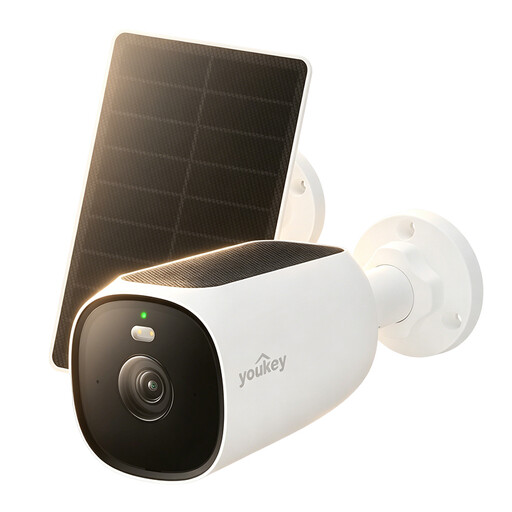
Why it stands out: The Youkey S420 stands out with its 24/7 recording capability, a rare feature in the solar-powered segment, ensuring you never miss a thing. Its dual solar panel system (one integrated, one external) guarantees optimal charging for unbeatable battery life.
Pros:
Who is it for? Ideal for those who demand constant, flawless surveillance of a sensitive area (entrance, driveway, business access) without compromising on battery life.
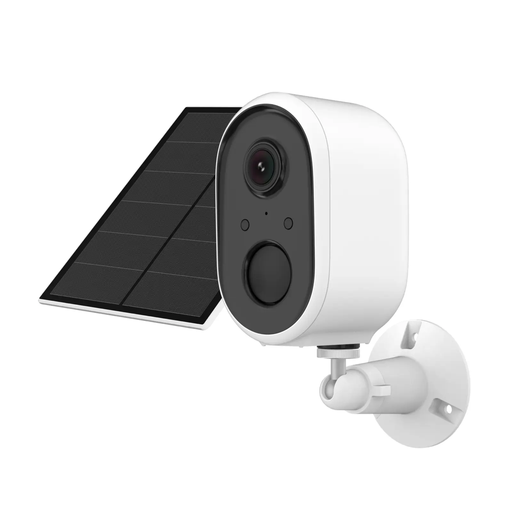
Why it stands out: This model integrates seamlessly into the TUYA (Smart Life) ecosystem, one of the most popular smart home platforms. Its real strength is its deterrent capability: as soon as motion is detected, it can trigger a powerful siren and flashing lights to scare off intruders.
Pros:
Who is it for? Perfect for fans of the TUYA ecosystem and for anyone who wants a camera that not only watches but also acts to actively deter intrusions.
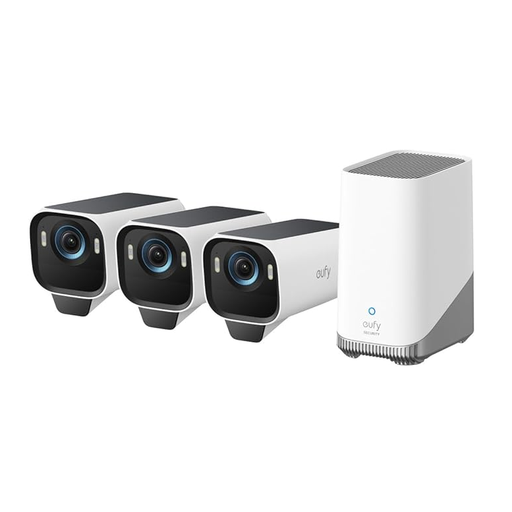
Why it stands out: With its 4K resolution and MaxColor Vision technology, the eufyCam S3 Pro sets a very high bar. The manufacturer promises images as clear as daylight, even in near-total darkness. Its advanced AI even offers facial recognition to distinguish between familiar faces and strangers.
Pros:
Who is it for? For demanding tech enthusiasts who want the pinnacle of image quality and advanced smart features like facial recognition, all within a closed, subscription-free ecosystem.
If these three cameras don't check all the boxes for you, feel free to explore other options.
Discover all our wireless security cameras
1. Does a solar camera work in winter or on cloudy days? Absolutely. These cameras are designed to operate year-round. The solar panel captures energy even in overcast weather (daylight is sufficient) and stores it in a high-capacity battery. This battery takes over at night or during periods of low sunlight to ensure continuous surveillance.
2. Do I really need a subscription for a security camera? No, and that's a major advantage. Most recent models, including those in our selection, are subscription-free. Recordings are saved locally on a MicroSD card or a dedicated base station connected to your network. Your data stays with you, and you have no monthly fees.
3. Is installing an outdoor Wi-Fi camera complicated? Not at all; in fact, it's one of their biggest strengths. The complete absence of cables greatly simplifies the setup, which boils down to a few steps: