
Livraison le jour même ou le lendemain

Qualité garantie

Débloquez vos offres de bienvenue: Livraison GRATUITE | Jusqu'à -80 % | 30 jours d'essai gratuits à JoyPlus
Téléchargez l'application
With energy prices soaring, every household is looking for ways to get a better handle on its consumption. The smart plug with energy monitoring has become an essential ally for tracking down power-hungry appliances and scheduling savings. But be warned: the market is flooded with models making tempting promises that often fall short. As a smart home expert, my role is to help you see clearly and make a truly useful choice, avoiding the most common pitfalls.
Before you start, here are the 3 beginner mistakes that turn a good investment into a useless gadget:
To ensure your purchase goes from a simple gadget to a real energy management tool, three technical points must be examined closely.
This is the non-negotiable criterion. The maximum power the plug can handle, expressed in watts (W) and amps (A), determines which appliances you can safely plug into it.
The rule of thumb: always check your appliance's nameplate to find its power rating and choose a smart plug with a higher capacity for safety.
Good energy monitoring should provide you with useful and accurate data. Check that the associated app offers at a minimum:
It's this feature that turns your Wi-Fi plug into a true home energy auditor.
For a seamless daily experience, connectivity is king. Most models connect directly to your 2.4 GHz Wi-Fi band. This is a point to check, as many modern internet routers default to the 5 GHz band.
The ideal choice is a plug compatible with an open platform like Tuya Smart Life. This universal ecosystem brings together thousands of devices from different brands, allowing you to control everything from a single app. Finally, compatibility with voice assistants is a real plus. An Alexa or Google Home smart plug promises a home that obeys your every command, by touch and by voice.
Rather than an endless list, here are three options that check all the boxes and meet specific needs.
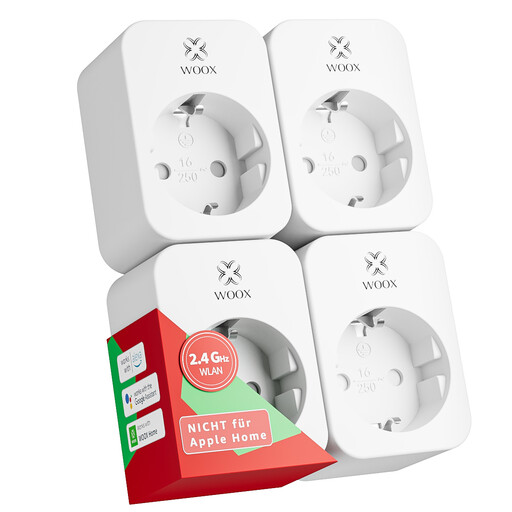
Why this choice: Ideal for outfitting multiple rooms on a budget. This four-pack lets you start monitoring several key devices (TV, computer, lamps) and create automation scenarios without breaking the bank.
Compatibility with the Tuya ecosystem ensures an open and scalable solution. The 16 A rating allows you to safely plug in most household appliances, and the energy monitoring is reliable.
Excellent value for money for anyone getting started. The T?V certification is a guarantee of safety and compliance with European standards, which is reassuring.
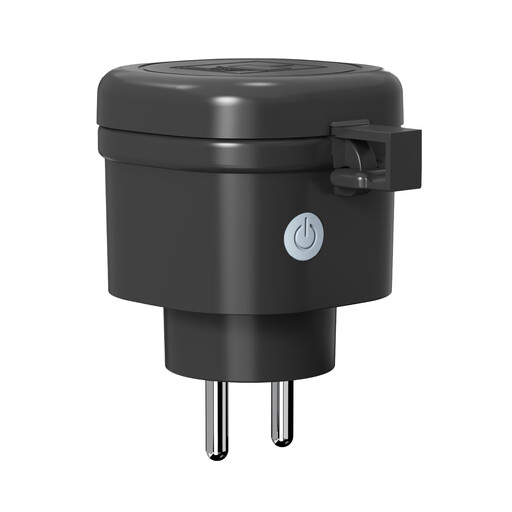
Why this choice: Designed for those who want to automate and monitor garden lighting, a pool pump, or Christmas lights. Its robustness and weather resistance are its greatest strengths.
Its IP44 certification guarantees protection against water splashes, which is essential for outdoor use. With a capacity of 16 A / 3680 W, it can handle gardening tools and other powerful equipment without issue.
Energy monitoring via the Smart Life/Tuya app allows you to keep an eye on outdoor equipment, which is often very power-hungry, and optimise its operation.
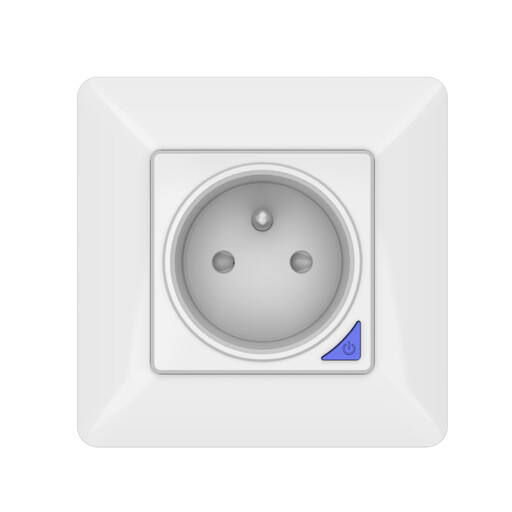
Why this choice: The solution for those who prioritise aesthetics and a permanent installation. It replaces a standard wall outlet for a clean, integrated look without the bulk of an adapter. Ideal for a renovation or new construction.
This in-wall model combines all the essential features (energy monitoring, remote control, scheduling). Its 16 A capacity makes it suitable for replacing any standard outlet, even for heavy-duty use.
A durable and completely invisible solution that enhances your electrical system. Please note: installation must be performed by a qualified person.
We have analysed dozens of models to select only those that meet our selection criteria and safety standards.
No, the standby power consumption of a Wi-Fi plug is negligible, typically less than 1 watt. The savings you'll achieve by truly turning off standby devices (TVs, game consoles, internet routers at night...) far outweigh the plug's own consumption.
In the vast majority of cases, no. Wi-Fi smart plugs are designed to connect directly to your internet router on the 2.4 GHz frequency band. This is their main advantage over other technologies like Zigbee or Z-Wave, which require an additional device (a bridge or hub) to communicate with your network.
This is a question of power, and it's crucial. Look at the label or nameplate on your heater to find its power rating in watts (W). For a space heater, it's often between 1500 W and 2500 W. You absolutely must choose a smart plug capable of handling this load. Always opt for a model rated at 16 A / 3680 W. Using a 10 A plug is completely unsuitable and poses a real risk of overheating or even fire.