
Livraison le jour même ou le lendemain

Qualité garantie

Débloquez vos offres de bienvenue: Livraison GRATUITE | Jusqu'à -80 % | 30 jours d'essai gratuits à JoyPlus
Téléchargez l'application
The promise of a smart digital notebook is certainly appealing: say goodbye to stacks of paper, find any note in an instant, and even convert your handwriting into digital text. But be warned—the market is a jungle of options that, beneath a glossy marketing veneer, often hide flaws capable of turning the dream into a frustration. As the Head of Product Recommendations at Joybuy, my goal is to help you see things more clearly and identify the features that truly make a difference.
Before you dive in, let's review the pitfalls to avoid so you don't regret your purchase.
To make the right choice, focus on these three points that have a direct impact on your daily comfort and productivity.
This is the number one criterion. It determines both the visual comfort and the battery life of the device.
To recapture the pleasure of writing, stylus latency must be imperceptible. Aim for under 30 milliseconds for excellent responsiveness. Pressure sensitivity (expressed in levels, such as 4096) is another major asset: it allows you to vary the thickness of the line just like with a real pencil, a crucial detail for drawing or diagrams.
A true digital notepad stands out because of its software. Make sure it includes essential features like:
Every user has different needs. Here is a selection of products tailored to distinct profiles, keeping performance and relevance in mind.

Why it's the right choice: Designed for professionals and students who spend hours reading, annotating, or in meetings. Its mission: pure, unadulterated productivity, without daily distractions. It's an excellent, AI-powered reMarkable alternative.
It sidesteps the "all-in-one" trap with its 300 PPI E-Ink screen, offering a paper-like reading comfort that's easy on the eyes. Here, no notifications will disrupt your concentration.
Audio-to-text transcription in 16 languages, perfect for generating meeting minutes. Its ultra-slim design (4.2 mm) and record-breaking battery life make it a champion of mobility.

Why it's the right choice: Perfect for students looking for a single device to take notes, do research, attend online classes, and relax. Its versatility is its main strength.
This model is a smart compromise. While it has an LCD screen, its performance-to-price ratio is unbeatable. There's no need to pay more for a specialized device if you do more than just take notes.
Its large 12.7-inch 2K screen provides ample workspace. The stylus with 4096 levels of pressure is included, and full access to the Android ecosystem ensures rock-solid versatility.
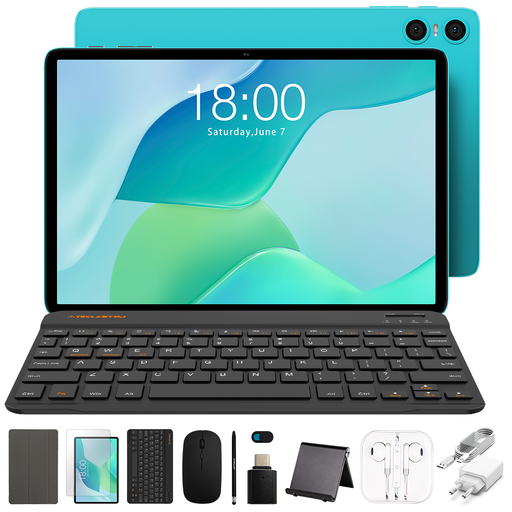
Why it's the right choice: Ideal for getting started with digital note-taking without breaking the bank. The ultra-complete bundle makes it ready to go right out of the box.
It avoids the hidden costs trap by offering an all-in-one package at a rock-bottom price. It's not a niche device, but an excellent entry point into the world of tablets.
A bundle of 11 accessories, including a case and keyboard, provides a turnkey solution perfect for office tasks and note-taking.
We have selected a full range of products that meet our quality standards and comply with European regulations.
The difference is radical and lies in the screen. An e-ink tablet has a screen that doesn't light up on its own but reflects ambient light, just like paper. This guarantees optimal visual comfort and a battery life of several weeks. A regular tablet (LCD/IPS), with its backlit screen, is built for video and colours, but it tires the eyes over time and its battery rarely lasts more than a day or two.
Its reliability largely depends on the software's performance and, of course, the legibility of your handwriting. On recent AI-powered models, the results are often stunning, provided you write clearly. Our advice: if this feature is crucial for you, try to test it. It's incredibly effective for digitizing notes and then being able to search them by keyword.
It's worlds apart depending on the screen technology. A model with an E-Ink screen can last for several weeks with normal use, as it only consumes power when the image changes. Conversely, an LCD/IPS tablet will struggle to last more than a day or two, depending on your usage.