
Livraison le jour même ou le lendemain

Qualité garantie

Débloquez vos offres de bienvenue: Livraison GRATUITE | Jusqu'à -80 % | 30 jours d'essai gratuits à JoyPlus
Téléchargez l'application
Remote work has become a staple of modern life, and with it, long hours spent in front of a screen. As a result, back pain and fatigue from being sedentary are now a daily reality for many workers. Far from being a mere gadget, the sit-stand desk is a true ally for your well-being and productivity.
But with a dizzying array of options on the market, how do you find the right one? This guide is here to provide the key insights you need to choose the perfect height-adjustable desk for your space and needs.
Before you commit, it's essential to consider the criteria that will make all the difference in your day-to-day use. Here are the key points to check to ensure you make the right choice.
The core of any adjustable desk is, of course, its adjustment mechanism.
The space you have available is obviously a fundamental criterion. Take your measurements and plan for the equipment you intend to place on it. Do you need room for one or two monitors, a laptop, and notebooks? Desktops typically range from 120 cm to 180 cm in width.
Also, remember to check the maximum load capacity the desk can support, especially if you have heavy equipment. A good ergonomic desk must be able to handle your entire setup without any issues.
Seemingly small details can radically improve your daily experience:
To help you see more clearly, here is a selection of models that cater to different needs, from the intensive home office desk to an optimised study space.
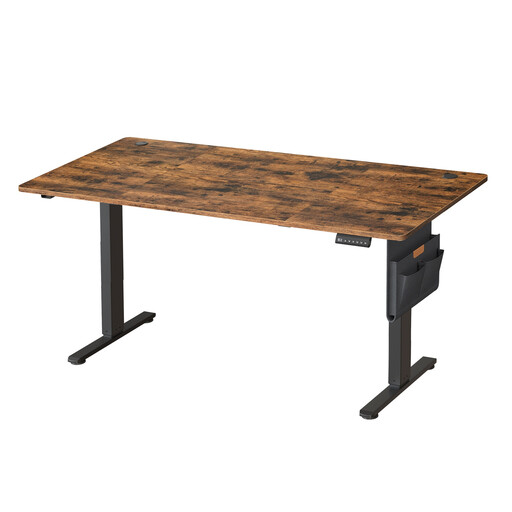
What sets it apart This model immediately impresses with its very large 180 x 80 cm desktop, which offers a more than generous work surface. Its motor ensures smooth and quiet adjustment, while its control panel includes a 4-position memory function and a fast-charging USB-C port.
Advantages
Who is it for? For professionals and creatives who need maximum space to spread out their equipment. The smart choice for those who want to build a complete, no-compromise setup.
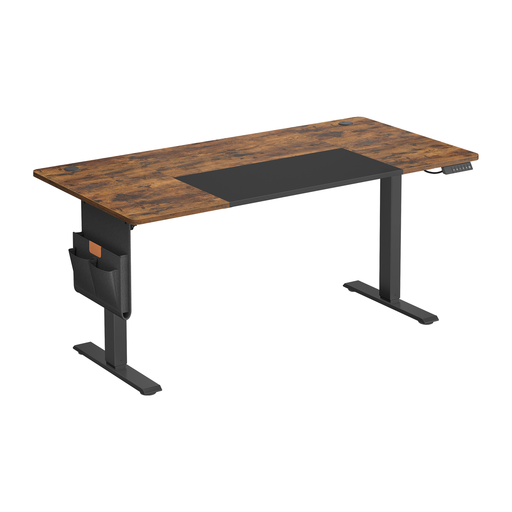
What sets it apart With its 160 x 70 cm dimensions, this desk strikes an excellent balance between a comfortable work surface and a manageable footprint, making it ideal for most homes. It includes the range's best features, such as the quiet motor, position memory, and well-designed organisational accessories (cable grommets, storage pouch, hooks).
Advantages
Who is it for? Perfect for the remote worker or student looking for a high-performing and well-designed electric desk without needing an XXL size. A complete and coherent turnkey ergonomic solution.

What sets it apart This is not a height-adjustable model, but this L-shaped desk is an excellent alternative for those who prioritise surface area and storage above all. Its corner design optimises workspace, while its 4 drawers and 2 shelves offer impressive storage capacity to keep the desktop clear.
Advantages
Who is it for? For those who juggle numerous files, projects, or multiple computers and need storage within arm's reach. A smart choice if alternating between sitting and standing isn't your top priority.
Our selection is just a glimpse of what's available. To discover more sizes, materials, or features, feel free to explore our full range.
? Discover all our height-adjustable desks
1. Is a sit-stand desk really useful? Absolutely. Alternating between sitting and standing throughout the day helps break up a sedentary routine. This helps reduce the discomfort and muscle stiffness associated with prolonged sitting. Changing your posture engages different muscle groups and can even boost concentration.
2. What is the ideal height for my desk? The golden rule of ergonomics is simple: whether you are sitting or standing, your forearms should rest flat on the desktop with your elbows at an approximately 90-degree angle. Your shoulders should remain low and relaxed. The memory function of an electric desk is very practical for returning to your perfect settings with a single press.
3. Does an electric desk use a lot of energy? Rest assured, the energy consumption is minimal. The motor only activates for the few seconds it takes to adjust the height. The rest of the time, its standby power consumption is negligible, comparable to any other electronic device. In fact, most models include an automatic power-saving mode.