
Livraison le jour même ou le lendemain

Qualité garantie

Débloquez vos offres de bienvenue: Livraison GRATUITE | Jusqu'à -80 % | 30 jours d'essai gratuits à JoyPlus
Téléchargez l'application
Back pain, flagging concentration... Do long days of remote work or intense study sessions sound familiar? Rest assured, you're not alone. The main challenge of working from home is creating an environment that is both productive and comfortable. This is where the sit-stand desk comes in: it has quickly established itself as the ideal solution for prioritising your daily well-being, simply by alternating between sitting and standing.
But with an overwhelming number of options on the market, how do you find your way? This guide is here to break down the essential criteria and present our selection of the best models—all without the unnecessary marketing jargon—to help you make the right choice.
Before you take the plunge, let's review the key points that will make all the difference and ensure your new desk perfectly meets your expectations.
At the core of a height-adjustable desk is its adjustment system.
What will be the main use for your desk? A computer desk worthy of the name should easily accommodate one or two monitors, a keyboard, and a mouse, while still leaving room for your notebooks or documents. Be sure to measure the available space in your room and ensure the desktop is large enough for your setup. Standard widths range from 120 cm to 160 cm, a comfortable size for most home office configurations.
A desk is often the centrepiece of a bedroom or living room, so its aesthetics shouldn't be overlooked. Whether you prefer a modern, minimalist design or an industrial-style desk that combines wood and metal, you're sure to find a perfect match. But beyond looks, don't compromise on material quality. A sturdy steel frame and a thick desktop are the best guarantees of stability, especially when the desk is in its highest position. Adjustable feet are also a real bonus for levelling on uneven floors.
To move from theory to practice, here is a selection of models that cater to different needs and budgets.
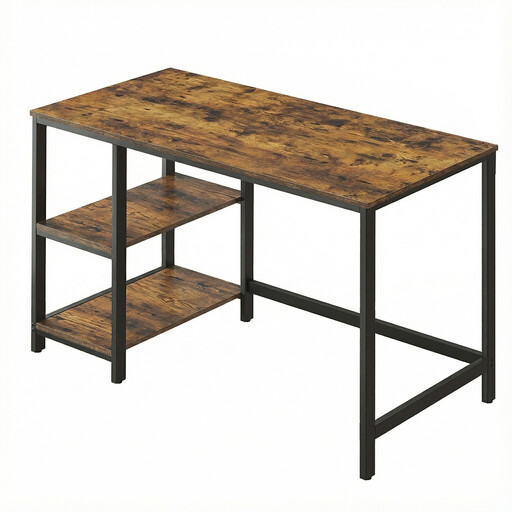
Why it stands out This model is an excellent starting point for anyone looking for a fixed workstation that is both sturdy and functional. Its bold industrial look, with a rustic brown top and black steel frame, adds a real touch of character. It doesn't skimp on practicality, offering a generous work surface and clever storage solutions.
Highlights
Who is it for? Ideal for students, occasional remote workers, or anyone who prefers a fixed workstation with a distinct style and integrated storage, all at an affordable price point.
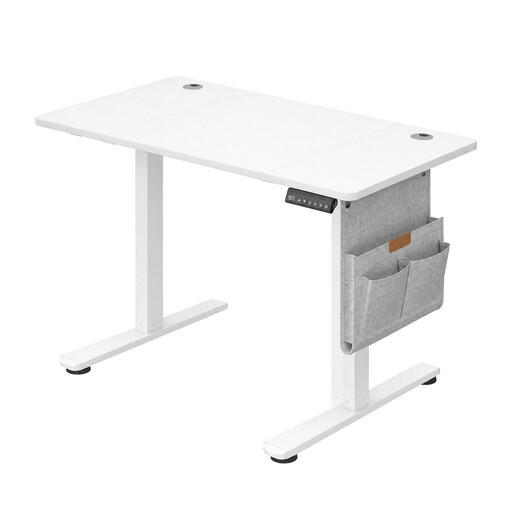
Why it stands out This electric desk is an excellent entry into the world of active ergonomics. It combines a quiet motor with well-thought-out features like height memory presets. It's all wrapped up in a clean, modern design that will fit right into any interior.
Highlights
Who is it for? Perfect for regular remote professionals who want to adopt a more dynamic, hassle-free routine. Its compact size makes it ideal for most rooms, even smaller ones.
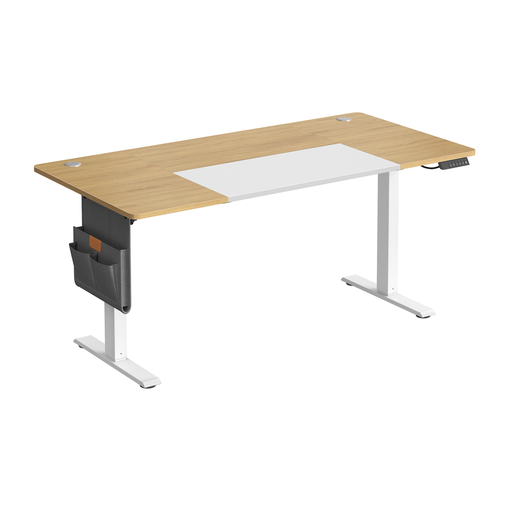
Why it stands out This model takes it up a notch, catering to those who want more space and comfort. With its extra-large 160 cm desktop and thoughtful features, like the integrated USB-C port and reminder function, it's built for daily productivity and well-being.
Highlights
Who is it for? Aimed at demanding users, freelancers, creatives, or professionals who spend long hours at their desk, need a large workspace, and appreciate smart features that promote healthy work habits.
If these three models didn't tick all your boxes for size, style, or features, feel free to explore our full collection. You'll find a wide variety of designs and configurations to discover the workspace that truly reflects you.
Discover our range of desks and computer workstations
1. What is the ideal height for a sit-stand desk? The golden rule is simple: whether you are sitting or standing, your elbows should form a 90-degree angle when your forearms are resting on the desk. Your wrists should remain straight as you type. Most electric desks allow for precise adjustments to find your optimal comfort position.
2. Does an electric desk use a lot of energy? No, the power consumption is very low. The motor only activates for the few seconds needed to adjust the height. In standby mode, its consumption is negligible, comparable to a phone charger left plugged in.
3. How do I manage cables on a height-adjustable desk? This is the main challenge with a mobile desk! To prevent cables from tangling or being pulled out, the easiest solution is to use cable trays or management baskets attached under the desktop. Also, consider using cable ties or spiral wraps to bundle the wires leading to the wall outlet, ensuring you leave enough slack to accommodate the desk's movement without strain.