
Livraison le jour même ou le lendemain

Qualité garantie

Débloquez vos offres de bienvenue: Livraison GRATUITE | Jusqu'à -80 % | 30 jours d'essai gratuits à JoyPlus
Téléchargez l'application
With remote work becoming the norm, the long hours spent in front of a screen have made postural comfort a top priority. Back pain, fatigue, and a lack of focus are often the direct result of poor posture held for hours on end. Far from being a gimmick, the sit-stand desk has become an essential tool for improving daily well-being and productivity.
Faced with a crowded market, it can be difficult to know where to start. Our guide is here to help you see things more clearly and choose the height-adjustable desk that truly fits your needs, without being swayed by marketing hype.
Before we get to our selection, let's review the crucial technical points for a successful purchase.
The heart of a sit-stand desk is, of course, its adjustment mechanism. Most models operate with one or two electric motors. A dual-motor system is generally more stable, faster, and quieter, especially for large desktops or if you have a lot of equipment.
Among the life-changing features is the memory function. An ergonomic desk with memory presets allows you to save several heights (for example, one for sitting, another for standing). A single press of a button is all it takes to return to your favourite setting?— a valuable time-saver that encourages you to alternate positions more often.
How much surface area do you really need?? A 160x70 cm desktop provides a comfortable space to set up two monitors, a laptop, and a few accessories without feeling cramped. A basic but essential tip?: measure the space you have available before clicking "Buy".
Also, check the maximum load capacity of the desk. It must be able to support your entire setup safely. A capacity of 70?kg, for example, is more than enough for a standard remote work desk configuration.
A tidy desk leads to a clearer mind. Some modern desks integrate clever solutions to end cable chaos. A desk with a USB-C port built into the control panel makes it easy to charge a smartphone or tablet. Likewise, cable grommets, headphone hooks, or under-desk storage baskets are significant bonuses for maintaining a clean and functional workspace.
Our editorial team has vetted several models to bring you a selection that meets different needs and budgets.
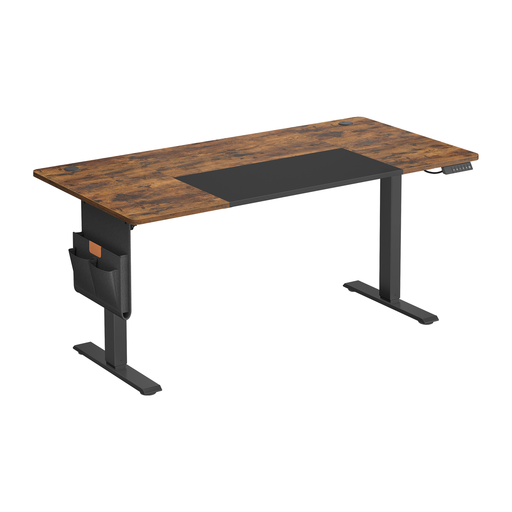
Why we love it
This model checks all the boxes for a modern sit-stand desk. Its generous dimensions (160 x 70 cm), memory function, and integrated USB-C port make it an ideal all-in-one solution for a primary workstation. Its motor, which is particularly quiet, is a real plus for maintaining a peaceful home environment.
Advantages
Who is it for?? Ideal for remote workers, creatives, or students who spend long hours in front of their screen and are looking for a complete, hassle-free ergonomic solution.
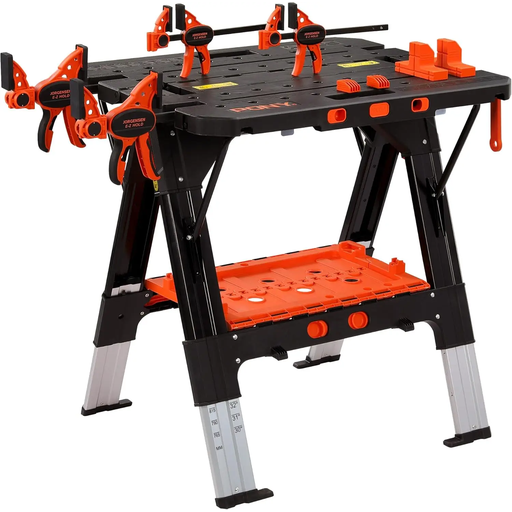
Why it stands out
While not a desk in the traditional sense, this PONY workbench is surprisingly versatile. Its height is adjustable across six levels, allowing it to be adapted for standing work far beyond the workshop. Its aluminium construction and impressive load capacity (up to 227?kg in workbench mode) make it a heavy-duty ally for the most demanding tasks.
Advantages
Who is it for?? For DIY enthusiasts, craftspeople, or artists looking for an adjustable and nearly indestructible work surface for their workshop, which can also serve as an occasional standing workstation.
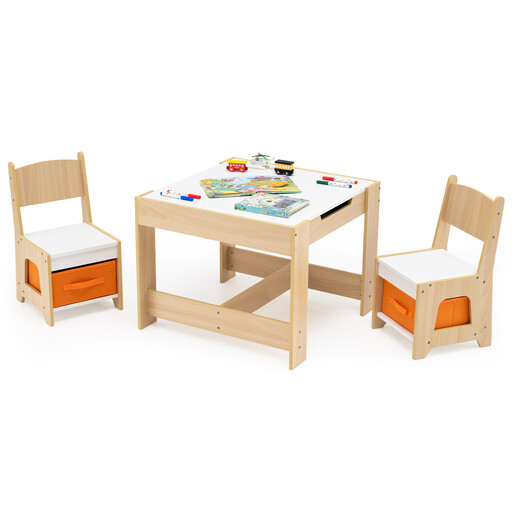
Why it stands out
Because ergonomics is for all ages, this children's set applies the principles of comfort and functionality to their scale. It's not a sit-stand desk, but it underscores the importance of a suitable workstation from a young age. The reversible top (whiteboard/chalkboard) and integrated storage make it as fun as it is practical.
Advantages
Who is it for?? For parents who want to give their children a creative, play, or drawing corner that is stimulating, safe, and well-designed.
If our selection doesn't check all your boxes, or if you're looking for a more compact model, don't worry?— the market is vast. To discover other flexible workstations, take a look at our dedicated category.
? Discover our selection of Portable Laptop Tables
The ideal height depends on your body. Whether you are sitting or standing, the golden rule is the same?: your elbows should form a right angle (about 90°) when your forearms are resting flat on the desk, and your shoulders should remain relaxed. This is precisely where the memory function of an electric desk really shines, allowing you to switch between positions effortlessly.
Recent models are designed to be particularly quiet. A good quality motor typically emits less than 50 decibels, which is equivalent to a quiet conversation or the hushed atmosphere of a library. This ensures you won't disturb your concentration or those around you.
The goal isn't to trade hours of sitting for hours of standing, but to alternate between them! It's often recommended to start with 30-minute standing sessions several times a day, then adjust based on how you feel. This alternation is the key to boosting blood circulation and relieving pressure on the spine.