
Livraison le jour même ou le lendemain

Qualité garantie

Débloquez vos offres de bienvenue: Livraison GRATUITE | Jusqu'à -80 % | 30 jours d'essai gratuits à JoyPlus
Téléchargez l'application
By the Joybuy team, your gear experts
Immersion is the holy grail for any sim racing enthusiast. You've invested in a cockpit, a force-feedback wheel, and a precise pedal set. Yet, for the experience to be truly complete, one crucial element is missing?: flawless visual integration. A screen hastily placed on a desk or a standard TV stand can not only create a distance that shatters the illusion but also introduce unwanted vibrations that compromise the rigidity of your setup.
This guide is here to help you choose THE sim racing monitor stand that will transform your setup. Stability, compatibility, optimal driving position?: we review the essential criteria to make your monitor and chassis become one.
Before diving into our selection, it's essential to understand the key points that differentiate the models. Here are the criteria you can't afford to overlook to make the right choice.
This is the first choice you'll need to make: will the stand be attached to your cockpit or be completely independent?
Compatibility is a non-negotiable point.
Robustness is the watchword for a cockpit monitor stand. The vibrations generated by a force-feedback wheel can make a low-quality stand tremble, completely ruining the immersion. Opt for structures made of tubular steel or aluminium profiles?: their solidity is renowned, and they handle stress without flinching.
Here is our selection of models that meet different needs and budgets, chosen for their relevance and performance.
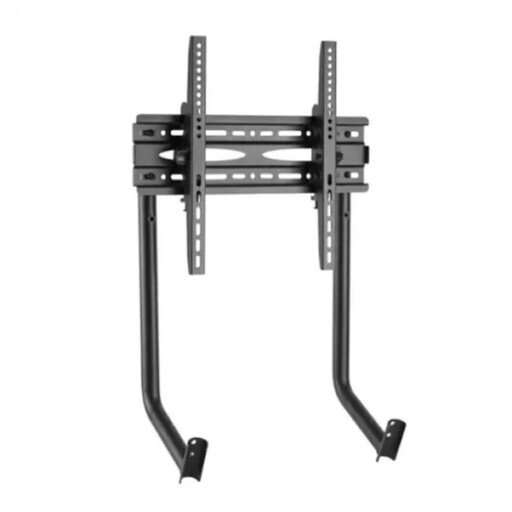
Why it stands out?: This mount was specifically designed to integrate with the OPLITE GT3 cockpit. It's not just an accessory, but a true extension of the chassis. By attaching it directly to the structure, it ensures remarkable overall rigidity. The screen and the driver become one, for a massively increased sense of immersion.
Pros?:
Who is it for?? This is THE logical choice for OPLITE GT3 cockpit owners seeking the most stable and immersive solution. If rigidity is non-negotiable for you, this Oplite GT3 monitor stand stands out as a benchmark.
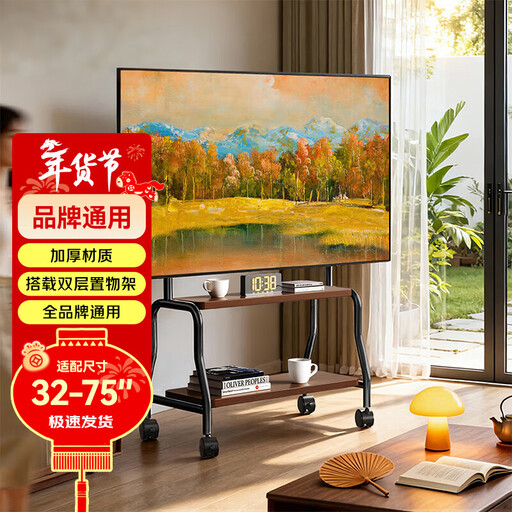
Why it stands out?: This freestanding mount stands out for its versatility. Completely independent, it adapts to any cockpit configuration. Its ability to accommodate screens from 32 to 75 inches makes it suitable for the most ambitious setups, while its casters allow you to move the entire unit easily.
Pros?:
Who is it for?? This stand is for drivers who prioritize flexibility. If your simulator is in the living room or if you use a large TV that you like to move around, this is an alternative that's as smart as it is functional.
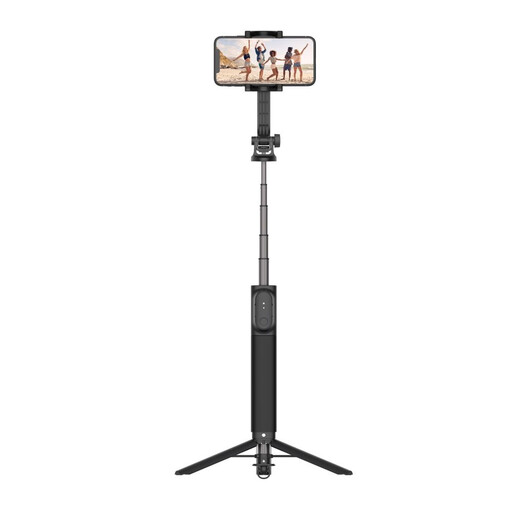
Why it stands out?: Be aware, this product is not a mount for your main gaming screen. It's a telescopic pole with a tripod function, designed for a very different but complementary use. Its strong point?: versatility and lightness, ideal for capturing your sessions.
Pros?:
Who is it for?? This product is aimed at content creators, streamers, and drivers who like to analyse their technique. It's perfect for placing a smartphone or a small camera to film your hands on the wheel, your footwork on the pedals, or to get an overview of your setup.
The monitor stand market is vast and offers solutions for all configurations and budgets. If our selection doesn't cover your needs, or you simply want to explore other avenues, the market is full of alternatives.
To discover a wider range of solutions (fixed mounts, articulating arms, multi-monitor models...), feel free to browse our dedicated category.
??Explore our selection of TV and monitor riser stands
How important is the VESA standard for a sim racing monitor stand?? The VESA standard is crucial?: it ensures that the mounting holes on the back of your screen perfectly match those on the stand. This international standard simplifies the selection process and guarantees a secure and surprise-free installation. Most modern screens and stands clearly state it in their specifications (e.g., VESA 100x100).
Is an integrated cockpit mount more stable than a freestanding one?? Generally, yes. An integrated mount creates a single, monolithic, and therefore more rigid unit. This prevents any unwanted movement of the screen relative to the seat when the wheel transmits its vibrations. However, a high-quality freestanding stand with a wide, heavy base will also offer excellent stability, with the added benefit of greater placement flexibility.
Can I use a standard TV stand for my racing simulator?? It's technically possible if the VESA compatibility and weight limits are respected. However, a standard TV stand is often not designed to be placed as close as possible to the driver, nor to withstand the constant vibrations of a force-feedback wheel. A dedicated cockpit monitor stand will generally be lower, more rigid, and offer adjustments far better suited to an ergonomic driving position.