
Livraison le jour même ou le lendemain

Qualité garantie

Débloquez vos offres de bienvenue: Livraison GRATUITE | Jusqu'à -80 % | 30 jours d'essai gratuits à JoyPlus
Téléchargez l'application
In sim racing, immersion is king. A powerful force-feedback wheel and a responsive pedal set are only part of the equation: without a flawless visual setup, the illusion shatters at the first corner. A shaky screen, a poorly adjusted view, or a narrow field of vision, and it's game over for your performance and driving enjoyment.
Far from being a mere accessory, the sim racing monitor stand is the cornerstone of a stable and immersive setup. It's what ensures your eyes stay glued to the track, without the slightest distraction. This guide breaks down the essential criteria for choosing the model that will match your hardware and your ambitions, whether you're starting with a single screen or already eyeing a multi-monitor configuration.
Before you pull out your credit card, let's review the essential technical points that will guarantee the compatibility, safety, and comfort of your installation.
This is fundamental. First and foremost, verify the stand's compatibility with your monitor (or future monitors). Three points to inspect meticulously:
A good sim racing TV stand must be made of solid materials, like steel, to handle the vibrations generated by the wheel and cockpit movements without flinching.
Ergonomics are crucial in sim racing. A stand worthy of the name must offer multiple adjustments to position your screen at the perfect height and angle. The golden rule: the center of the screen should be at eye level when you are in your driving position.
Think about the future, too. Are you starting with a single screen but already dreaming of a triple monitor sim racing stand for a panoramic field of view? Opt for a modular model. Some stands allow you to add side arms later, an excellent way to future-proof your investment.
There are two main families of stands:
For owners of powerful force-feedback wheels (Direct Drive), the choice is clear: a freestanding stand is essential to guarantee perfect stability and protect your monitor.
To guide you, we have selected one standout product for its versatility and robustness, as well as a complementary service to ensure you have absolute peace of mind.
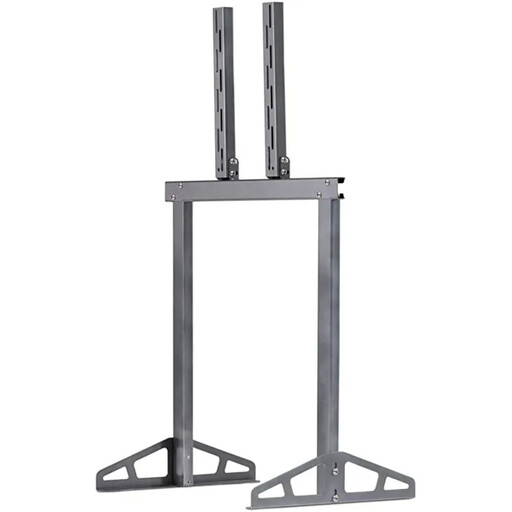
Why It Stands Out
The Playseat Professional TV Stand is a safe bet, a standalone solution designed specifically for the demands of sim racing. Its metal structure gives it unshakeable stability, even during the most intense sessions. Designed to be both robust and scalable, it's a wise choice for drivers with a long-term vision.
Advantages
Who Is It For?
This stand is for sim racers, from beginners to experts, who are looking for a solid, reliable, and future-proof foundation for their display. It is particularly recommended for owners of a Playseat simulator (or any other brand) who want an independent solution to free themselves from vibrations.
Discover the Playseat Professional TV Stand on Joybuy
Why It's a Real Plus
Mounting a screen, especially a large and heavy one, can quickly turn into a headache. Millimeter-perfect alignment, a perfectly secure attachment... the slightest misstep can ruin the experience or even pose a risk. Joybuy's installation service allows you to delegate this crucial step to professionals.
Advantages
Who Is It For?
This service is for anyone who values simplicity and safety. It becomes almost essential for complex setups, like a triple monitor sim racing stand, or for anyone who isn't a DIY enthusiast.
Learn more about the installation service
Does your simulator have pride of place in the middle of your living room? Aesthetics then become as important a criterion as performance. If a purely technical simulation cockpit accessory clashes with your decor, a more traditional TV unit can be an excellent alternative to combine form and function.
For options that blend design and functionality, take a look at our selection of TV units.
Discover our range of White Corner TV Stands with Fireplace
The golden rule is simple: the center of the screen should be perfectly aligned with your eyes when you are seated in your bucket seat. This adjustment is crucial to avoid neck strain and ensure your perception of the track is as natural as possible, just like behind the wheel of a real car.
Absolutely, provided you plan ahead and choose a modular system from the start. Models like the Playseat TV Stand Pro are specifically designed for this. You can begin with the single-screen stand and later purchase the extension kit to add two side screens. Your setup evolves with you, without you having to replace everything.
In theory, yes. In practice, it is strongly discouraged. A classic TV stand is not at all optimised for this use: it will lack rigidity against vibrations, will often be positioned too high, and will not offer the fine adjustments necessary for a good driving position. In short, it's the best way to ruin the immersion.