
Livraison le jour même ou le lendemain

Qualité garantie

Débloquez vos offres de bienvenue: Livraison GRATUITE | Jusqu'à -80 % | 30 jours d'essai gratuits à JoyPlus
Téléchargez l'application
A silent wireless mouse can make working days, lectures and remote working significantly more pleasant. But discreet clicks alone aren't enough to guarantee a great experience. Some models boast impressive DPI figures without delivering genuinely useful precision, while others promise record battery life without specifying the battery type or connection method.
Before you place an order, it's worth examining three criteria that are often overlooked: the connection method, the shape of the mouse and its power source. Here are the points to check to avoid nasty surprises and find a model that works with your Windows, macOS, Linux or ChromeOS computer, or even your Android tablet.
The term "silent" usually refers to the noise made by the main buttons. It doesn't guarantee that the scroll wheel or side buttons are quiet. In a library, open-plan office or shared bedroom, take the time to check what the specification sheet says about each control.
A silent optical mouse can also be noisier on a hard surface. A soft mouse mat dampens sounds and can sometimes improve movement consistency.
A sensor advertised at 4,800 or 30,000 DPI isn't automatically more enjoyable to use day to day. High sensitivity can be useful for certain games or high-resolution screens, but a more moderate value is usually sufficient for writing, working on spreadsheets or browsing the web.
A mouse with adjustable DPI lets you tailor the sensitivity to each task. However, check the number of available levels and whether there's a dedicated button, rather than just focusing on the maximum value.
A 2.4 GHz mouse typically works with a small USB receiver. If your laptop only has USB-C ports, you may need to add an adaptor. A Bluetooth mouse avoids this receiver, but pairing can be less straightforward depending on the device you're using.
Models that combine Bluetooth and 2.4 GHz offer more flexibility, particularly for switching between a work computer, a tablet or a personal PC.
A multi-device mouse can be very practical for remote working. However, check how many devices it actually supports and how switching between them works.
An ergonomic vertical mouse can suit right-handed or left-handed users who prefer an angled grip. However, it takes up more desk space and may require a few days to get used to. An ambidextrous shape is better suited to a shared workstation or someone who alternates between hands.
Also consider its size. A compact mouse for the office or laptop is easy to carry around, but may be less comfortable for larger hands during prolonged use.
A mouse powered by an AA battery is generally ready to use straight away, and the battery can be replaced in seconds. A rechargeable wireless mouse saves you from buying batteries regularly, but you need to remember to charge it using the supplied cable or a compatible model.
With a built-in lithium battery, check the charging recommendations, see if there's a USB-C port and look into recycling guidelines. In the UK, electronic devices and batteries must be disposed of at a designated collection point, never with household waste.
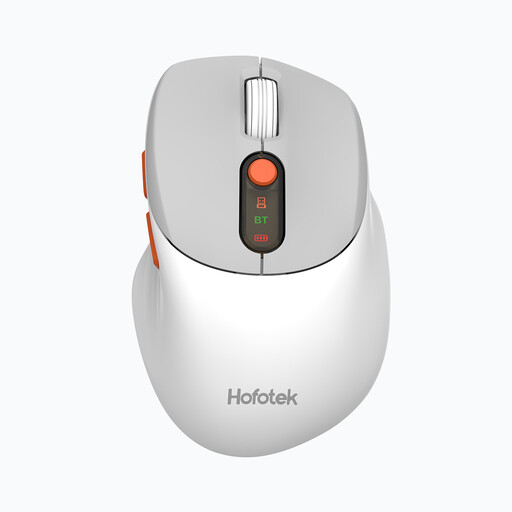
Why this model suits you: With its stated 62 g weight, compact size and dual connectivity, it's ideal for students, remote working and travel.
The low-noise clicks are paired with DPI levels from 800 to 4,000 and a 2.4 GHz or Bluetooth 5.1 connection.
Connection with up to three devices, an optical sensor and a supplied AA battery.
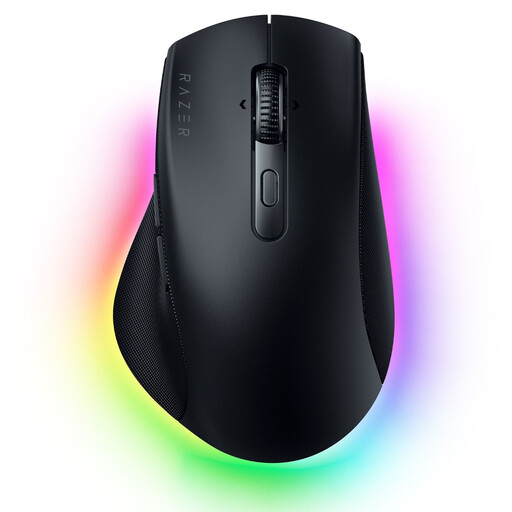
Why this model suits you: It's designed for those who want to combine productivity, customisation and gaming in a single peripheral.
The spec sheet states three connection modes and a button to switch between devices. However, the mechanical clicks are not described as silent.
A sensor reaching up to 30,000 DPI, nine buttons, a USB-C port and a claimed battery life of 3.5 months.
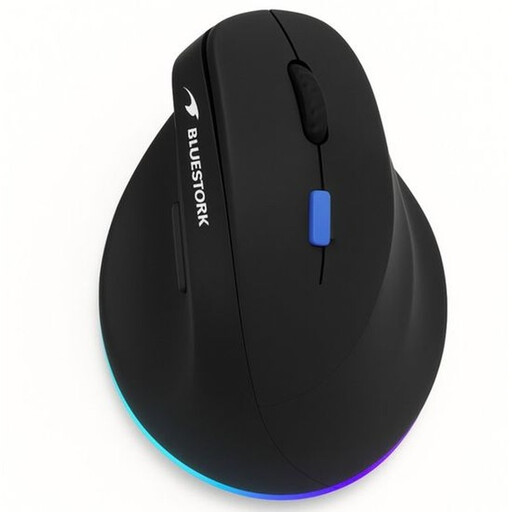
Why this model suits you: Its right-handed vertical grip and built-in battery target long working sessions, with USB-C charging.
The spec sheet specifies 2.4 GHz and Bluetooth compatibility, along with several sensitivity levels up to 4,800 DPI.
A rechargeable lithium battery, a USB-C cable and a right-handed vertical design.

Why this model suits you: Its claimed silent operation and 2.4 GHz connection meet the needs of a workspace where discretion matters.
The spec sheet mentions silent clicks, optical tracking and a resolution of 1,600 DPI, without highlighting a disproportionate value.
A USB receiver, an optical sensor and a size that suits both a laptop and a desktop PC.
Not necessarily. Bluetooth frees up a USB port, while 2.4 GHz is often quick to set up thanks to its receiver. On a desktop computer, the latter can be very handy. With a laptop or tablet, Bluetooth reduces the number of accessories you need to carry.
It depends on the model, how often you use it and the power management features. Some spec sheets claim up to twelve months with an AA battery, but this is only an estimate. A rechargeable mouse saves you from buying batteries, as long as you remember to charge it regularly.
Yes, if its buttons and scroll wheel remain quiet and its shape suits your hand. For daily use, also check the weight, width, compatibility with your system and whether it has an on/off switch or sleep mode.