
Livraison le jour même ou le lendemain

Qualité garantie

Débloquez vos offres de bienvenue: Livraison GRATUITE | Jusqu'à -80 % | 30 jours d'essai gratuits à JoyPlus
Téléchargez l'application
Finding the perfect silent AZERTY gaming keyboard can be a real challenge. Between marketing promises and technical reality, it's easy to end up with a keyboard that's neither truly silent nor comfortable for long-term use. For anyone who spends hours in front of a screen, whether for gaming or creative work, silence and comfort aren't luxuries—they're essential.
Before you take the plunge, let's review the most common pitfalls that can turn a sound investment into a costly disappointment.
To avoid falling into these traps, focus on these non-negotiable technical specifications. They are the true guarantors of your future keyboard's quality, durability, and silence.
The choice of mechanical switches is the cornerstone of your experience. To achieve near-total silence, it takes more than just avoiding 'clicky' switches (like Blues).
The material of your keycaps has a direct impact on the comfort, longevity, and even the sound of your keyboard.
A hot-swappable keyboard is a model where the switches are not soldered. They can be removed and replaced on the fly using a simple included tool. This is a game-changing advantage:
Rather than an exhaustive list, here are our targeted recommendations for every need, from the hardcore gamer to the demanding content creator.
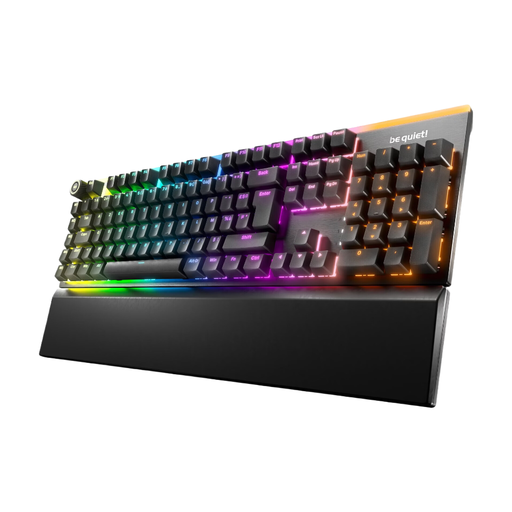
Ideal for: The gamer who seeks pure performance, but without the accompanying decibels. Perfect for late-night sessions or streaming, this keyboard combines an ultra-responsive mechanical feel with near-monastic silence, all in a full-size AZERTY mechanical keyboard layout.
It counters the "fake silent" trap with its 3 layers of sound dampening and factory-lubricated be quiet! Silent Tactile switches. It also dodges the low-quality material pitfall thanks to its double-shot PBT keycaps and brushed aluminium top plate.
Its hot-swappable compatibility (5-pin MX switches) ensures unparalleled customisation and longevity. The magnetic wrist rest and 3-level adjustable feet guarantee perfect ergonomics.
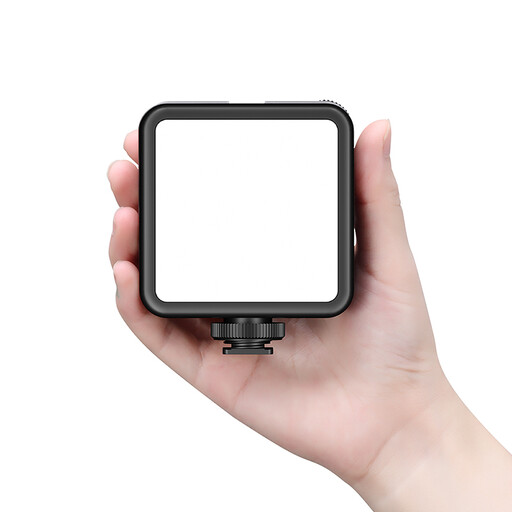
Ideal for: For a streamer or vlogger, clean audio is just as crucial as a great picture. A silent keyboard is the first step. This fill light is the second. It helps you achieve a professional look without breaking the bank, an essential asset for standing out from the crowd.
No more washed-out webcam lighting or desk lamps creating unflattering shadows. This dedicated accessory provides full control over brightness and colour temperature (3200K-5600K), so you'll never have a dull or blown-out image again.
Its built-in 3000 mAh battery provides excellent runtime. Its three cold shoe mounts allow you to attach a microphone or other gear. A Colour Rendering Index (CRI) of 95+ ensures natural and accurate skin tones.
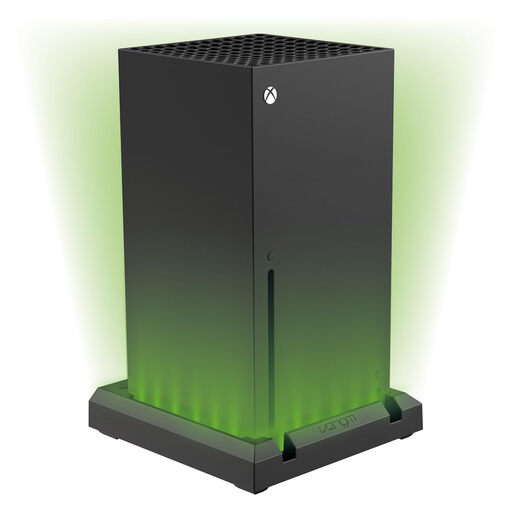
Ideal for: For those whose playground extends beyond the PC, this LED stand for the Xbox Series X unifies your setup's aesthetic. It works in tandem with the lighting of an RGB gaming keyboard to create an immersive and cohesive desktop atmosphere.
Unlike generic gadgets, this stand is custom-fit for the Xbox Series X. It maintains optimal ventilation and perfect stability while offering precise colour control. No risk to your console.
It offers 7 distinct colours with adjustable brightness. It's powered simply via a USB port on the console, and a dedicated switch lets you turn everything off without unplugging anything.
A high-performance setup isn't just about the keyboard or the console. The lighting in your workspace and gaming area plays a crucial role, whether for streaming, reducing eye strain, or creative activities.
We have selected a full range of products that meet our strict selection criteria and current safety standards.
A membrane keyboard uses a rubber dome under each key. The typing feel is generally mushy and imprecise, and the silence comes at the cost of performance and comfort. In contrast, a silent mechanical keyboard retains the precision, responsiveness, and durability of a classic switch, but adds dampeners to muffle the noise. The typing feel remains incomparably better.
Absolutely not. RGB lighting is managed by a dedicated microcontroller, and its power consumption via the USB port is negligible. It has no effect on responsiveness or in-game performance. Its function is purely aesthetic: to customise your setup or highlight specific key zones.
Not at all; the process is designed to be easy for anyone. You simply remove the keycap with a keycap puller, then pull out the switch with the dedicated switch puller. To install the new one, align the pins and press it firmly into its socket. No soldering or technical skills required.