
Livraison le jour même ou le lendemain

Qualité garantie

Débloquez vos offres de bienvenue: Livraison GRATUITE | Jusqu'à -80 % | 30 jours d'essai gratuits à JoyPlus
Téléchargez l'application
Whether you're a gamer, content creator, or remote worker, optimising your workspace is essential. The market for setup accessories is a minefield: promises are plentiful, but so are the pitfalls. A stand that looks sturdy but wobbles at the slightest touch, a flashy gadget that misses the essentials, a sleek design that's completely unergonomic—disappointments are common.
As a product selection expert at Joybuy, my mission is to help you cut through the noise and identify the criteria that truly make a difference. This guide breaks down the key things to watch out for to make a smart, long-lasting purchase.
Before you pull out your credit card, beware of these classic mistakes that can turn a promising purchase into a daily regret.
To avoid these disappointments, focus on objective technical specifications. These are the true guarantees of a product's quality and durability.
The choice of material is crucial. Anodised aluminium or steel offer far superior rigidity and durability compared to standard ABS plastic. Before any purchase, you must check the maximum static load the accessory can support. For a monitor, projector, or even a printer stand, ensure this value is at least 20% higher than your device's weight to provide a safety margin and prevent any vibration. A wide base and non-slip pads are also key indicators of stability that shouldn't be overlooked.
For active accessories like a laptop stand with a built-in hub, connectivity is paramount. Look for ports that meet your current and future needs:
Good desk organisation also depends on thoughtful cable management. Integrated cable routing channels or dedicated clips are details that make all the difference in daily use.
A good accessory adapts to you, not the other way around. For a laptop stand or a projector stand, prioritise models that offer multiple adjustments:
Here are a few options that perfectly illustrate these criteria for quality and functionality, for different use cases.
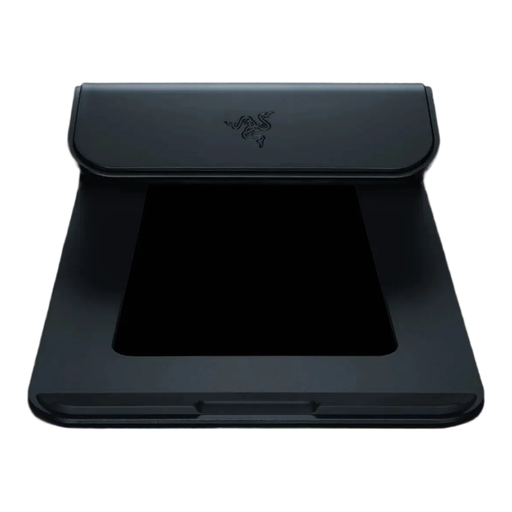
Why it's the right choice: This stand is for discerning gamers who want to create a clean, centralised gaming station. It elevates the laptop to optimise airflow and align it with an external monitor, all while integrating a comprehensive connectivity hub.
Here, the Razer Chroma RGB lighting isn't just for show. It enhances a very solid technical foundation: an anodised aluminium chassis and a high-performance USB-C hub with 4K video output and 80W power delivery.
All-in-one USB-C hub (HDMI 2.0, USB-A, USB-C DP) and a robust aluminium build. The fixed 18° angle is designed for ergonomic use with an external monitor.
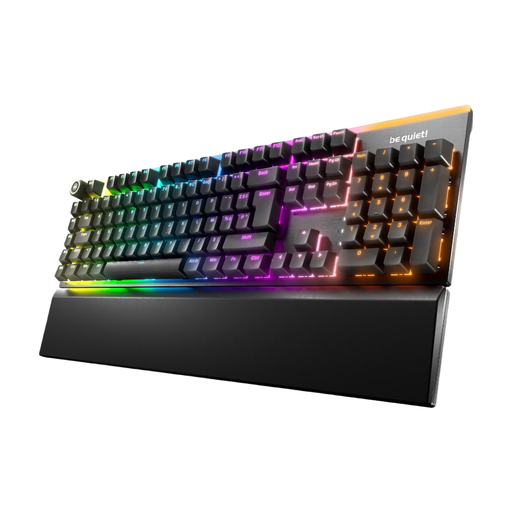
Why it's the right choice: This gaming mechanical keyboard is perfect for those who share their office space or are sensitive to noise. It's equally suited for streamers and remote workers as it is for late-night gamers who don't want to disturb others.
It shatters the stereotype of the noisy mechanical keyboard. Thanks to its 3 sound-dampening layers and factory-lubricated silent tactile switches, it delivers the tactile feedback of a mechanical keyboard without the noise.
Quiet and precise mechanical typing, a magnetic wrist rest for ergonomics, and a brushed aluminium top plate for durability.
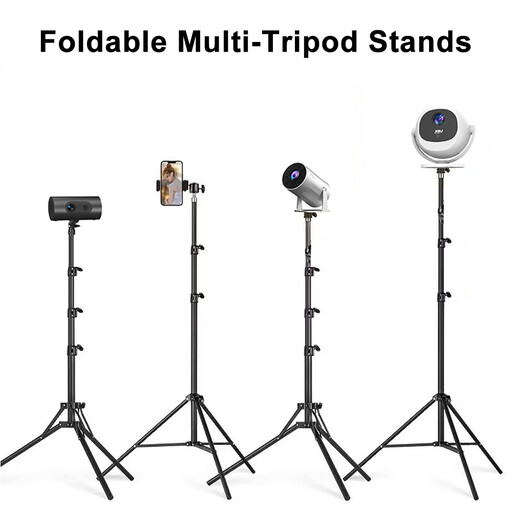
Why it's the right choice: Perfect for those who need versatility: setting up a projector for a movie night, a camera for a shoot, a ring light for a live stream, or even a smartphone for a vlog. Its foldable design makes it easy to transport and store.
It overcomes a lack of flexibility with a height adjustment from 60 to 160 cm and a 360° ball head. It avoids deceptive flimsiness with its triangular aluminium alloy structure and non-slip feet.
Wide height adjustment range, multi-device compatibility thanks to the standard 1/4" screw, and a lightweight, foldable design (collapses to 40 cm).
We have curated a wide selection of products for you that meet our strict selection criteria and safety regulations.
For good ergonomics, the top of your laptop screen should be at eye level. A height and tilt-adjustable laptop stand is therefore the ideal solution. If you opt for a fixed-angle model, make sure it positions the screen at a comfortable height for you, and consider using an external keyboard and mouse to prevent strain in your arms and wrists.
RGB gaming accessories can add an undeniable aesthetic touch to your setup. However, their value depends on the intrinsic quality of the product. RGB lighting should never be the sole selling point. Prioritise products where the lighting is a feature that complements a solid build, good ergonomics, and reliable performance, such as a well-designed mechanical keyboard or a sturdy stand with an integrated hub.
It's a non-negotiable safety criterion. Weigh your device (projector, monitor, console, etc.) and choose a stand with a maximum static load that is at least 20% higher. This prevents the risk of sagging or tipping, especially if you frequently move or adjust the stand. Don't just trust its appearance; always check this technical specification.