
Livraison le jour même ou le lendemain

Qualité garantie

Débloquez vos offres de bienvenue: Livraison GRATUITE | Jusqu'à -80 % | 30 jours d'essai gratuits à JoyPlus
Téléchargez l'application
In an era of all-touch screens and endless spec sheets, choosing a mobile phone for a senior can quickly become a daunting task. For our elders or their loved ones, the search focuses on the essentials?: simplicity, readability, safety, and comfort. The goal isn't a feature overload, but to find the ideal device for staying in touch daily, easily, and with complete peace of mind.
Our editorial team has scrutinised the market to guide you. This guide is designed to help you identify the features that truly matter and to discover our selection of the most relevant models for 2026.
Before diving into model comparisons, it's crucial to define the features that will make a real difference. Here are the key points to consider.
The phone's form factor is a primary consideration.
The assistance feature is a decisive criterion for many families. A mobile phone with an SOS button, usually located on the back of the device, allows users to alert loved ones with a single press in case of a problem. A simple long press sends an alert SMS—which often includes the user's geolocation thanks to the built-in GPS—and initiates a call loop to pre-registered numbers. A real source of peace of mind for both the user and their family.
Declining eyesight or hearing should never be a barrier to using a phone. It is therefore essential to pay attention to certain details?:
Keeping these criteria in mind, here are a few models that stand out for their perfectly adapted design for seniors.
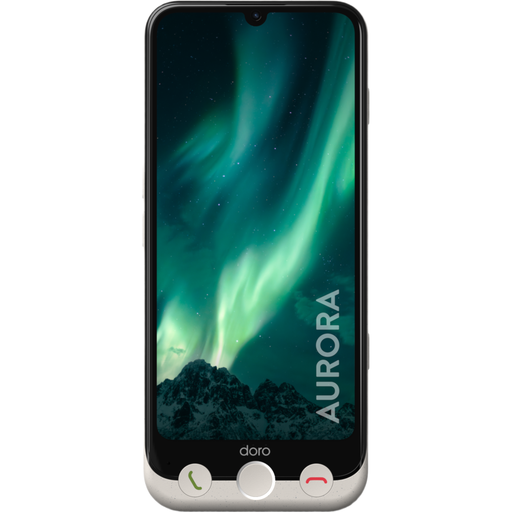
Why it stands out?: The Doro Aurora A30 is a smartphone for the elderly that successfully combines a large 6.1-inch touchscreen with physical buttons to answer and end calls. This hybrid approach is perfect for easing the transition to a smartphone while retaining familiar reference points. Its interface is a model of simplicity, and Doro Clear Sound technology ensures optimally clear conversations.
Key features?:
Who is it for? For seniors who are curious to discover the benefits of a smartphone (photos, apps) without being intimidated by the technology, and for whom safety and sound clarity are priorities.
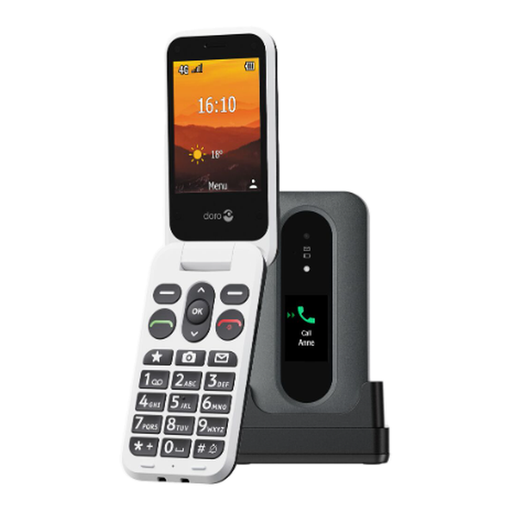
Why it stands out?: This senior flip phone gets straight to the point with impressive efficiency. Its external screen allows you to identify the caller before even opening it. The large, high-contrast keys make dialling incredibly simple. It successfully integrates all modern safety features into a traditional and reassuring format.
Key features?:
Who is it for? Ideal for seniors who prefer the simplicity of a keypad phone and are primarily looking for a reliable device for calling, texting, and benefiting from an effective emergency function.
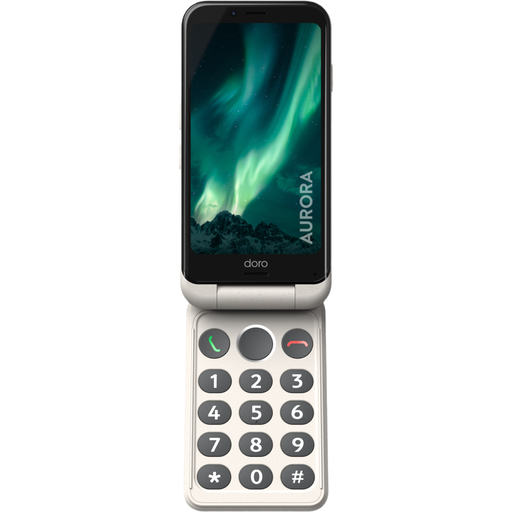
Why it stands out?: The Aurora A20 offers a bold hybrid concept?: a smartphone in a flip phone format. It delivers the best of both worlds?: a 4.5-inch touchscreen with a simplified Android interface, combined with a real physical keyboard for intuitive navigation. It doesn't forget the Doro safety button and is even splash-resistant (IP54).
Key features?:
Who is it for? For those who love the familiar gesture of a flip phone but also want to access smartphone features (video calls, internet) in a simple and secure way.
The models in our selection are primarily designed for accessibility. If your criteria are more focused on ruggedness and durability for outdoor use or in demanding environments, our range of rugged basic phones might be of interest.
When the SOS button is held down (for 3 to 5?seconds), the phone initiates an emergency procedure. It first sends an alert SMS to a list of predefined contacts (usually up to 5). This message includes a link to the device's GPS location. Next, the phone calls these contacts in a loop, on speakerphone, until one of them answers.
Absolutely. Models from specialised brands like Doro include a software overlay that radically simplifies the standard Android experience. Doro's "Eva" interface, for example, guides the user with clear action verbs ("Call," "View," "Send") and large, highly readable icons. This makes an easy-to-use senior smartphone far more accessible than a standard model.
The flip phone format combines several practical advantages. Firstly, it protects the screen and keys in a pocket or bag, preventing accidental calls. Secondly, the action of opening to answer and closing to hang up is simple, instinctive, and unambiguous—a real plus for those uncomfortable with all-touch devices. Finally, this format allows for the inclusion of large physical keys, which significantly simplifies dialling numbers.