
Livraison le jour même ou le lendemain

Qualité garantie

Débloquez vos offres de bienvenue: Livraison GRATUITE | Jusqu'à -80 % | 30 jours d'essai gratuits à JoyPlus
Téléchargez l'application
Peace of mind at home is priceless. Whether it's to watch over the kids, keep an eye on a pet, or simply secure your home, a security camera has become a tool that's as accessible as it is effective. The problem is, the market is saturated with options and marketing promises that create confusion.
As a product expert at Joybuy, my mission is to help you cut through the noise. Together, let's break down the common pitfalls to avoid and the criteria that truly matter, so you can make the right choice without getting lost in technical jargon.
Before you even start comparing spec sheets, it's crucial to know the classic mistakes that can turn a good purchase into a real disappointment.
To make the right choice, focus on the few features that make a real difference in daily use.
Resolution determines the sharpness of the image. While 1080p (Full HD) is an acceptable minimum, higher resolutions like 2K (QHD) or 4K (UHD) offer an unmatched level of detail. This is what will make all the difference when you need to zoom in on a face or read a license plate. For enhanced home security, a 2K resolution is an excellent starting point.
The storage method is a strategic choice.
The choice obviously depends on the area you need to monitor.
Here are a few models that meet specific needs, in line with the criteria we've just discussed.
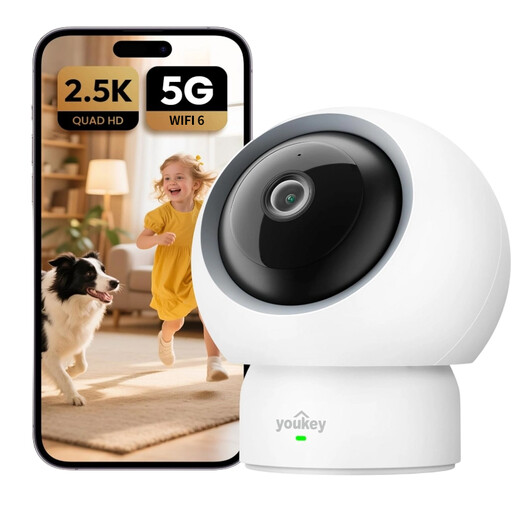
Why this model stands out: Ideal for keeping an eye on children or pets, this motorised camera offers a 360° view and 2.5K resolution for ultra-sharp images. Its baby cry and pet detection features, along with two-way audio, allow you to interact remotely.
This model operates without a subscription (local storage) and its dual-band Wi-Fi 6 connectivity ensures a rock-solid connection, avoiding pitfalls 1 and 3.
Its smart detection (cries, pets) and automatic motion tracking to ensure nothing is missed.
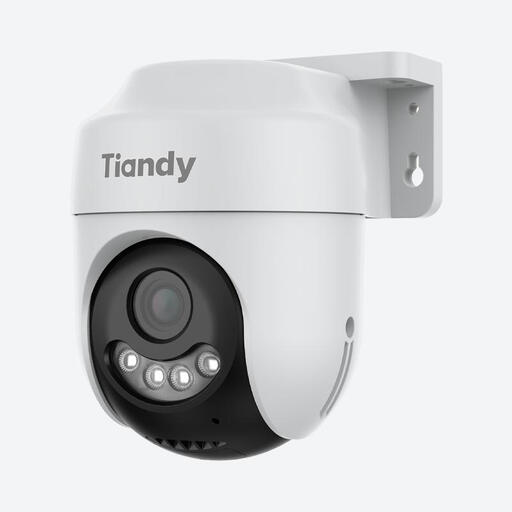
Why this model stands out: Designed for the outdoors, this camera is IP66 certified to withstand the elements. Its 360° panoramic view and 2K (4MP) resolution allow it to monitor large areas like a garden or driveway with no blind spots.
It beats pitfall #2 with its Starlight colour night vision, which delivers crisp, colourful images even in near-total darkness. The microSD card storage avoids pitfall #1.
Its Starlight colour night vision for perfect identification at night, combined with smart human detection to reduce false alerts.

Why this model stands out: Perfect for renters or anyone who can't (or doesn't want to) drill holes. It sticks directly onto a window pane, and its anti-reflection technology allows it to film outside from inside, day or night, without any distortion.
Its drill-free installation and local storage spare you from complications and hidden fees. Its anti-reflection technology and colour night vision directly tackle pitfall #2 (poor visibility).
Its unique anti-reflection technology for flawless monitoring through a window, and its dual-band 2.4/5 GHz Wi-Fi connectivity.
We have curated a complete selection of products that meet our strict selection criteria and current security standards.
Yes, in the vast majority of cases. The "subscription-free" label means that essential functions, like recording and viewing videos, do not require any recurring payments. The only cost to anticipate is the one-time purchase of a microSD card for local storage. Some manufacturers may offer paid cloud services for advanced features, but these remain purely optional.
Absolutely. Installation is now a breeze. You just need to plug in the camera, download the manufacturer's app on your smartphone, and follow the steps to connect it to your Wi-Fi network. Most models are designed to be set up in minutes, without any special technical skills.
For standard home use, a 2K (sometimes called 3 or 4MP) resolution offers the best sweet spot between detail quality and video file size. It allows you to clearly distinguish faces and objects, which is more than enough for home security in most cases. 1080p remains a viable option for tighter budgets or for monitoring a small room.