
Livraison le jour même ou le lendemain

Qualité garantie

Débloquez vos offres de bienvenue: Livraison GRATUITE | Jusqu'à -80 % | 30 jours d'essai gratuits à JoyPlus
Téléchargez l'application
The smartwatch market is flooded with promises: revolutionary health tracking, multi-week battery life, a personal assistant on your wrist. Yet, disappointment is often just around the corner, with devices that fail to deliver. Before you splurge on the upcoming Samsung Galaxy Watch 8 or another model, it's crucial to know how to avoid the marketing traps that too often turn a promising purchase into a costly regret.
To help you see things more clearly, here are the three pitfalls to avoid and the criteria that truly matter.
To make an informed choice, forget the marketing speak for a moment and focus on objective features. Here are the non-negotiable points to scrutinise.
Never trust the manufacturer's advertised number alone. Look for the battery life rating for "typical" usage or, even better, with the Always-On Display active. This is the only reliable indicator of what to expect day-to-day. A watch that needs charging every night quickly becomes a burden. For a high-end Android smartwatch, 30 hours of mixed usage is an acceptable minimum, while simpler models can last over a week.
This is the make-or-break factor. If you have an Android smartphone, especially a Samsung, a Samsung smartwatch running Wear OS with the One UI Watch interface will offer flawless integration. Notifications, apps, and assistants like Galaxy AI will work in perfect harmony. Conversely, pairing a watch designed for one ecosystem (the Apple Watch is a perfect example) with a smartphone from another brand is a guaranteed recipe for frustration. Also, remember to check the minimum required operating system version (e.g., Android 12 or later).
Beyond sports tracking, certain features transform the daily experience.
Because every user is unique, here are three models that meet specific needs while avoiding the pitfalls we've just discussed.
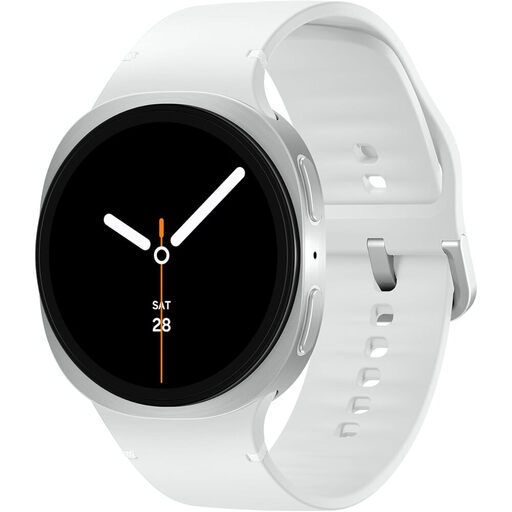
Why we chose it: For the Samsung smartphone user, this is the natural extension of their phone. The integration of Galaxy AI, perfect synchronisation with Samsung Health, and a refined design make it a choice that's as logical as it is powerful.
It avoids the compatibility trap by offering perfect symbiosis with the Android/Samsung ecosystem. The battery life is clearly stated (up to 30h with AOD), ensuring no nasty surprises.
The integration of Galaxy AI directly on the wrist and the comprehensive health suite (ECG, body composition, energy score) that turns raw data into useful advice.
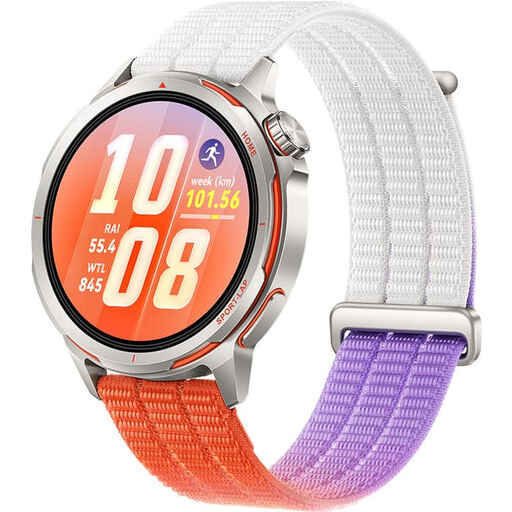
Why we chose it: Designed for runners, this watch focuses on the essentials: tracking accuracy and endurance. Its multi-system GPS and lightweight design make it a true performance tool, not just a gadget.
It directly tackles the battery life trap for sports use. With up to 32 hours of battery life with GPS enabled, it won't let you down mid-marathon, unlike many competitors.
The dual-band, multi-system GPS ensures formidable location and pace tracking accuracy, even in cities or forests. The battery life in training mode is a major asset.
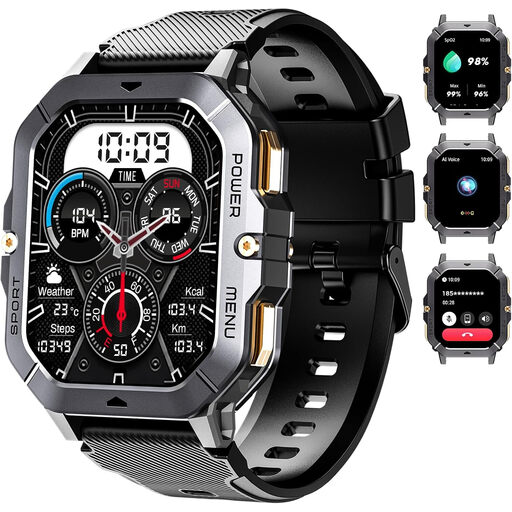
Why we chose it: For those who want essential features (notifications, Bluetooth calls, activity tracking) without breaking the bank. It offers a large screen and broad compatibility with both Android and iOS smartphones.
It doesn't promise to revolutionise your health, but to provide tools that simply work. Its main advantage is a multi-day battery life in real-world use, which avoids the frustration of daily charging required by more complex models.
An unbeatable features-to-price ratio. The inclusion of Bluetooth calls and a long-lasting battery (410 mAh) at this price point is a real asset.
We have compiled a curated selection of products that meet our demanding selection criteria.
1. How can I optimise my smartwatch's battery life? To extend battery life, a few simple steps can make a big difference: disable the Always-On Display, reduce the screen brightness, limit notifications to essential apps, and turn off continuous heart rate monitoring if you don't need it at all times.
2. Is the health data from a smartwatch reliable? Modern sensors offer increasingly accurate estimates for metrics like heart rate or blood oxygen levels (SpO2). However, it's crucial to remember that a smartwatch is not a medical device. This data is useful for tracking general trends in your fitness, but should never replace a diagnosis or advice from a healthcare professional.
3. Can I use a Samsung Galaxy Watch with an iPhone? Technically, it's possible to connect some older models to an iPhone, but the experience is severely degraded. You will lose access to many key features like syncing with the health app, contactless payments via Samsung Pay, and advanced notification management. For an optimal experience, it is therefore highly recommended to pair a Galaxy Watch with an Android smartphone.