
Livraison le jour même ou le lendemain

Qualité garantie

Débloquez vos offres de bienvenue: Livraison GRATUITE | Jusqu'à -80 % | 30 jours d'essai gratuits à JoyPlus
Téléchargez l'application
Buying an RTX 5060 gaming laptop is about more than simply spotting the NVIDIA logo on a specification sheet. Between a fast but low-resolution display, memory that is difficult to upgrade and battery life affected by powerful components, certain details can turn a great deal into a disappointing purchase.
Whether you want to play games, study, stream or work with creative software, it is best to assess the configuration as a whole. Here are the criteria to check before choosing a gaming laptop, along with a selection of models suited to different types of user.
A 240 Hz display can make fast-paced games feel smoother, but refresh rate is not everything. You should also consider the resolution, panel format and whether the graphics card and display are well matched.
A 16-inch gaming laptop with a QHD or 2K panel displays more detail than a Full HD model. The trade-off is that this resolution places greater demands on the GPU. The NVIDIA GeForce RTX 5060 Laptop GPU is perfectly capable of handling this use, but performance depends on the game, graphics settings, cooling system and power limit set by the manufacturer.
An Intel Core i7-13650HX has enough resources for gaming, handling several tasks at once and running certain demanding applications. That said, a processor should never be judged in isolation. Limited RAM, slow storage or inadequate ventilation can all reduce ease of use.
Also check how much memory is installed. 16 GB of DDR5 RAM is a solid foundation for gaming and work. Users who handle large files, stream regularly or switch between several applications should consider a configuration with greater upgrade potential.
A high-performance laptop should integrate easily with your existing equipment. Before placing your order, check that it has the ports you need to connect an external monitor, mouse, headset or additional SSD. Wi-Fi 6 makes it easier to connect to a compatible router, but stability also depends on coverage in your home, interference and network quality.
Finally, an RGB keyboard can improve visibility in a dark room, but it has no effect whatsoever on performance. Treat it as a comfort feature rather than a technical selling point.
The RTX 5060 is mainly responsible for rendering games and handling certain graphics acceleration features. For a 2K gaming PC, always compare the graphics card with the panel’s resolution and the games you intend to play.
It is impossible to promise a specific number of frames per second without measuring performance in a particular game. Results vary according to drivers, component temperatures and power mode.
For versatile use, choose a recent processor with at least 16 GB of DDR5 memory. A 1 TB PCIe NVMe SSD provides enough space to install several games and applications, while reducing loading times compared with a mechanical hard drive.
Before ordering, check whether the RAM and SSD can be replaced or upgraded. This information is not always clearly stated on specification sheets, even though it can have a major impact on the laptop’s useful life.
Powerful components generate more heat. A gaming laptop may therefore be thicker, noisier and heavier than an office model. For a student who travels every day, weight, the charger and battery life matter just as much as the graphics card.
For the best gaming experience, place the laptop on a hard surface that does not block the air intakes. Avoid soft furnishings and confined spaces. Performance can also vary significantly between battery use and operation while connected to mains power.
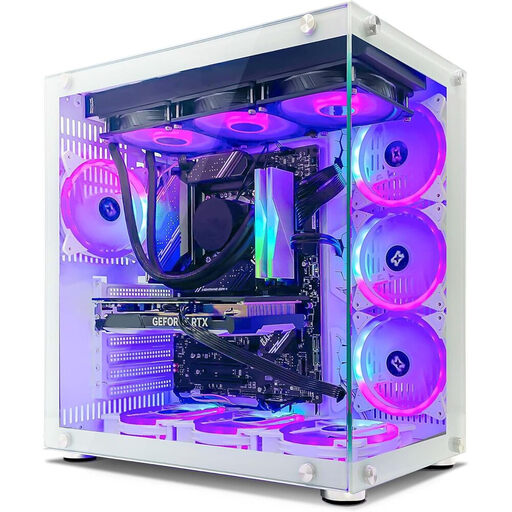
Why this choice suits this type of user : this desktop tower is aimed at gamers who prefer an upgradeable fixed setup to the portability of a laptop.
The listing clearly details the 16 GB of DDR4 RAM, 1 TB NVMe SSD and 8 GB RTX 5060, rather than focusing solely on the processor.
ATX format, Wi-Fi 6, advertised liquid cooling and seven ARGB fans.
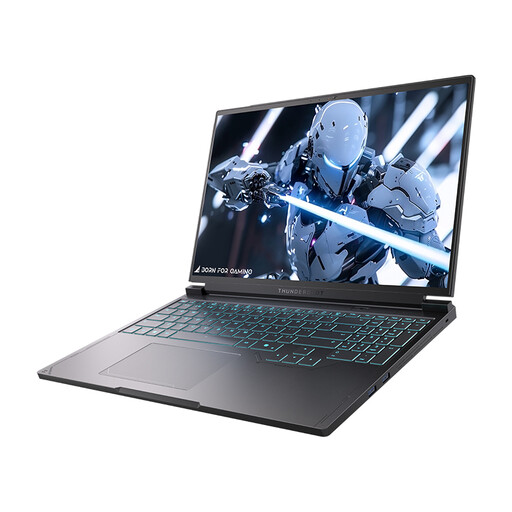
Why this choice suits this type of user : this model combines portability, a QHD+ 240 Hz display and components capable of running demanding games as well as creative applications.
The listing brings together the key specifications to check : a 16-inch QHD 240 Hz display, i7-13650HX, RTX 5060, 16 GB of DDR5 and a 1 TB SSD.
Two USB-A ports, two USB-C ports, HDMI, Mini DisplayPort, RJ-45, Wi-Fi 6 and a single-zone backlit RGB keyboard.
Why this choice suits this type of user : this desktop configuration is designed for gaming, content creation and extended multitasking, with more memory than the reference laptop configuration.
The specifications clearly distinguish between the processor, 32 GB of DDR4 RAM, 1 TB SSD and 8 GB RTX 5060 Ti.
Wi-Fi 6E, advertised liquid cooling, Gen4 NVMe SSD and ATX case with ARGB ventilation.
We have put together a complete, real-time updated selection of products that meet these demanding criteria, as well as European safety requirements.
Not necessarily. A 240 Hz refresh rate is most valuable in fast-paced, competitive games, provided that the configuration can produce enough frames per second. For story-driven games and creative applications, the sharper QHD resolution will often be more noticeable in everyday use than the maximum refresh rate.
Its lifespan depends on build quality, maintenance, operating temperatures, how often it is transported and how games evolve. Regularly cleaning the air vents, using the supplied charger and keeping drivers up to date will help preserve performance. The ability to replace the SSD or memory can also extend its useful life.
It depends entirely on the mode being used. Power consumption increases when the processor and graphics card are operating under full load, particularly during a gaming session or video render. To keep your electricity bill down, use balanced mode for office tasks, unplug unused peripherals and avoid leaving the laptop running at full power unnecessarily.