
Livraison le jour même ou le lendemain

Qualité garantie

Débloquez vos offres de bienvenue: Livraison GRATUITE | Jusqu'à -80 % | 30 jours d'essai gratuits à JoyPlus
Téléchargez l'application
Every new generation of graphics cards is an event eagerly awaited by gamers and creators alike. With the arrival of the RTX 5060 Ti graphics card, based on the NVIDIA Blackwell architecture, a myriad of new options are now available. However, the market is flooded with models featuring such varied specifications that it's easy to fall into a marketing trap and regret your purchase.
As the head of product selection at Joybuy, I'm here to help you navigate the choices. Let's review the key points to watch out for and the essential criteria for making an informed decision that's perfectly suited to your needs and your PC.
Before you even start comparing models, it's crucial to sidestep the most common mistakes. A little vigilance on these points will save you a lot of disappointment and unnecessary expense.
To find the perfect card, focus on these three fundamental technical aspects. They determine the real-world performance, compatibility, and longevity of your investment.
Video Memory (VRAM): Amount and Type The RTX 5060 Ti mainly comes in two versions: 8?Go or 16?Go of GDDR7 memory.
Cooling and Dimensions A graphics card's raw performance is worthless if it can't stay cool.
Connectivity and Power Requirements The devil is in the details: one oversight here, and your entire build can be stalled.
Rather than an exhaustive list, here is a selection of models that cater to specific user profiles, based on the criteria we've just discussed.
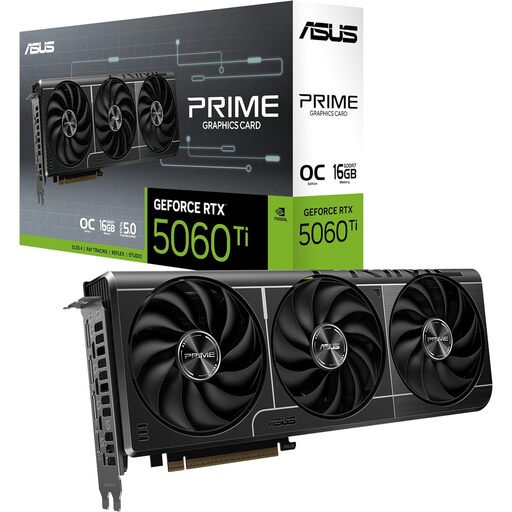
Editor's Pick: For those who want no-compromise 1440p performance and dabble in content creation or AI. Its 16 Go of VRAM is a true passport to the future.
Its triple-fan Axial-tech cooling system, paired with a vented backplate, prevents any *thermal throttling*. Performance remains stable, even after hours of gaming.
Its 16 Go of GDDR7 VRAM ensures excellent longevity and solid AI performance. The dual BIOS, which lets you switch between a Quiet and a Performance mode, is the icing on the cake.
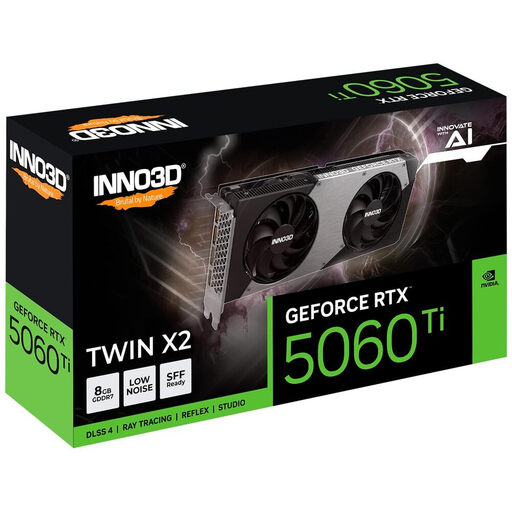
Editor's Pick: The ideal solution for building a compact (SFF) PC without sacrificing power or cooling, even in a tight space.
It avoids the trap of oversized graphics cards. At 250 mm long and with a strict 2-slot design, it fits into most mini-ITX cases while ensuring good cooling thanks to its 4 heat pipes.
Its excellent balance of compactness and thermal performance. The 8 Go of GDDR7 is a very smart compromise for a build focused on 1440p gaming.
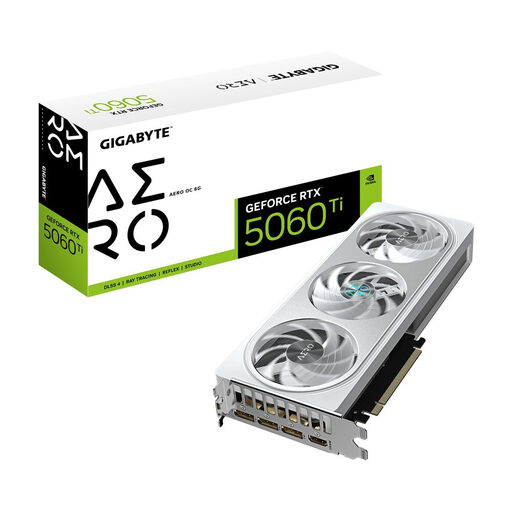
Editor's Pick: For modding enthusiasts and lovers of pristine all-white builds who refuse to choose between aesthetics and performance.
It doesn't sacrifice performance at the altar of design. Its all-white shroud conceals a formidable triple-fan WindForce cooling system and a metal *backplate*. Say goodbye to the trap of pretty cards that overheat!
Its AERO white aesthetic, highly sought-after for themed *builds*. The triple-fan cooling system perfectly tames the heat from this OC version.
Discover our complete and up-to-date selection of graphics cards, all tested and approved according to our rigorous selection criteria.
A few answers to the questions you're probably asking.
Most manufacturers recommend a power supply of at least 550?W to 650?W for a standard build. The safest bet is to check the exact recommendation for the model you're considering and to allow for a little headroom, especially if you have a power-hungry CPU.
For pure 1440p gaming, 8?Go of GDDR7 VRAM will remain a solid foundation for the coming years. However, if you plan to use 4K texture packs, heavy creative applications, or dabble in AI, a 16GB GeForce RTX 5060 Ti model will give you welcome peace of mind and flexibility for the future.
Absolutely. The NVIDIA Blackwell architecture brings major improvements. It features 4th-gen Ray Tracing Cores and 5th-gen Tensor Cores, which are crucial for AI technologies like DLSS 4 and its Frame Generation. In practical terms? Expect spectacular smoothness gains in compatible games and a significant speed-up in AI-related tasks, making these cards more versatile than ever.