Which option is right for you?
How much time you save depends as much on how easily the appliance can move around your home as on the tasks you want it to take care of.
For anyone looking to automate regular cleaning
If you’re short on time for everyday cleaning, a robot can take care of scheduled runs between manual cleans. You’ll need to clear enough space for it to move around and make time to maintain the dust bin, brushes and filter.
For hard floors that need mopping too
A vacuum-mop can help you keep hard floors clean if you can manage the water and mop pads, and mark off any surfaces that shouldn’t get wet. However, UFC-Que Choisir highlights the limitations of robot mopping, so keep a manual solution handy for stubborn dirt.
For homes with obstacles or frequent spot cleaning
Stairs, thresholds, cables, rugs and narrow spaces can make it harder for a robot to complete its cleaning runs. A stick vacuum lets you tackle these areas directly. Use it alongside a robot, or instead of one if you mainly need to clean specific spots.
What should you consider for your home?
Start with the task you’d like to make easier: regular vacuuming, routine mopping or spot cleaning. Then check the movement and maintenance requirements of the model you’re considering.
Robot vacuum
Choose this if: you want to schedule vacuuming between manual cleans in rooms with plenty of clear floor space.
Bear in mind: you’ll still need to clear the floor and maintain the appliance.
Robot vacuum-mop
Choose this if: your hard floors also need regular routine mopping.
Bear in mind: you’ll need to manage the water and mop pads, and tackle ingrained stains by hand.
Stick vacuum
Choose this if: stairs, corners or unexpected messes often need a more targeted clean.
Bear in mind: you’ll need to vacuum manually each time and recharge the appliance.
| Priority |
What to check |
Who is it for? |
| Automating cleaning |
Scheduling and room mapping; space for the base and access to the rooms you want to clean. |
When everyday cleaning piles up because I’m short on time, I mainly want to set the appliance going regularly without having to guide it. Around 42% of consumers would make automation their top priority. |
| Keeping hard floors clean |
Whether the floors are suitable for wet cleaning; protecting rugs and maintaining the mop pads or station. |
On tiles or another suitable hard floor, I want to mop less often for routine cleaning, while still having a way to tackle ingrained stains. Mopping would be the top priority for around 33% of consumers. |
| Dealing with obstacles |
Clearance under furniture and thresholds to cross; rugs, cables and stairs in the home. |
If my rooms have lots of obstacles or need quick touch-ups, I’d prioritise an appliance that can clean these areas without getting stuck repeatedly. Around 25% of consumers would put this adaptability first. |
Brands to know, model by model
The features below apply to the ranges or models mentioned, not necessarily every appliance from each brand.
Roborock
Its range includes robot vacuum-mops with mapping and, depending on the model, a multifunction station.
- Roborock says the Qrevo S station empties dust, refills water and maintains the mop pads.
- These features are specific to the model. Roborock states that the Qrevo S only supports 2.4 GHz Wi-Fi.
iRobot
The Roomba range includes robot vacuums and Combo models with mopping features that vary by version.
- iRobot says the Roomba Combo j9+ has a retractable mop pad designed to protect rugs.
- For the Roomba Combo i and j5 models mentioned in its support information, iRobot advises setting no-mop zones where needed. Maintenance instructions also vary by series.
Dreame
The brand offers robot vacuum-mops, with rug handling and stated threshold-crossing abilities varying by model.
- Dreame says the Aqua10 Roller has a roller-protection feature designed for rugs and carpets.
- Check the model’s stated threshold-crossing ability against the thresholds in your home; it doesn’t apply to the whole range.
Dyson
Its stick vacuums offer a manual option for stairs, corners and targeted cleaning.
- Depending on the model and accessories, you can choose a cleaner head suited to your floors or the areas you need to tackle.
- A stick vacuum won’t schedule cleaning for you: you’ll need to use it yourself and recharge it.
Robot vacuum-mops on Joybuy
These models are worth considering if you’re looking for a robot vacuum-mop for regular cleaning. Their stations and mopping features won’t remove the need to clear the floor or do targeted cleaning, where a stick vacuum can still come in handy.
 Image unavailable
ECOVACS Deebot T30C OMNI Gen2, black
Worth considering if you want to schedule vacuuming and mopping and have space for the OMNI station. The product listing specifies 25,000 Pa suction and mop pad washing at 75 °C, but these figures don’t tell you exactly how it will perform on your floors. You’ll need to manage the water and maintain the brushes and filters. Check that it can cross your thresholds and find out how to protect your rugs.
View on Joybuy
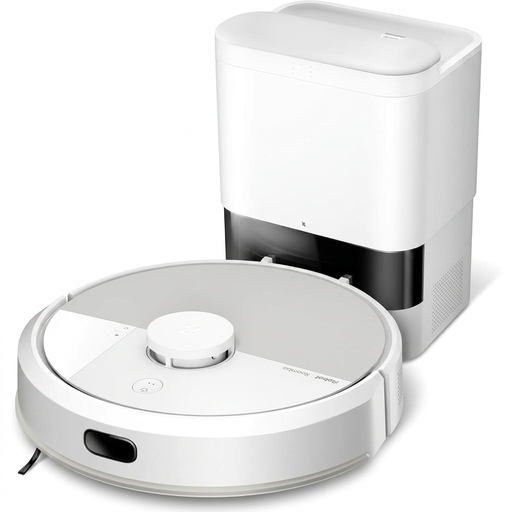 Image unavailable
iRobot Roomba Combo 115 AE, white
Worth considering if your priority is scheduling cleaning and reducing the need to empty the dust bin by hand. The product listing describes an AutoEmpty base and a mopping function, but you’ll still need to take care of cleaning the mop pad. Check how it handles your rugs and whether it can cross your thresholds before relying on it to clean without supervision.
View on Joybuy
 Image unavailable
Eureka E20 Plus, black
Worth considering if you want to schedule cleaning and set areas for the robot to avoid. The product listing specifies 8,000 Pa suction, 180 minutes of runtime and an emptying station, but these figures don’t guarantee the same results in every home. If you have rugs, check the mopping settings and threshold clearance. Before buying, also confirm which type of container or bag the station needs.
View on Joybuy
 Image unavailable
ECOVACS DEEBOT X9 PRO Omni
Worth considering for regular hard-floor cleaning if you have space for a multifunction station. The product listing mentions an OZMO roller, 16,600 Pa suction, hot-water washing and hot-air drying for the mopping system. You’ll still need to refill the clean-water tank, empty the dirty-water tank and maintain the brushes and filters. Check the clearance under your furniture, your thresholds and how the appliance protects your rugs.
View on Joybuy
 Image unavailable
roborock Qrevo S5V, white
Worth considering if you’re looking for a robot vacuum-mop with a station to cut down on some maintenance tasks. The product listing specifies 12,000 Pa suction, FlexiArm mop pads and hot-air drying. If your home has a mix of rugs and hard floors, check the mopping settings for rugs, threshold clearance and the scheduling options you need before choosing this model.
View on Joybuy
Frequently asked questions
What should I check at home before buying a robot vacuum?
Look for rugs, cables, small objects, thresholds, low furniture, stairs and a suitable spot for the base. Measure any tight spaces and compare them with the specifications of your chosen model. Obstacle avoidance doesn’t mean you can skip clearing the floor, particularly when mapping certain Roomba models, according to iRobot.
Can a robot vacuum-mop replace a traditional mop?
Not for every type of dirt or every area. UFC-Que Choisir highlights the limitations of robot mopping, so keep a manual option for ingrained stains, corners and places the robot struggles to reach.
Can I leave my rugs down during a mopping cycle?
It depends on the model and its settings. Some lift or retract their mop pads; others need you to set no-mop zones. iRobot notes that certain Roomba Combo models don’t automatically recognise different floor types, so check the instructions before starting a cycle near rugs.
What maintenance does a robot with a station need?
A station cuts down on some tasks, but you’ll still need to maintain the dust bin, brushes, filter and parts of the base, depending on the model. For the Roomba j series, iRobot recommends emptying the bin after every use and cleaning the brushes and filter each week. Follow the instructions for your appliance.
What should I do if my new robot doesn’t match its description or breaks down?
In France, the statutory guarantee of conformity applies to new, second-hand and refurbished goods sold by a business to an individual, as the Ministry of the Economy reminds consumers. Keep your proof of purchase and the product description, then report the issue to the seller so they can assess whether the appliance conforms to its description.


