Who is a robot vacuum for?
A robot can handle regular cleaning of accessible floors. How much time you save also depends on how well you prepare your home and maintain the appliance.
Busy households with hard floors
If you want to delegate frequent vacuuming between more thorough cleans, scheduling can help you plan cleaning runs. Light mopping and a docking station add useful features, but also mean there are more parts to maintain.
People living in homes with rugs or thresholds
First, check that the robot can reach every room and that its settings are suitable for your rugs. ECOVACS support explains that, depending on the layout, an obstacle may prevent the robot from reaching an area or cause it to wet the edge of a rug.
People thinking about long-term maintenance
Compare how easy it is to access the brushes, filters and other consumables with the maintenance required by the docking station. For eligible purchases in France, ADEME says robot vacuums are covered by the repairability index. Check the rating for the model you’re considering.
What should you check before buying?
First decide whether scheduled vacuuming is enough or whether you’d also like regular mopping on hard floors. Either way, your home’s layout may limit which rooms the robot can actually reach.
Robot vacuum without a mopping function
Worth considering: if your priority is regularly picking up dust and crumbs without having to manage a water tank or mop pads.
The trade-off: mopping is still a manual job, as is cleaning the dustbin, brushes and filter.
Robot vacuum-mop
Worth considering: if you’d like to add regular mopping on floors that are mostly hard surfaces.
The trade-off: you’ll need to manage the water and mop pads. Rugs may also require specific settings or mopping exclusion zones.
| Criteria |
What to check |
Consumers who may be interested |
| Daily tasks |
The docking station’s exact functions, such as emptying the dustbin or cleaning the mop pads, and which tasks still need to be done by hand. |
When there’s little time for regular cleaning, cutting down on the jobs you need to do after each cycle becomes a priority. Around 36% of consumers put this need first. |
| Access to rooms |
Threshold heights and clearance under furniture, compared with the dimensions and limitations of the specific model. |
In a home divided by thresholds or obstacles, the key is whether the robot can actually reach the rooms you want it to clean. Around 29% of consumers put this need first. |
| Mopping and rugs |
Rug settings, how the mop pads behave and whether you can exclude areas while mopping. |
If you have hard floors and rugs, you may want the robot to mop without exposing your rugs to water. Around 21% of consumers prioritise this balance. |
| Long-term maintenance |
Maintenance schedule, consumable part numbers, parts availability and the model’s repairability index rating. |
If you want to delegate the housework, you’ll also want to be able to maintain the robot without difficulty over time. This is the main priority for around 14% of consumers. |
Mapping, scheduling and no-go zones can help tailor cleaning runs across several rooms, but they won’t get the robot over an impassable threshold. Before relying on a connected feature, check the model’s network requirements too. For example, Roborock says its QV 35A only supports 2.4 GHz Wi-Fi.
Brands to consider, model by model
The features mentioned apply to specific models or ranges. Always check what’s included with the robot you’re considering.
Roborock
Worth considering if you’re looking for mapping, no-go zones and a docking station on a connected vacuum-mop.
- According to Roborock’s product information, the QV 35A combines LiDAR navigation, liftable mop pads and a docking station that washes and dries them.
- The QV 35A only supports 2.4 GHz Wi-Fi; its features aren’t representative of every Roborock model.
Dreame
Worth considering if you want to schedule cleaning by room or set areas for the robot to avoid.
- Dreame says that, depending on the model, its app lets you choose rooms, schedule cleaning and set no-go zones.
- Check the exact model for the navigation, mopping features, docking station and network compatibility you need.
iRobot
Worth considering if you want to compare detailed maintenance guidance and different levels of automation.
- iRobot support provides detailed instructions for maintaining the dustbin, brushes, filter, contacts and sensors. The brand also offers the Roomba Plus 575 Combo with an AutoWash docking station.
- Maintenance schedules vary by series. The Roomba Plus 575 Combo’s stated ability to cross obstacles up to 35 mm high doesn’t apply to other models.
ECOVACS
Worth considering if you want to compare rug and edge handling, as well as docking stations for vacuum-mops.
- ECOVACS describes the DEEBOT T90 MAX PRO OMNI as coming with a docking station that washes and dries the mop pads and empties the dustbin.
- ECOVACS support explains that, depending on the layout, a rug may restrict access or get wet around the edge. Check how the model you choose will work in your home.
Robots for regular floor care
These Joybuy models are designed for scheduled vacuuming and each also has a mopping function. Compare their docking stations and settings with the rugs, thresholds and maintenance tasks in your home. An advertised feature alone doesn’t guarantee access to every area.
 Image unavailable
Eureka E20 Plus, black robot vacuum-mop
Worth considering if you want to schedule cleaning runs and have a self-emptying docking station. The product name lists 8 000 Pa suction, a 180-minute run time and 3D obstacle avoidance. Check how dust is collected at the station, whether the robot can cross your thresholds and how it handles your rugs.
View on Joybuy
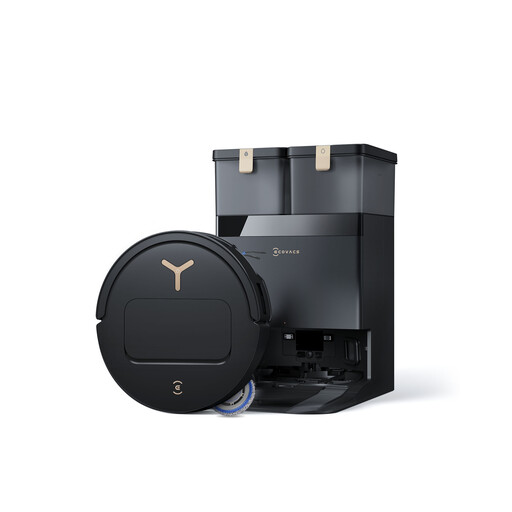 Image unavailable
ECOVACS T50 Pro, black robot vacuum-mop with OMNI docking station
Worth considering if you want to combine hard-floor mopping with a multifunction docking station. The product claims up to 25 000 Pa suction and 9 mm mop-pad lifting. This feature alone doesn’t guarantee that your rugs will stay dry, so check the settings and whether the robot can cross your thresholds.
View on Joybuy
 Image unavailable
roborock Q7 L5+, black robot vacuum-mop
Worth considering for scheduled cleaning runs with automatic dust emptying. The model name lists LiDAR navigation, an anti-tangle system and 8 000 Pa suction. If you have rugs, check how the mop pad behaves while mopping and measure your thresholds.
View on Joybuy
 Image unavailable
ECOVACS Deebot T30C OMNI Gen2, black robot vacuum-mop
Worth considering if you want an OMNI docking station to support vacuuming and mopping. The product claims 25 000 Pa suction and mop-pad washing at 75 °C. Check the settings available for your rugs and the height of your thresholds before expecting it to travel between every room.
View on Joybuy
 Image unavailable
ECOVACS Deebot X11 Pro Omni, robot vacuum-mop
Worth considering if your choice depends on the robot travelling between rooms separated by thresholds. The product claims 19 500 Pa suction. Its description distinguishes between crossing a single threshold of 2,2 cm and clearing up to 4 cm in total after several attempts. Don’t treat the latter figure as the height of a threshold it can cross in one go, and check separately how it handles your rugs.
View on Joybuy
Frequently asked questions
Can a robot vacuum completely replace my regular vacuum cleaner?
No. A robot can help with everyday floor care, but it won’t clean every surface or replace all manual cleaning. Keep another way to clean stairs, upholstery, areas it can’t reach and occasional spills or messes outside its route.
How can I tell if a robot will reach every room?
Measure each threshold, narrow passage and clearance under furniture, then check the limits of the exact model. To compare different models, ECOVACS support says the DEEBOT X1 can cross 2 cm, while iRobot claims up to 35 mm for the Roomba Plus 575 Combo. Neither figure automatically applies to any other robot.
Could a vacuum-mop get my rugs wet?
Yes, depending on the robot and how your rug is positioned. ECOVACS highlights the risk of wetting the edge if an obstacle disrupts the robot’s route. Check the rug settings, mop-pad lifting and no-go zones before starting a mopping cycle.
What maintenance is still needed with an automatic docking station?
A docking station doesn’t eliminate robot maintenance. You’ll still need to check the brushes, filter, contacts and sensors, as well as the water tanks on a vacuum-mop. For some Roomba models, iRobot support recommends cleaning the dustbin after each use and the brushes and filter once a week. Follow the schedule for your own model.
Does the repairability index apply to robot vacuums in France?
Yes. ADEME lists robot vacuums among the appliances covered by France’s repairability index. Check the rating and parts information for the model you’re considering rather than assuming it’s as repairable as another model.


