Households with several rooms to manage
If you want to schedule separate cleaning runs and keep certain areas off-limits, look for mapping features and room-by-room settings. Also check how the robot is designed to handle the obstacles in your home.


To schedule cleaning across several rooms, choose a robot whose mapping and room-by-room settings suit your home. A docking station can mean less frequent emptying, but it needs maintenance too. Mopping can help with routine cleaning on compatible hard floors, but it won’t replace manual cleaning for stains or hard-to-reach areas. Before choosing, also check how the model handles rugs, as well as its app, consumables and repairability.
If you want to schedule separate cleaning runs and keep certain areas off-limits, look for mapping features and room-by-room settings. Also check how the robot is designed to handle the obstacles in your home.
A self-emptying dock can reduce how often you need to empty the robot’s dustbin. You’ll still need to make room for the dock and maintain its container, filters and any other model-specific parts.
A robot mop can complement vacuuming on compatible hard floors. If there are rugs along its route, check the manual to see how the mop pads are lifted or protected. Don’t assume this feature is available on every robot.
Start with what you actually want the robot to take care of: moving between rooms, emptying the dustbin or light cleaning of hard floors. If you mainly need to tackle occasional messes, a manual appliance may still be the best option.
| What matters to you | What to check before buying | Who is it for? |
|---|---|---|
| Rooms and obstacles | Mapping and no-go zones on the specific model; clearance under furniture and thresholds in your home. | If I need to schedule separate cleaning runs in several rooms, I want to plan the route rather than rely on the robot to find its own way. Around 36% of consumers put this level of control over cleaning zones at the top of their list. |
| Emptying and maintenance | How the dock empties the robot and which bags, filters and brushes are compatible. | If emptying the small dustbin after every run becomes a chore, I’d rather do it less often, while still setting aside time to maintain the dock. Around 29% of consumers say reducing repetitive tasks is their main priority. |
| Mopping and rugs | Which floor coverings are suitable and, if you have rugs, how the pads work on the exact model. | On hard floors, I’m looking for a mop for everyday upkeep, but I don’t want to wet my rugs or risk using water on a sensitive floor. Around 21% of consumers prioritise making sure the robot can handle different floor coverings. |
| Targeted cleaning | Whether you need to clean stairs, areas the robot can’t reach or spills as soon as they happen. | For stairs or a specific stain, I want to direct the cleaning myself when needed, even if I also have a robot for everyday use. Around 14% of consumers put this kind of targeted cleaning first. |
A dock can collect dust from the robot, but its own container still needs maintenance. Bags, filters, brushes and any mop pads depend on the model or a compatible range.
Check the part numbers before buying and find out how to access the dock components for cleaning or replacement.
You’ll still need to handle the container and budget for the consumables your setup uses.
Que Choisir has found disappointing mopping results on some types of dirt. Its analysis also advises caution on wooden floors, particularly solid wood: check that your floor is compatible before using water.
Use this feature for routine cleaning on hard floors approved in the manual, and keep a manual option for stains and hard-to-reach areas.
The mop pads and, depending on the dock, water-related components need regular cleaning.
A suction figure alone doesn’t tell you how well the robot handles rugs, skirting boards or obstacles. Que Choisir’s testing looks at different floor types, edges and corners, among other things.
Measure low-clearance areas and thresholds in your home, then check the specifications and usage instructions for the model you’re considering.
With a connected robot, the settings you want may depend on your phone, network and app. Que Choisir recommends checking compatibility and updates, while the CNIL highlights permissions and data collected by mobile apps.
Check the Wi-Fi requirements, update arrangements and privacy settings for the model. In France, also check its repairability index, along with the part numbers and stated availability of spare parts and consumables.
The French range includes robots with mapping, mopping or a docking station, depending on the model. Roborock’s Qrevo S5V, for example, comes with a multifunctional dock.
Mapping features and AutoEmpty docks vary across the Roomba range. iRobot describes the Roomba Mini with AutoEmpty dock as a compact appliance for smaller spaces.
Depending on the model, the DEEBOT range includes mapping, mopping and a docking station. ECOVACS documentation for the N20, for example, mentions laser mapping and anti-tangle brushes.
These Joybuy models are for regular floor cleaning with a robot vacuum. Compare their advertised features with the layout of your rooms, then check the settings, rug compatibility and maintenance requirements for the version on sale.
 Image unavailable
Worth considering if items left on the floor make scheduled cleaning more difficult: the listing mentions DuoDetect AI 3D obstacle avoidance, but this doesn’t guarantee how it will perform in your home.
The title lists 8,000 Pa suction, an anti-tangle brush and app control. If mapping features and rug handling are important to you, check they’re included on the version being sold.
 Image unavailable
If you want to schedule cleaning in several rooms and empty the dustbin less often, take a look at the LiDAR mapping and emptying dock listed in the title.
The listing states 8,000 Pa suction and a mopping function, but these details don’t prove how well it will clean your floors. Check the Wi-Fi requirements and how the mop pads handle your rugs before choosing this model.
 Image unavailable
Consider this model if you want a dock that handles both vacuuming and mop pad maintenance, and you’re happy to clean the dock regularly.
The title lists 25,000 Pa suction, the OZMO Turbo 2.0 system and mop pad washing at 75 °C. These specifications don’t show how well it will tackle stains. Check the manual for how mopping works around rugs and which floors are suitable.
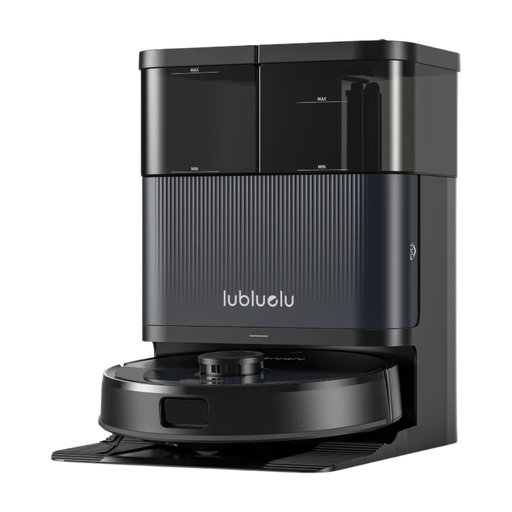 Image unavailable
If you want to schedule a routine across several rooms, take a look at the LiDAR navigation, app control and dock mentioned in the title.
The name lists both S1000 and S1000 Ultra+. Confirm which model is actually being sold before relying on the stated specifications, including 10,000 Pa suction. If you have rugs, also check the manual for the conditions of use for the mopping function.
 Image unavailable
If your priority is to schedule regular cleaning, check the mapping options and room-by-room settings available on this model to make sure they meet your needs.
Also check the manual to find out which tasks the dock handles, whether mopping is suitable for your floor coverings and what maintenance you’ll still need to do.
First, check which floor coverings are suitable in the model’s manual: Que Choisir advises against using robot mopping on wooden floors, particularly solid wood. For rugs, look for a feature that lifts or protects the mop pads and is explicitly specified for your chosen model. ECOVACS describes this feature for some DEEBOT models, not all robot vacuums.
No. It can transfer dust from the robot’s bin to a larger container, but that container still needs emptying or replacing. Depending on the model, you may also need to clean or replace filters, brushes and mop pads, as well as maintain any water-related parts of the dock.
Check that your phone and Wi-Fi are compatible, find out how updates work and make sure the app supports the features you want. Review the permissions and privacy policy too: the CNIL highlights the data issues associated with mobile apps. Network requirements vary by model. For example, Roborock says the Qrevo S supports 2.4 GHz Wi-Fi, but not 5 GHz.
Yes. It’s worth checking alongside the stated availability of spare parts for the specific model. The French ministries responsible for ecological transition say that robot vacuum cleaners are among the appliances covered by the repairability index. Separately, check that the consumables needed for maintenance are compatible with the model you plan to buy.