Homes with pets and items on the floor
If you want to schedule frequent cleaning, check how the model you’re considering handles pet hair and detects obstacles. Even with this feature, put away cables, socks and small items before heading out.


To schedule floor cleaning while you’re out, first choose a robot that can reach the rooms and areas you want it to clean. Measure thresholds and clearance beneath furniture, then check the navigation system and any obstacles on the floor. A docking station can reduce how often you need to get involved, but it takes up space and needs maintenance. If you also want to mop hard floors, check how the robot handles your rugs. A robot is still a complement to manual cleaning, particularly for stairs, furniture and skirting boards, as Les Numériques points out.
If you want to schedule frequent cleaning, check how the model you’re considering handles pet hair and detects obstacles. Even with this feature, put away cables, socks and small items before heading out.
Clearance beneath furniture, thresholds and rug protection during mopping can all affect whether the robot can actually reach different rooms. Measure them before comparing the advertised specifications.
If the robot will run while you’re out, check its scheduling options, app compatibility and the maintenance tasks you’ll still need to take care of. The CNIL also highlights the importance of keeping connected-device data secure.
Start with anything that could interrupt a clean while you’re out, then decide how much maintenance you’re happy to do. Mapping, docking stations and mopping each meet different needs, and can be combined in the same robot.
| Criterion | What to check | Who it matters to |
|---|---|---|
| Obstacles and access | Measure thresholds and clearance beneath furniture; check the limits of the robot’s ability to detect cables and small items. | If cables, toys or low furniture could stop a clean while I’m out, I want to know where the robot will be able to go. Around 36% of consumers would prioritise unrestricted access. |
| Robot maintenance | Check whether the dock only empties the bin or also washes or dries the mop pads; make sure you know where it will go, and which bins and consumables it needs. | I mainly want to avoid emptying the bin or untangling the brush after frequent cleans, while accepting that the dock will need maintenance. Around 29% of consumers would prioritise reducing these tasks. |
| Mixed flooring and mopping | Check how rugs are handled during mopping and whether the settings let you separate areas to vacuum from those to mop. | With hard floors and rugs, I want to schedule mopping without getting the fabric surfaces wet. Around 21% of consumers would make this their top priority. |
| App and long-term use | Check app compatibility, privacy settings, updates, the repairability index and available parts. | Before trusting an app with maps and schedules, I want to understand how my data is used and be able to maintain the appliance over time. Around 14% of consumers would put these considerations first. |
A suction rating won’t tell you whether the robot can cross a threshold or fit beneath your sofa. In its review of the Roborock Qrevo Edge 2, Maniaques.fr notes that this particular model can cross obstacles up to 2.5 cm high.
Measure any problem thresholds, the clearance beneath furniture and the thickness of your rugs, then compare them with the specifications for the exact version you’re considering.
Cables and small items can still get in the way of a robot with obstacle detection. If a cleaning run is interrupted, it won’t meet your needs while you’re out.
Clear the floor before scheduling an unattended clean, and check the limits of the model’s obstacle detection.
Depending on the model, a docking station may empty the dust, wash the mop pads or dry them. It also needs space, and its bins require maintenance.
Check what the manufacturer says you’ll need to do, as well as which compatible bags, cleaning solutions and other consumables are required.
You’ll still need to refill and clean the tanks, and replace wear parts, as required by the docking station.
Mapping and scheduling may depend on the app. The CNIL points out that connected devices generate data that must be kept secure. The repairability index presented by ADEME can help you assess whether an appliance can be repaired.
Check the permissions and privacy settings, update terms and compatibility of the exact model. Also look at its repairability index and the parts you may need.
The range includes robots with mapping and app-based settings. Docking station and mopping features vary by series.
Depending on the model, the DEEBOT range includes mapping, mopping, a docking station and features designed to reduce tangles.
The robot vacuum and mop range offers different docking station features and ways to handle mixed flooring, depending on the model.
These models let you compare mapping, mopping and different types of docking station for everyday floor care. For each one, check that its advertised features suit the obstacles and rugs in your home.
 Image unavailable
Worth considering if you want to schedule cleaning and empty the robot less often. The title lists LiDAR navigation, 8 000 Pa suction and up to 200 minutes of runtime; these figures aren’t a measure of how it will perform in your home.
Before choosing this dock, confirm the type of consumable it uses and how often it needs emptying. Also check the app and how it handles your rugs.
 Image unavailable
Consider this model if scheduled cleans and less handling of dust are important to you. The title lists a docking station, 3D obstacle avoidance, 8 000 Pa suction and up to 180 minutes of runtime.
Confirm the features and consumables for this version’s dock, then check how it handles rugs and put away small items before a clean while you’re out.
 Image unavailable
Compare this model if you’re looking for LiDAR navigation and a self-emptying dock for scheduled cleans. The title lists 8 000 Pa suction and an anti-tangle system, but you’ll still need to check the brush.
Measure your thresholds and check the robot’s height, as well as how it handles rugs while mopping, before choosing this model.
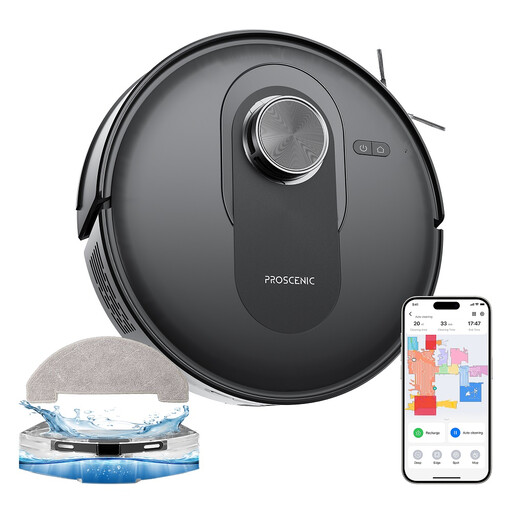 Image unavailable
Worth considering if you prioritise cleaning settings by area. The title lists LiDAR navigation, app control and advertised suction of 6 000 Pa.
Allow time to maintain the bin and brushes. If you have rugs or thresholds, check how this model handles them before scheduling a mop.
 Image unavailable
Consider this model if you want a docking station to take care of several maintenance tasks. The title lists 25 000 Pa suction, a ZeroTangle 3.0 anti-tangle system and mop-pad washing at 75 °C; these aren’t cleaning results measured in your home.
Make room for the docking station and allow for maintenance of its bins, brushes and filters. Confirm the scheduling options and how this version handles your rugs.
No. It’s mainly designed to keep your floors clean between deeper cleans. Les Numériques points out that a robot won’t clean stairs, furniture or skirting boards, so keep a manual cleaning option for these areas and for dirt that needs occasional attention.
No. It automates some tasks, which vary by model, but doesn’t remove the need for maintenance. Check whether it only empties the dust or also washes and dries the mop pads, then allow for checking the bins and replacing compatible consumables.
Check that the app works with your phone and network, then review its permissions and privacy settings, as well as the update arrangements for the exact model. The CNIL points out that connected devices can generate data stored online, and that keeping it secure matters.
It helps you assess how repairable a covered vacuum cleaner is, on a scale from 0 to 10. ADEME says robot vacuum cleaners are among the appliances covered. Also check which parts your model needs, as the score alone doesn’t guarantee that a particular part will be easy to obtain.