Busy households with a large floor area
If you’d like to schedule regular cleaning runs, check the mapping, docking and resuming after recharging. Also consider what you’ll still need to do to maintain the robot and its station.


In a large home, a robot vacuum can take care of some routine floor cleaning, but it’s still an additional helper rather than a complete replacement. According to UFC-Que Choisir, results vary depending on the floor covering, while Les Numériques points out that a robot can’t clean stairs or furniture. Before choosing a mopping function or a docking station, check your thresholds, rugs, clearance under furniture and how much maintenance you’re still happy to do yourself.
A robot is best suited to floors it can reach regularly, between more thorough cleans.
If you’d like to schedule regular cleaning runs, check the mapping, docking and resuming after recharging. Also consider what you’ll still need to do to maintain the robot and its station.
Measure the doorways between rooms and the clearance under furniture. A robot that can’t cross a threshold or fit under a sofa won’t be able to clean those areas without your help.
Mopping can help with routine cleaning on compatible flooring, but it won’t always replace manual cleaning. You’ll still need to keep an eye on the water tanks, mop pads and station.
First decide which tasks you’ll still do by hand, then check how each robot will cope with your home’s access points, floor coverings and available space.
Worth considering: if you want to schedule vacuuming on accessible floors without having to manage water and mop pads.
The trade-off: you’ll still need to maintain the dust bin, brushes and filters, and mop the floors by hand.
Worth considering: for frequent cleaning runs on compatible hard floors, if you have room for a station.
The trade-off: the station, water and mop pads all need maintenance. UFC-Que Choisir also notes that mopping performance varies between models.
Keep one for: stairs, furniture and areas the robot can’t reach, as Les Numériques points out.
The trade-off: you’ll need to clean these areas yourself.
| Priority | What to check | What I need |
|---|---|---|
| Access to rooms | Measure thresholds and clearance under furniture, then compare them with the capabilities of the specific model. Also check how it navigates around cluttered rooms. | I want the robot to move around the rooms I’ve chosen without having to carry it from place to place for every cleaning run. |
| Robot maintenance | Check exactly what the station empties, washes or dries. Plan where to put it and check the maintenance tasks listed in the instructions. | If I’m running it frequently, I’d like to cut down on handling the dust bin and mop pads without assuming the station looks after itself. |
| Floors and rugs | Compare test results for the floor coverings in your home rather than focusing only on the Pa figure. For mopping, check that your floor is compatible and see how the robot handles rugs. | My rugs and hard floors need different care. I want to avoid starting a mopping run on unsuitable flooring. |
| Large floor area | Confirm that the model can return to its station, resume after recharging and map your home. Mapping multiple floors doesn’t mean it can climb the stairs. | In a large home, I want to schedule cleaning in several rooms without restarting every cycle, while still having a solution for upstairs. |
This figure alone doesn’t tell you how well the robot picks up dirt from rugs, hard floors, edges or corners. UFC-Que Choisir assesses these situations separately in its testing protocol.
Compare tests on the floor coverings in your home, and also look at the model’s brush, navigation and maintenance requirements.
Mopping results vary. UFC-Que Choisir tests this function on tiles and advises against using it on wooden floors, particularly solid wood.
Check the instructions from both your flooring and robot manufacturers before turning on the mopping function. Continue to clean by hand in areas, or for marks, that need it.
A threshold or low piece of furniture can leave a room or area outside the robot’s route, even if it has obstacle detection. In its test of the Roborock Qrevo Curv 2 Pro, Les Numériques noted that it had difficulty crossing some thresholds.
Measure your thresholds, the clearance under furniture and the thickness of your rugs, then check what the model you’re considering can handle.
A station can reduce some of the manual tasks, but it takes up space and needs maintaining itself.
Choose a spot near a power socket, check the clearance required in the instructions and find out which parts need cleaning or replacing.
Depending on the system, dust bags, filters, brushes and mop pads may need replacing.
The features and limitations below apply to the models mentioned, not to each brand’s entire range.
The X50 Ultra is designed with access under furniture and crossing thresholds in mind.
The Qrevo range includes robot vacuum mops with docking stations, with features that vary by model.
The Deebot T50 Pro Omni is an example of a slim-profile robot vacuum mop.
These five robot vacuums with a mopping function are suited to the ‘routine cleaning with mopping’ option. Compare their advertised features with the floors and access points in your home, and keep a traditional vacuum cleaner for areas the robot can’t reach.
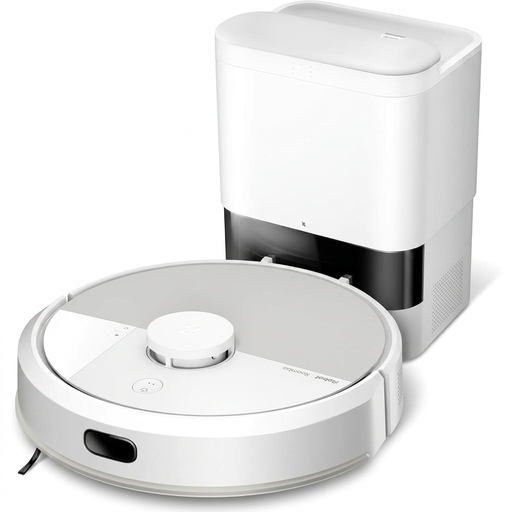 Image unavailable
Worth considering if you’d like to combine vacuuming and mopping for routine cleaning. Check that it can cross your thresholds and that mopping is suitable for your floor coverings before planning its route.
 Image unavailable
Worth looking at if you want a robot vacuum mop with a station for regular cleaning runs. Its product information lists 19 500 Pa and an OZMO Roller 2.0 system. The Pa figure alone won’t predict how well it will clean your floors. Measure your thresholds and check the conditions for crossing them, as well as the space needed for the station.
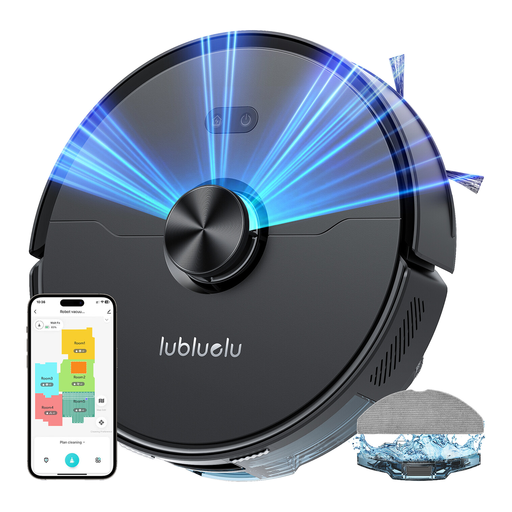 Image unavailable
Compare it for scheduled cleaning across several rooms. The product name lists laser navigation and 4 000 Pa; it’s more useful to check how the model suits your floor coverings and the clearance under your furniture. If its route includes rugs, check how it handles the mop pad before buying.
 Image unavailable
Worth looking at if you want a station for vacuuming and mopping runs. The product information lists 25 000 Pa and mop-pad washing at 75 °C. Separately, check whether it resumes after recharging, how it handles thresholds and how much space the station needs in your home.
 Image unavailable
Worth considering if a cleaning station is one of your priorities. The product name lists 16 200 Pa and hot-water cleaning at 75 °C. Check whether it can cover your floor area and resume after recharging, as well as how it handles rugs and thresholds.
No. Think of it as an extra helper for accessible floors. Les Numériques points out that a robot can’t climb stairs or clean furniture and skirting boards, so a traditional vacuum cleaner is still useful for these areas and for more thorough cleaning.
Don’t turn it on until you’ve checked your flooring and the instructions from both the floor and robot manufacturers. UFC-Que Choisir tests mopping on tiles and advises against using it on wooden floors, particularly solid wood.
No. Depending on its features, it may reduce how often you need to empty the robot or take care of the mop pads, but you’ll still need to check and clean the brushes, filters, tanks and station. Les Numériques noted, for example, that the filter on the Ecovacs Deebot T50 Pro Omni clogged quickly.
It depends on the model and the features you want to use. According to Roborock support, the Qrevo MaxV can clean without Wi-Fi, but scheduling requires a connection. Check the instructions for the model you’re considering if you plan to use it offline.
Check what data it collects, the app permissions, sharing settings and security updates. The CNIL notes that connected devices can generate data stored online, and that it’s important to keep this data secure.