What should you check before buying?
First choose a robot to suit the rooms it needs to cover and the obstacles it will encounter. Then decide whether automating mopping and dustbin emptying is worth the extra dock maintenance. A conventional or cordless vacuum is still useful for areas the robot can’t reach.
Robot vacuum without a full-service dock
Worth considering: if your main aim is to automate frequent vacuuming and you’re happy to empty the dustbin and mop the floors separately.
Keep in mind: the brushes and dustbin still need maintenance, and you should check how the model you choose performs on carpets and along walls.
Robot vacuum and mop with a multifunction dock
Worth considering: if you regularly clean compatible hard floors and want to empty the dustbin or handle the mop pads less often.
Keep in mind: the dock needs its own dedicated space, and its tanks, surfaces and consumables still need attention.
| What to consider |
What to check |
Who is it for? |
| Room coverage |
Mapping and programmable zones; whether it resumes its cycle after recharging, and how much floor space it covers in a test. |
If I want to clean several rooms without restarting the robot, I need to know whether it can finish its route after recharging. Around 31% of consumers rank this automated coverage as their top priority. |
| Carpets, thresholds and obstacles |
The height of your thresholds and the pile height of your carpets; tests of obstacle crossing, navigation and vacuuming on carpets. |
If I have carpets, thresholds or items on the floor, my main concern is avoiding blockages and rooms being missed. For around 25% of consumers, handling these is their top priority. |
| Maintenance and parts |
What needs cleaning on the dock and robot; the repairability index displayed and the consumable part numbers for the exact model. |
I want to empty the dustbin less often, but I don’t want to find out later that routine maintenance involves too much hands-on work. Around 25% of consumers put reducing these tasks ahead of other criteria. |
| Mopping hard floors |
Whether your floor types are compatible, how carpets are handled, mopping test results and the maintenance needed after a cycle. |
If I have hard floors that need frequent cleaning, I want to cut down on quick mop-ups without relying on the robot to tackle stubborn stains. This is the top priority for around 19% of consumers. |
Brands to consider
These brands are a useful starting point for comparisons, but their general features and after-sales service data aren’t enough to draw conclusions about every model.
Roborock
Worth considering if you’re looking for a robot vacuum and mop with navigation, carpet handling and a dock, depending on the model.
- Roborock France lists a chassis designed for carpets and rugs up to 3 cm thick on the Qrevo Curv 2 Pro. Check the specifications of the model you’re considering.
- The Darty after-sales service barometer looks at brand durability; it doesn’t predict how well a particular model will navigate or how repairable it is.
Dreame
Compare its robot vacuums and mops with docks and features for obstacle crossing or navigation, which vary by model.
- In its review of the X60 Pro Ultra Complete, Les Numériques notes that it crosses obstacles successfully and delivers good vacuuming and cleaning performance.
- The same review points to navigation that needs improvement and weaker performance near walls. Dreame France lists accessories for the X50 Ultra Complete; check which ones fit the model you choose.
Ecovacs
Worth considering if you’re comparing different DEEBOT configurations for mopping, dock features and carpet handling.
- Ecovacs’ French support site lists different variants and maintenance kits, which can help you find the exact reference for a consumable.
- The Darty after-sales service barometer’s brand durability data won’t tell you how a particular DEEBOT will perform in your home.
iRobot
Include it in your comparison if durability and access to after-sales service are important to you.
- The Darty after-sales service barometer provides durability data for the iRobot brand.
- This data doesn’t replace checking the navigation, mopping and maintenance requirements of the specific Roomba you’re interested in.
Rowenta
Consider it as part of a comparison that weighs after-sales service alongside cleaning features.
- The Darty after-sales service barometer lets you compare Rowenta’s durability with that of other robot vacuum brands it tracks.
- Check the mapping, obstacle crossing and consumables for the model you’re considering separately; brand-level results don’t tell you about these features.
Robot vacuums and mops available on Joybuy
These models are robot vacuums with a mopping function, and several come with a dock. If you have a large home, use their advertised features as a starting point and compare them with your room layout, floor types and the maintenance tasks you want to hand over to the robot.
 Image unavailable
EUREKA E20 Plus robot vacuum and mop
Worth considering if you want to schedule cleaning runs and empty the dustbin less often, but check how much of your home it can cover. The product listing quotes 8,000 Pa and an anti-tangle brush; these claims alone don’t show how it will perform on your carpets and around obstacles.
Check how the dock collects dust, as well as whether the robot resumes after recharging and which consumables this model needs.
View on Joybuy
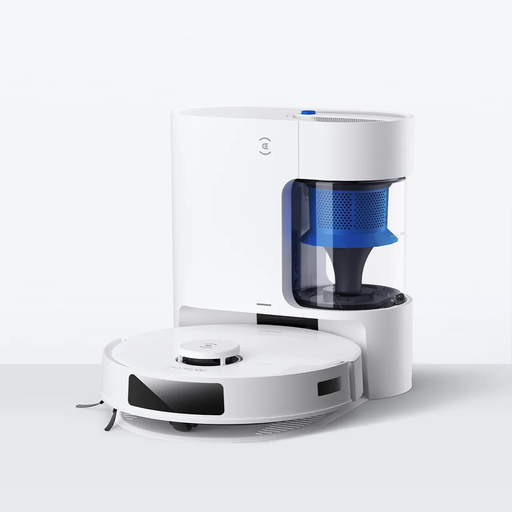 Image unavailable
ECOVACS DEEBOT N20 Plus robot vacuum cleaner
Worth considering if scheduling cleaning runs and automatic dustbin emptying are among your priorities. The listing mentions 8,000 Pa, an anti-tangle system and a claimed runtime of 300 min; that figure alone doesn’t tell you how much of your home it will clean.
Check whether it resumes its cycle after recharging and how it handles your carpets and thresholds before relying on it to clean every room.
View on Joybuy
 Image unavailable
ECOVACS DEEBOT X11 Pro Omni, OMNI station
Worth considering if you want to hand over some of the work involved in maintaining the mop. The listing mentions an OZMO Roller 2.0, an OMNI station and a claimed obstacle-crossing height of 4 cm. Measure your own thresholds and look for a test of this model’s performance.
Check how the dock collects dust and how much floor space it covers with the settings you plan to use.
View on Joybuy
 Image unavailable
ECOVACS DEEBOT X9 PRO Omni, all-in-one station
Worth considering if you regularly clean hard floors and want to spend less time handling the mop pads. The listing specifies an OZMO roller and a station that washes the roller with hot water and dries it with hot air.
You’ll still need to fill and empty the tanks. If you have a large home, also check the area covered per cycle and whether the robot resumes after recharging.
View on Joybuy
 Image unavailable
Black ECOVACS DEEBOT T30C OMNI Gen2
Worth considering if you want regular vacuuming alongside automated mop maintenance. The listing mentions an OMNI station and mop washing at 75 °C; this doesn’t indicate how well it will clean your floors.
Check how much of your home it can cover and whether it resumes after recharging. You’ll still need to manage the dock’s tanks and clean the brushes and filters regularly.
View on Joybuy
Frequently asked questions
Can a robot vacuum and mop replace all floor cleaning?
No. It can clean frequently, but keep another option for stairs, corners and stubborn stains. UFC-Que Choisir notes that vacuuming and mopping results vary between the models it tests, so assess these two functions separately.
How can I check whether a robot will cross my thresholds and clean my carpets?
Measure your thresholds and carpet pile height, then compare them with the specifications for the exact model. Also look for an independent test on carpets and around obstacles: a claimed obstacle-crossing height doesn’t guarantee it will navigate your home.
What still needs maintaining with a multifunction dock?
The dock can automate some tasks, but the robot, brushes, filters and dock components still need to be checked and cleaned as appropriate for the model. Consult the manual for the maintenance steps and matching consumables.
Can the repairability index help me choose a robot vacuum in France?
Yes, it can help you compare how easy it is to repair the models covered by the index. ADEME says robot vacuums are included, so check the rating displayed for the model on sale. Don’t confuse it with a measure of cleaning performance.
Who should I contact if my robot doesn’t conform to its description?
If you bought it from a professional retailer in France, contact the retailer under the legal guarantee of conformity, as explained by the French Ministry of the Economy. Keep any documents describing the product and the fault you’ve found. This legal guarantee is separate from any commercial warranty offered by the brand.


