For regular hard-floor maintenance, choose a navigation system that suits your home’s layout. Mapping is worth considering if you need to manage several rooms or set areas to avoid, while simpler navigation is best suited to open spaces if you’re happy with less controlled cleaning runs. Mopping and a dock can take care of some tasks, but check how the robot handles your rugs and thresholds, as well as what maintenance you’ll still need to do.
Who is a robot vacuum for hard floors suited to?
Homes with cluttered or separate rooms
If furniture, cables, doors or rugs make it harder for a robot to get around, check its navigation, no-go zones and ability to cross your thresholds. UFC-Que Choisir assesses how robots move around furniture and obstacles.
People looking to cut down on hands-on maintenance
A dock can reduce how often you need to carry out some tasks, but it won’t eliminate the need to clean the robot and its components. For example, iRobot’s care instructions still call for regular maintenance on the Roomba models concerned.
Homes with hard floors and a few rugs
If you’d like to add mopping, check how the model you’re considering detects rugs, avoids them or lifts its mop, then compare its stated threshold clearance with the thresholds in your home.
What should you look for before buying?
First, choose a navigation system that suits the rooms the robot needs to cover. Then decide whether mopping and a dock match the tasks you want it to handle.
Random navigation
Consider it: for a mostly open hard-floor area with few obstacles.
Be prepared for: less methodical cleaning runs, without room mapping or the ability to manage no-go zones.
Mapping navigation
Consider it: to plan cleaning runs across several rooms or set areas to avoid, if the model offers these settings.
Bear in mind: a map doesn’t guarantee that the robot will avoid every object or cross every threshold.
| Factor |
What to check |
Who it matters to |
| Getting around your home |
Measure thresholds and clearance beneath furniture; check the mapping and obstacle avoidance on the specific model. |
When rooms are separate or cluttered, I want the robot to reach the floors that need cleaning without getting stuck. Around 36% of consumers would make this a priority. |
| Ongoing maintenance |
Check the manual for instructions on the dust container, brushes, filters and, where applicable, the dock’s tanks and consumables. |
If I’m looking to spend less time on maintenance, I need to know exactly which tasks the dock will take care of. Around 29% of consumers would make reducing these tasks a priority. |
| Mopping around rugs |
Check the mopping system and how the model detects, avoids or protects rugs during a mopping run. |
My hard floors need mopping, but I don’t want my rugs to get wet. Around 21% of consumers would make this combination a priority. |
| Simple cleaning runs on hard floors |
Look for tests of the model on the types of flooring and dirt you have, including along edges and in corners. |
In an open space, I mainly want regular cleaning runs without complicated settings. Around 14% of consumers would prioritise this simplicity. |
UFC-Que Choisir reports results by floor type and also tests how robots navigate obstacles. So a feature listed in the product details alone won’t tell you how well a particular model will clean your floors.
What pitfalls should you avoid?
-
Choosing based solely on promises of hands-free cleaning
The robot and its dock still have components that need cleaning. For example, iRobot’s instructions include cleaning the dust container and brushes on the models concerned.
Before you buy, check the manual for the model you’re considering to see what maintenance is required and which consumables are compatible.
Depending on the equipment, you may also need to replace dust bags, filters, brushes, wipes or mop pads, as well as maintain the dock’s tanks.
-
Assuming every robot mop protects rugs
Rug detection, avoidance and mop lifting vary by model. The rug’s pile and the height of your thresholds also matter.
Measure your rugs and thresholds, then check how the robot is designed to behave while mopping. If the model allows it, set no-go zones wherever needed.
-
Assuming a suction figure guarantees results on every floor
UFC-Que Choisir notes that performance varies depending on the floor type and tests several surfaces as part of its testing process.
Compare test results for the floors, debris, edges and corners that matter in your home, rather than relying on a single advertised feature.
-
Forgetting about clearance under furniture and between rooms
If a robot is too tall to fit under a piece of furniture or can’t manage a threshold, it won’t be able to clean the area beyond it, whatever other features it may have.
Measure the key access points and compare them with the dimensions and limits stated for the exact model. Plan another way to clean any areas the robot can’t reach.
Brands to know when comparing ranges
iRobot
The Roomba range includes robot vacuums and Combo models that combine vacuuming and mopping. Navigation and dock features vary by model.
- iRobot lists LiDAR navigation on the Roomba Mini, and a dock that empties debris, washes and dries mop pads on the Roomba Plus 415 Combo.
- These features aren’t necessarily available on every Roomba and don’t replace the maintenance specified for each model.
Rowenta
The X-Plorer range includes models with different navigation, mopping and dock configurations.
- For the X-Plorer Serie 75 S+ RR8595WH, Rowenta states that it can cross thresholds up to 18 mm high. Compare this figure with the measurements in your home.
- This stated clearance doesn’t apply to other models. Check their mopping features and specific consumables too.
Ecovacs
The DEEBOT range includes robot mops, with mapping, obstacle handling and dock features varying between series.
- For some models, Ecovacs describes rug detection and dock-based maintenance features.
- Check how the specific model handles thresholds and rugs, taking your floors into account.
Roborock
Depending on the model, Roborock ranges include mapping, a dock and a mopping function.
- The different configurations make it easier to compare the features you need to plan cleaning runs and maintain hard floors.
- Check the documentation for the model you’re considering for details on rug handling, mop pad maintenance and consumables. These features aren’t available across the whole range.
Robot vacuum and mop models available at Joybuy
These models combine vacuuming with a mopping function for regular hard-floor maintenance. To compare their features, consider how they’ll work with the rugs, thresholds and access points in your home, as well as the maintenance tasks you’re happy to take on.
 Image unavailable
ECOVACS DEEBOT X9 PRO Omni, with Omni station
Worth considering if you want to combine vacuuming, mopping and a dock for regular hard-floor cleaning.
The product description lists 16 600 Pa suction, an OZMO Roller and hot-water washing and drying of the mopping component. Check separately how it handles your rugs and thresholds.
View on Joybuy
 Image unavailable
ECOVACS Deebot T30C OMNI Gen2, black
Consider this model if a dock and mopping function are part of your plans for everyday cleaning.
The product description lists 25 000 Pa, an OZMO Turbo 2.0 system and mop washing at a stated 75 °C. If you have rugs, check whether the mops lift or avoid them, as well as the threshold clearance.
View on Joybuy
 Image unavailable
Eureka E20 Plus, black
Worth considering for regular cleaning runs if obstacle avoidance and an auto-empty dock are among your priorities.
The product description lists 8 000 Pa, 3D obstacle avoidance, DuoDetect AI navigation and a 180-minute runtime. Check the mopping features and how it handles your rugs on the model you’re considering.
View on Joybuy
 Image unavailable
Eureka J15 Pro Ultra
Consider this model if you’re looking for a robot with mopping and automatic cleaning features for everyday hard-floor care.
The product description lists 16 200 Pa, hot-water cleaning at 75 °C and a brush lift. Check separately how it protects rugs while mopping and whether it can cross your thresholds.
View on Joybuy
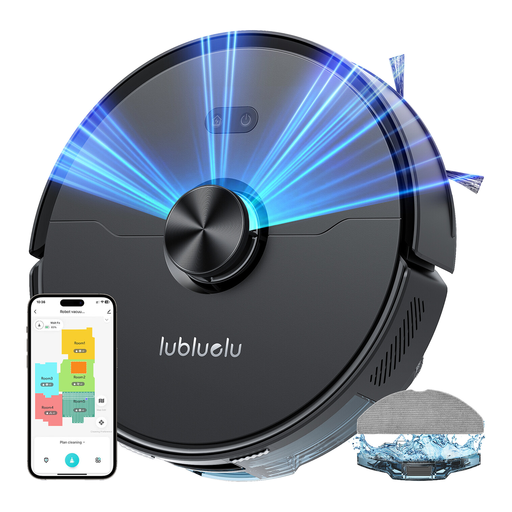 Image unavailable
Lubluelu L15 Ultra 3-in-1
Worth considering if you want to plan hard-floor cleaning runs using laser navigation and a mopping function.
The product description lists 4 000 Pa, five-stage mapping and app control. Before mopping near rugs, check whether the robot can detect them and how it handles the mop pad.
View on Joybuy
Frequently asked questions
Can a robot vacuum replace all manual cleaning?
No. It’s best suited to regular maintenance of areas it can reach. UFC-Que Choisir reports results by floor type and assesses edges and corners, among other things. Check the test results for the model you’re considering, focusing on the surfaces and types of dirt you have at home.
Should I clear the rooms before the first mapping run?
Yes. Clearing access routes helps the robot create a usable map. For the models concerned, iRobot recommends removing obstacles and leaving doors open when mapping. After that, don’t assume the robot will detect every small object or cable.
Does an automatic dock mean the robot needs no maintenance?
No. It only takes care of the tasks provided for on the model you choose. A dock may empty debris or clean mop pads, but brushes, filters, sensors and dock components still need maintenance according to the manual.
What should I do with an old robot vacuum in France?
An old robot vacuum should be disposed of through electrical and electronic equipment recycling. The Ministry for the Ecological Transition explains that the ‘one-for-one’ take-back scheme applies when you buy a new appliance of the same type. Check the take-back options available when you make your purchase.


