What should you check before choosing?
Start with the surfaces and doorways in your home, then choose the features that will reduce the tasks you actually want to avoid.
| Priority |
What to check |
What you need |
| Floor coverings |
Compare results on the types of flooring in your home, then check performance along edges and in corners. UFC-Que Choisir tests these surfaces separately, so the advertised suction power alone doesn’t tell the whole story. |
I have tiles, wooden floors or rugs, and want to know how the robot performs on each one. |
| Navigation |
Check whether the model maps rooms and lets you set no-go zones or clean individual rooms. These controls depend on the model’s features and often its app. |
I want to schedule cleaning for specific rooms rather than let the robot roam without clear instructions. |
| Doorways and obstacles |
Compare the height of each threshold you’ve measured with the stated capability of the exact model, and measure the clearance beneath furniture too. Check which objects the obstacle-avoidance system is designed to recognise. |
There are thresholds between my rooms, or cables and other objects could get in the way. |
| Emptying and maintenance |
A self-emptying station transfers dust into a larger container, according to UFC-Que Choisir’s guide. Check where it will go, how easy it is to access the containers and what consumables the model needs. If you’re buying in France, also check its repairability index. |
I want to empty the robot’s small dust container less often, while keeping maintenance tasks manageable. |
| Mopping |
Check that your floor covering is suitable. If you have rugs, look for no-mop zones or a retractable mop pad. UFC-Que Choisir reports mixed mopping results and advises against using this feature on wooden floors, particularly solid wood. |
I’d like to maintain a compatible hard floor regularly without getting my rugs wet. |
| Connectivity and data |
Check that your phone and the app are compatible, and find out which Wi-Fi band is required. Read the settings and privacy policy for mapping features before enabling them. |
I want to control the robot through an app, while understanding the connection requirements and how maps of my home are handled. |
Which ranges should you compare?
These brand examples can help you compare specific features. Their inclusion here doesn’t mean that every model in each range has the same equipment.
Roborock
The range includes robots with mapping, mopping models and versions with a station. Check the configuration of each model.
- Roborock lists LiDAR navigation, carpet detection and a self-emptying station among the features of the Q10 S5+.
- The brand also lists compatible bags, brushes, filters and mop pads for this model, so the station doesn’t mean you can ignore consumables.
iRobot
Some Roomba vacuum cleaners and Combo vacuum-and-mop models focus on object avoidance and app controls.
- iRobot says the Roomba j7+ can avoid cables and pet waste. Mopping and station features vary by model.
- According to iRobot’s documentation, usage data from Wi-Fi robots may be sent to the cloud. How maps are handled depends, among other things, on whether you agree to view them in the app.
Rowenta
The X-PLORER range includes models with mapping and app controls, but features should be compared model by model.
- Rowenta lists a height of 7,8 cm, the ability to cross thresholds up to 18 mm and a repairability index of 9,1/10 for the X-PLORER Series 65.
- These figures apply to the Series 65. Compare them with your furniture and thresholds rather than assuming they apply to other X-PLORER models.
ECOVACS
The DEEBOT range includes several series, with different designs and station features.
- Depending on the series, ECOVACS offers edge-cleaning features and technology to reduce hair tangles.
- For some models, its support team recommends using a threshold ramp or cleaning the wheels if the robot struggles to cross a doorway. Check your doorways and maintain the model you choose.
Robot vacuum cleaners available on Joybuy
These five models are suited to routine vacuuming, with a station and advertised mopping features. Compare their variants and installation requirements, and don’t assume they cover every way of automating your cleaning.
 Image unavailable
ECOVACS DEEBOT T30C OMNI Gen2
Worth considering if you want to combine vacuuming, mopping and a station for everyday cleaning. The product name lists 25 000 Pa and mop-pad washing at 75 °C, but these figures alone don’t tell you how it will perform on your floors. Check that it can cross your thresholds and that you have room for the station, then factor in maintenance for the containers, brushes and filters.
View on Joybuy
 Image unavailable
ECOVACS DEEBOT X9 PRO OMNI
Compare this model if you want to combine vacuuming, mopping and a station. The product name lists 16 600 Pa, an OZMO Roller system and hot-air drying. Check that it’s suitable for your floors rather than assuming these features guarantee a particular result. Measure your thresholds and the space available, and check the network requirements if you plan to use the app.
View on Joybuy
 Image unavailable
Eureka E20 Plus with station
Worth considering if reducing how often you empty the robot and cleaning rugs are important to you. The product name lists 8 000 Pa, 3D obstacle avoidance and 180 minutes of runtime; check the conditions under which that runtime is measured. Move cables and small objects before each cycle, and measure your thresholds and the space available for the station.
View on Joybuy
 Image unavailable
Q8-Max with mopping and self-emptying station
Worth considering if you want to schedule cleaning for several rooms and empty the dust container less often. The product name lists LiDAR navigation, 8 000 Pa and 200 minutes of runtime, but these figures don’t guarantee the same results on every floor. Using the app requires a 2,4 GHz Wi-Fi network. Also check your thresholds and the space needed for the station.
View on Joybuy
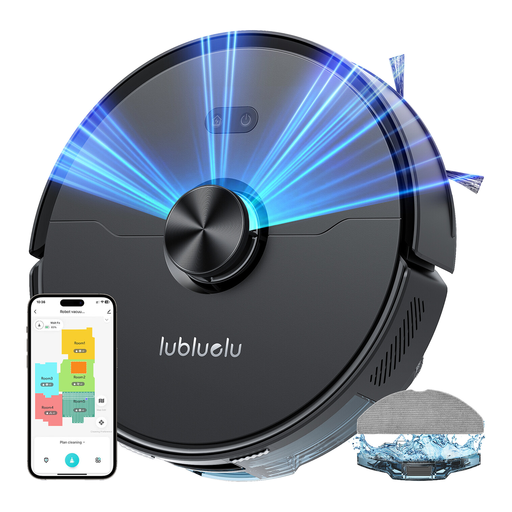 Image unavailable
Lubluelu L15 Ultra 3-in-1
Compare this model if the doorways between your rooms and station maintenance are key considerations. The product name lists laser navigation and 4 000 Pa. The stated threshold clearance for this model is 2 cm, so compare it with the thresholds you’ve measured. Check the applicable noise level for this model before buying, and factor in maintenance for the brushes and filters.
View on Joybuy
Frequently asked questions
Can a robot replace a conventional vacuum cleaner and mop?
Don’t assume it can. A robot is mainly for regular cleaning of areas it can reach. UFC-Que Choisir reports that performance varies between floor types and models, particularly when it comes to mopping. Keep a manual cleaning option for stairs, awkward corners and stubborn stains.
How can I check whether it will cross my thresholds?
Measure each threshold and compare its height with the stated capability of the exact model. For example, Rowenta says the X-PLORER Series 65 can cross thresholds up to 18 mm high; this figure doesn’t apply to other robots. Wheel condition and the layout of the doorway can also make a difference, as ECOVACS support notes for some of its models.
Should I move cables before starting the robot?
Yes, it’s best to move cables and fragile objects out of the way. iRobot says some Roomba j7 models can avoid certain cables, shoes and pet waste, but check which objects are covered for the model you choose. Obstacle avoidance doesn’t guarantee that every cleaning run will be trouble-free.
Does a station eliminate the need to maintain the robot?
No. A self-emptying station can reduce how often you need to empty the robot’s dust container, but you’ll still need to check the station’s container and maintain the brushes and filters. Depending on the model’s features, you may also need to keep on top of bags, mop pads and water containers.
What should I check before using mapping in an app?
Check that your phone and Wi-Fi are compatible, then review the model’s app permissions and privacy settings. iRobot support says some of its robots require a 2,4 GHz connection. The brand also says maps from its Wi-Fi robots may be processed in the cloud if you agree to view them in the app. Check the terms for the brand you choose.


