What should you check before choosing one?
Start with the floors and obstacles in your home, then choose the level of automation and mopping features based on which tasks you’re happy to keep doing yourself.
| Feature |
What to check |
What I need |
| Performance in different areas |
Compare test results for your flooring, then check performance along walls and in corners. UFC-Que Choisir tests these situations separately; a quoted suction power alone doesn’t tell you how well a model will clean. |
The skirting boards and corners in my home collect dust, so I want to know how well the model actually cleans them. |
| Navigation |
Check the mapping, no-go zones and obstacles the model is designed to recognise. Also make sure there’s enough clear space for it to move around. |
Cables, low furniture or small objects could get in the way while I’m out, so I can clear the floor before I leave. |
| Scheduling |
Check that the exact model can be scheduled, and find out how to set which rooms or areas it cleans, if that feature matters to you. |
I want the robot to clean regularly without having to start it every time I go out. |
| Docking station and maintenance |
Check which tasks the dock handles: emptying the dustbin, washing the mop pads or drying them. Not all docks do the same things. Check how much space it needs, its tanks and which consumables are compatible. |
I’d like to empty the dustbin less often, but I can still manage the water and maintain the accessories. If that works for me, a robot without a fully featured dock is still an option. |
| Mopping |
Check that the robot is suitable for your hard floors and, if you have carpets, find out how it handles the mop pads. Compare mopping results rather than just the advertised features. |
I’m looking for a damp clean between proper cleans, not a way to avoid tackling tough stains by hand. In December 2024, UFC-Que Choisir reported that robot mops could have limited effectiveness. |
| Manual cleaning as a backup |
Think about stairs, areas under furniture and localised dirt that you’ll need to tackle yourself. |
If I need to clean a step or deal with a mess in a cluttered corner straight away, I’ll keep a stick or cylinder vacuum handy. |
Which brands should you know?
The products below relate to specific ranges or models. Always check the product details for the version you’re considering.
ECOVACS
The DEEBOT range includes robot vacuum mops, including models with an OMNI station.
- According to ECOVACS France, the DEEBOT T30e OMNI station handles tasks including automatic emptying and refilling, and has a 4 L tank.
- These features alone don’t show how well the robot cleans edges or different floor types. Compare test results for the exact model.
Rowenta
The X-Plorer range includes robot vacuum mops. The Série 580 Max is shown with a station that collects dust and cleans the mop pads.
- The French product listing for this model gives it a repairability index of 9.6/10.
- These features and this index apply to the Série 580 Max, not the entire Rowenta robot range.
iRobot
The Roomba range includes the j7+, which iRobot France describes as having an automatic emptying system.
- iRobot says the Roomba j7+ can recognise certain obstacles, including charging cables and pet waste.
- Check which obstacles the version you’re considering can handle. The manufacturer’s claim doesn’t guarantee an uninterrupted cleaning cycle in every home.
Dreame
Dreame includes the L10s Ultra Gen 3 Kit among its robot vacuum mops for the French market.
- This model’s name identifies it as a vacuum and mop.
- Before choosing it, check the product details for the dock’s features, accessories and specifications that matter for your home.
Robot vacuums available on Joybuy
These models are designed to keep your floors clean, with different docking station and mopping configurations. If your priority is running a cleaning cycle while you’re out, check the product details to confirm that your chosen model can be scheduled before you buy.
 Image unavailable
Eureka E20 Plus, 8 000 Pa, Self-Draining Station
Worth considering if you want to schedule cleaning while you’re out: the product description mentions scheduling and no-go zones. The model name specifies 8 000 Pa suction, 3D obstacle avoidance and a 180-minute battery life. Check test results to see how it performs on your floors and in corners.
View on Joybuy
 Image unavailable
ECOVACS DEEBOT X9 PRO Omni, 16 600 Pa, OZMO Roller
This robot vacuum mop is designed for households looking to combine scheduled cleaning cycles with hard-floor care. Its name specifies an Omni station that washes the mop pads with hot water and dries them with hot air; the product description also mentions mapping. You’ll still need to manage the water, and should check mopping results separately.
View on Joybuy
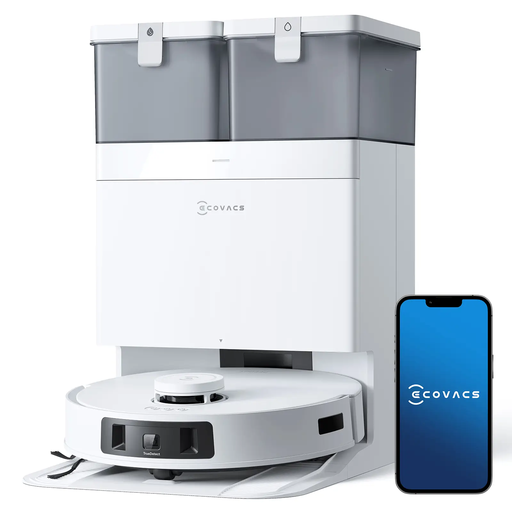 Image unavailable
ECOVACS DEEBOT T30C Pro Omni GEN 2, 15 400 Pa
This model combines vacuuming and mopping with an automatic emptying station. Its name also specifies hot-air drying and a 200-minute battery life. If you plan to run cleaning cycles while you’re out, check that the model can be scheduled and look for test results for your flooring and edges.
View on Joybuy
 Image unavailable
Eureka J15 Pro Ultra, 16 200 Pa, 75 °C mop washing
This robot vacuum mop may suit households looking to cut down on some of the tasks involved after mopping. Its name specifies hot-water cleaning at 75 °C and a self-cleaning feature. Check which tasks you’ll still need to do, whether it can be scheduled if that matters to you, and how well it mops your floors.
View on Joybuy
 Image unavailable
JONR T5 Pro, 8 150 Pa, all-in-one station
This robot vacuum mop combines an all-in-one station with laser navigation, as stated in its name. If your home has obstacles, check exactly what its recognition system can handle. If you want to use it while you’re out, confirm that it can be scheduled. You’ll still need to keep an eye on the dirty water and the robot’s components.
View on Joybuy
Frequently asked questions
Can a robot completely replace a manual vacuum cleaner?
Don’t expect it to handle every task. UFC-Que Choisir tests robot performance on different floors, near walls and in corners separately. Keep a manual vacuum for stairs, hard-to-reach places and occasional cleaning.
Does the mopping function mean you won’t need to use a mop?
Not reliably. In December 2024, UFC-Que Choisir highlighted limitations in the effectiveness of robot mops. Consider damp cleaning for the routine care of compatible hard floors, and clean stubborn stains and hard-to-reach areas by hand.
What should you do before setting a robot to clean while you’re out?
Clear its route and put away cables, textiles and small objects that could get in the way. If your home has problem areas, check that the model lets you mark them as no-go zones. Advertised obstacle avoidance doesn’t mean you can skip preparing the floor.
Does a docking station mean you don’t need to maintain the robot?
No. Depending on its features, it may empty the dustbin or maintain the mop pads, but you’ll still need to check the tanks, brushes, filters and consumables. ECOVACS, for example, says its station can alert you when the clean-water tank is low or the dirty-water tank is full.
What should you do with an old vacuum cleaner in France?
First consider repair or donation if the appliance can still be used. If you need to dispose of it, ADEME advises using in-store collection points or the dedicated electrical and electronic equipment container at a recycling centre.


