Who is a scheduled robot suitable for?

Households out during the day with several rooms

If you want to schedule a clean while you’re at work or out, check that the model lets you select rooms and set no-go zones. Rowenta describes these options for robots with the relevant mapping features.

Homes with rugs, thresholds or low furniture

Measure your thresholds and the clearance under your furniture before choosing. UFC-Que Choisir’s tests assess performance on rugs, tiles and parquet flooring separately, so a listed feature alone won’t tell you how well a robot will clean every surface.

People looking to reduce hands-on work between cycles

A collection dock or a dock that maintains the mop pads can reduce some tasks, depending on its features. However, you’ll still need to make room for it and maintain the bins, brushes, filters and mopping accessories.

What should you check before choosing?

Robot vacuum with mapping

Worth considering: for scheduling vacuuming in rooms or specific areas while you’re out.

Keep in mind: floors need to be clear, and the bin will need emptying if the robot doesn’t have a collection dock.

Robot mop with a dock

Worth considering: to help maintain compatible hard floors and reduce some of the hands-on work between cycles.

Keep in mind: the dock takes up space and needs maintenance itself. UFC-Que Choisir reports that mopping results vary between models.

Stick or cylinder vacuum

Worth considering: for cleaning stairs, corners or specific spills directly.

Limitation: it can’t clean on a schedule while you’re out.

CriterionWhat to checkWhat you need
Navigation Check the mapping, room-by-room cleaning and no-go zone features. If your home needs a long cleaning cycle, also check whether the specific model can return to its dock and resume cleaning after recharging. I want the robot to clean the rooms I’ve selected while I’m out, without entering areas where it could get stuck.
Floors and access Compare test results for your flooring. UFC-Que Choisir tests rugs, tiles, parquet flooring, edges and corners, among other things. Measure thresholds and clearance under furniture, and check how the robot handles rugs if it has a mopping function. It needs to be able to reach the areas I want it to clean, including around my rugs, thresholds and low furniture.
Maintenance Find out which tasks the dock takes care of and which you’ll still need to do. Check the product codes for bags, filters, brushes and mop pads, as well as spare-parts availability and the repairability index shown for the specific model. I’d like to do some maintenance less often, without neglecting the bins, brushes or dock.
App and network Check which phone versions are compatible, which Wi-Fi band is required and whether you’ll have a signal near the dock. Roborock says its devices don’t support 5 GHz Wi-Fi; iRobot Support notes that this restriction applies to some of its models. To schedule or change a cycle remotely, I need a model that’s compatible with my phone and home network.

What should you watch out for?

  • Choosing based solely on the advertised Pa rating

    This figure alone doesn’t tell you how well a robot will clean a rug, a hard floor or along skirting boards. UFC-Que Choisir’s testing protocol assesses these surfaces and areas separately.

    Look for test results that match your flooring, and also consider the dimensions, brushes and navigation of the specific model.

  • Assuming mopping can always replace a mop and bucket

    UFC-Que Choisir reports that mopping results vary between robots. A dock also won’t eliminate the need to refill and empty it or clean its components.

    Check that your flooring is suitable for this type of care, how the robot handles rugs and what maintenance the dock requires.

    Depending on the model, mop pads, bags and maintenance tasks add to your regular chores.

  • Forgetting about the network and app

    Mapping and remote controls depend on the model’s features and connection. Roborock devices don’t support 5 GHz Wi-Fi, while iRobot notes that this restriction applies to some models.

    Before buying, check phone compatibility, the required Wi-Fi band and signal strength where you plan to put the dock.

  • Overlooking consumables and repairability

    Brushes, filters and dock accessories need maintenance or replacing, depending on the model. The repairability index indicates how easy it is to repair an appliance, not how well it cleans.

    Check the product codes for compatible accessories, the stated availability of spare parts and the index shown for the robot you’re considering.

Brands to compare

Roborock

The range includes robot vacuum-mops with docks, worth considering in particular if rugs or low furniture make it harder for a robot to get around.

  • Roborock gives the Qrevo Curv 2 Pro a height of 7,98 cm and says its chassis is designed for rugs and carpets up to 3 cm thick. Check the conditions for these specifications in your home.
  • Roborock Support says its devices don’t support 5 GHz Wi-Fi. Check that 2,4 GHz Wi-Fi is available before choosing a connected model.

Dreame

Its robot mops offer a range of brush, mopping and rug-management features, depending on the model.

  • Dreame advertises 19 000 Pa and an anti-tangle brush for the L40s Pro Ultra; the L40 Ultra AE product details describe rug-cleaning strategies.
  • These specifications apply to the models mentioned and don’t guarantee how they’ll perform on your floors or that the same features are available across the range.

Rowenta

The X-Plorer range lets you compare navigation features, accessories and the repairability index shown for each model.

  • Rowenta gives the X-PLORER Serie 135+ a repairability index of 9,6/10 and describes map creation with specific zones or no-go zones for relevant models.
  • Check the features and accessories of the model you choose: specifications for one series won’t necessarily apply to another.

iRobot

Some Roomba models combine mapping and an app with a maintenance dock; features vary by model.

  • iRobot describes the Roomba Plus 405 Combo as featuring LiDAR technology and an AutoWash dock, and provides support for setting up connected robots.
  • According to iRobot Support, some models don’t support 5 GHz Wi-Fi. Check the connection requirements for the model you’re considering.

Robot vacuum cleaners available on Joybuy

These models combine vacuuming and mopping for scheduled cleaning while you’re out. Compare their navigation features, dock and installation requirements to find the right fit for your home. They won’t replace targeted cleaning on their own.

Q8-Max robot vacuum-mop with emptying dock

Q8-Max with mopping and emptying dock

For scheduled cleaning, this robot combines LiDAR navigation and mapping with an automatic emptying dock. Its product details list 8 000 Pa and 200 min of operation. Before scheduling it, check the clearance under your furniture, your thresholds and compatibility with a 2,4 GHz Wi-Fi network.

View on Joybuy

ECOVACS DEEBOT X9 PRO Omni robot vacuum-mop

ECOVACS DEEBOT X9 PRO Omni

This model with a mopping function and Omni dock is worth considering if you want to schedule cleaning across several rooms. Its product description lists 16 600 Pa, an OZMO roller, hot-water mop washing and hot-air drying. Measure the space available for the dock and check that 2,4 GHz Wi-Fi is available for the app.

View on Joybuy

ECOVACS DEEBOT X11 Pro Omni robot vacuum-mop

ECOVACS DEEBOT X11 Pro Omni

This robot with an Omni dock is worth considering for scheduled cleaning in a home with thresholds. Its product description lists 19 500 Pa and a maximum climbing height of 4 cm, but this doesn’t guarantee it can cross every threshold. Measure your actual access points and check the conditions for crossing thresholds, along with the 2,4 GHz Wi-Fi connection specified for the app.

View on Joybuy
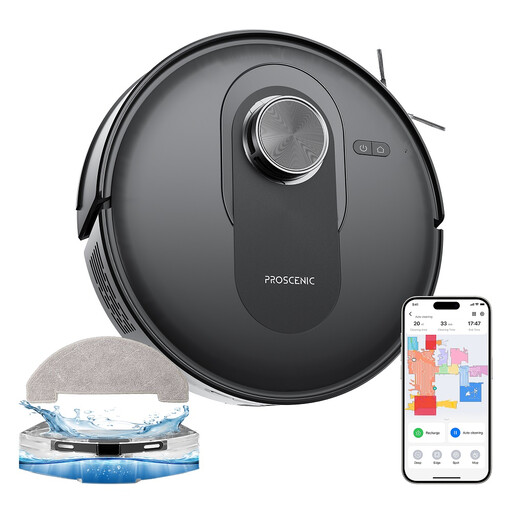
Proscenic Q8 robot vacuum-mop

Proscenic Q8 with mopping and LiDAR navigation

If you want to schedule cleaning by room, check that its mapping and scheduling settings suit your needs. Its product description lists LiDAR navigation and 6 000 Pa. Before running it unsupervised, check the thresholds, clear away any cables and make sure 2,4 GHz Wi-Fi is available for the app.

View on Joybuy

Eureka E20 Plus robot vacuum cleaner with dock

Eureka E20 Plus with collection dock

Its scheduling features and dock are worth considering if you want to reduce hands-on work between scheduled cleans. Its product description lists 8 000 Pa, 180 min of operation and 3D obstacle avoidance. If the robot needs to resume cleaning after recharging while you’re out, make sure this feature is explicitly confirmed. Also check the thresholds and that the app is compatible with 2,4 GHz Wi-Fi.

View on Joybuy

Frequently asked questions

Can a robot replace a stick or cylinder vacuum?

Not for every cleaning task. A robot maintains the surfaces it can reach, while a manual vacuum is still useful for stairs and areas that need direct attention. UFC-Que Choisir assesses robot performance separately across different floors, edges and corners, so check what the model can cover in your home.

What should I do before starting a cycle while I’m out?

Clear away cables and small objects, then check thresholds, rugs and the clearance under furniture. Make sure the robot can reach its dock and, if you’ll be using the app remotely, that your phone and network are compatible with the model.

Is the mopping function suitable for all floors?

No. Check the care instructions for your flooring and robot before using it. UFC-Que Choisir reports varying mopping results and advises against this use on wood, particularly solid wood, in its testing protocol.

Do I need a 2,4 GHz Wi-Fi network?

It depends on the model. Roborock says its devices don’t support 5 GHz Wi-Fi, while iRobot Support notes that this restriction applies to some robots. Check the connection requirements for the model you’re considering before buying.

What still needs maintaining when you have a dock?

Check the maintenance tasks for the dock you choose. Collection can mean you need to empty the robot less often, but the bins, brushes and filters still need care. For a model with a mopping function, also check the mop pads and water-related components, and find out which accessories are compatible with that model.