Choose a robot vacuum cleaner based on the floors it will clean and the routes it needs to navigate, rather than relying on claims about battery life alone. UFC-Que Choisir highlights that results vary depending on the floor covering. Mapping is mainly useful if you want to schedule cleaning by room or area. A self-emptying station means you need to empty the dustbin less often, but it still needs maintenance. Keep a manual cleaning option for stairs, inaccessible spots or quick, targeted clean-ups.
Who is a robot vacuum cleaner for?
A robot can take care of some of your regular vacuuming, as long as its cleaning performance and route suit your home.
Homes with a mix of floor coverings
If you have a combination of wooden floors, tiles and rugs, compare how the robot performs on each surface. UFC-Que Choisir’s testing protocol also assesses edges and corners, where results can matter just as much as they do in the middle of the floor.
Homes where you want to schedule cleaning by area
Mapping is useful if you want different routines for different rooms or floors. Check the settings available on your chosen model and which app you need to access them.
Homes where you want to empty the dustbin less often
A self-emptying station can mean fewer trips to empty the robot’s dustbin. However, you’ll need to allow space for it and check how to empty or replace its container, as well as what other maintenance is required.
What should you check before buying?
Start with the floors and routes in your home, then think about the scheduling features you need and how much maintenance you’re prepared to do.
| Feature | What to check | What I need |
|---|
| Cleaning performance across different areas |
Compare tests carried out on your floor coverings under similar conditions. Look separately at results on rugs, wooden floors and tiles, as well as along walls and in corners. UFC-Que Choisir assesses these situations separately in its testing protocol. |
I have several types of flooring, or dust builds up along the skirting boards. The advertised suction power alone doesn’t tell me what results to expect in these areas. |
| Access to rooms |
Measure thresholds, door tracks and the clearance under furniture, then compare them with the dimensions and obstacle-climbing capability of the exact model. Also look out for cables and small objects along its route. |
The robot needs to reach the rooms that need cleaning without getting stuck on the way. I can also clear the floor before starting it. |
| Navigation and scheduling |
If you want to choose specific rooms or areas, check the mapping features, schedules, no-go zones and app compatibility for the model you’re considering. A robot with random navigation won’t give you the same room-by-room control. |
I can manage without room-by-room settings if I only need a simple routine. If my priorities vary between rooms or floors, I want to be able to organise its cleaning routes. |
| Emptying and maintenance |
Check the robot’s dustbin and any station container, which bags or filters are needed, and what maintenance the manual recommends. For example, iRobot Support explains that bags should be replaced when prompted and that parts of its Clean Base need periodic cleaning. These instructions apply to that station. |
I want to handle dust less often, but I also need to consider how much space the station takes up and how to maintain it. |
What pitfalls should you avoid?
-
Relying on the advertised suction power alone
UFC-Que Choisir says robot vacuum performance varies depending on the floor. Its testing protocol also examines edges and corners, so a suction power figure doesn’t tell the whole story.
Look for tests that cover the types of flooring in your home, and compare results measured under similar conditions.
-
Assuming the robot can cross every threshold
Whether a robot can cross a threshold depends on the model and the conditions in your home. Ecovacs Support recommends checking the wheels, for example, and in some cases adjusting a threshold ramp if the robot has difficulty getting through.
Measure each threshold and the clearance under your furniture, then check the dimensions and obstacle-climbing guidance for the exact model you’re considering.
-
Assuming a self-emptying station means no maintenance
The station collects dust from the robot, but its container and some of its parts still need attention. iRobot Support, for example, recommends maintaining the duct and pre-filter in its Clean Base.
Check the manual for the station you’re considering to find out how it collects dust and what maintenance is required.
Depending on the station, you may still need to replace bags and set aside time for cleaning.
-
Leaving app requirements until after you buy
Connected features depend on the model and the app it uses. For example, iRobot specifies which series and sales period are compatible with Roomba Home.
Before buying, check which app you need, whether it’s compatible with your phone and which scheduling features are available for your chosen model.
Which brands should you know?
These pointers relate to specific ranges and features. They don’t guarantee the performance of any particular model or confirm that it’s included among the products below.
iRobot
Roomba robot vacuum cleaners include connected models, some of which use the Roomba Home app.
- iRobot says Roomba Home is compatible with the 100, 200, Plus 400, Plus 500 and Max 705 series sold after March 2025.
- Check the series and app for the robot you’re considering. If you’re looking at a Clean Base station, also check the maintenance instructions and consumables for its specific model.
Roborock
The brand offers an app with scheduling and mapping settings to explore, depending on the robot you choose.
- Roborock’s app offers room management, no-go zones, cleaning sequences and multi-floor mapping.
- Check clearance under furniture and the ability to cross thresholds for each model. The advertised capability of the Saros 20 doesn’t apply to other models.
Ecovacs
The brand sells robot vacuum cleaners whose ability to move between rooms should be checked for the specific model and your home.
- Ecovacs Support offers advice on what to check if a robot has difficulty crossing a threshold, including the condition of its wheels.
- Measure the routes around your home and check the guidance for the model you’re considering. Adjustments don’t guarantee the robot will cross every threshold.
Robot vacuum cleaners available on Joybuy
These robot vacuum cleaners are designed for regular automated cleaning. Depending on the model, features may include navigation, scheduling or a station. Compare their features and requirements with your floors, the routes around your home and the maintenance you’re happy to do.
 Image unavailable
roborock Q7 L5+ with self-emptying station, black
For regular cleaning, the product description lists LiDAR navigation, schedules and no-go zones in the app. The title also specifies an automatic emptying station and an advertised suction power of 8 000 Pa.
Compare test results on your floors, and check the clearance around your home, the app features and the station maintenance for this model.
View on Joybuy
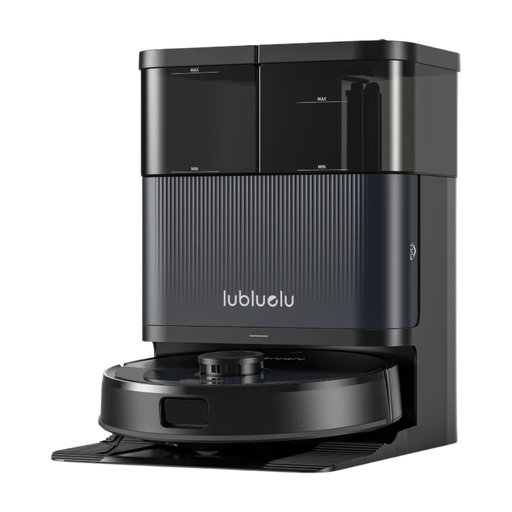 Image unavailable
Lubluelu S1000 / S1000 Ultra+ with station
The description lists LiDAR mapping, scheduling in the app and a station with automatic emptying. The title also mentions 10 000 Pa and 55 dB. These are advertised figures, not test results on your floors.
Both S1000 and S1000 Ultra+ appear in the title. Confirm which version is on sale and the features it includes, then check the routes around your home and the station’s consumables.
View on Joybuy
 Image unavailable
ECOVACS Deebot T30C OMNI Gen2, black
For a cleaning routine across several areas, the description lists TrueMapping 2.0 multi-floor mapping. It describes a station that empties the dustbin, then washes and dries the mop pads. The title gives an advertised suction power of 25 000 Pa.
Allow time for maintenance of the tanks and station. Also check how it performs on your floor coverings, along with the robot’s height and the thresholds it needs to cross.
View on Joybuy
 Image unavailable
Eureka E20 Plus with self-emptying station, black
The listing specifies multi-floor mapping, scheduling and an emptying station. It states that the robot only connects to 2.4 GHz Wi-Fi, so check that your network supports this connection.
The information about dust collection is inconsistent: the station is described as bagless, but there’s also an instruction to replace a bag. Confirm the system used by the version on sale before choosing consumables, and compare its dimensions and cleaning performance with your home.
View on Joybuy
 Image unavailable
roborock Qrevo S5V with station, white
The title lists obstacle avoidance, a station and 12 000 Pa suction power. The description says the station empties the dustbin, then cleans and dries the mop pads.
If you want to schedule cleaning by room, confirm which mapping and settings are available for this model. Also check its performance on your floors, the clearance around your home and the station’s maintenance requirements.
View on Joybuy
Frequently asked questions
Can a robot vacuum cleaner replace all manual cleaning?
Not in every home. Keep a manual cleaning option for stairs, places the robot can’t reach or dirt that needs dealing with straight away. UFC-Que Choisir also finds that robot vacuum performance varies depending on the floor, and assesses edges and corners separately.
What should I measure if my home has thresholds?
Measure every threshold and door track, the edges of rugs and the clearance under furniture, then compare these measurements with the specifications for the exact model. Another robot’s advertised capability won’t tell you whether this one can get around your home. Ecovacs Support also notes that the condition of the wheels and certain adjustments may come into play if the robot fails to cross a threshold.
Does a self-emptying station mean no maintenance?
No. It collects dust from the robot, but the station’s container and parts still need maintenance, depending on the model. For its Clean Base, iRobot Support says to replace the bags when prompted by the station or app, and to clean the suction duct and pre-filter every two weeks. Check the instructions for the model you’re considering.


