Who is this option for?
A scheduled robot vacuum can help keep your floors clean between proper cleans, provided its features and the maintenance it needs are suited to your home.
Households looking to schedule cleans while they’re out
If you want to keep your floors clean without starting every cycle yourself, consider how easy it is to set a schedule, how well the robot moves between rooms and what you’ll need to do before and after it runs.
Homes with different floor types or obstacles
Carpets, wooden floors, tiles, thresholds and furniture all make your choice more dependent on the exact model. UFC-Que Choisir’s testing protocol looks at performance on different floors, along room edges and in corners. Compare those results with your own home.
Shoppers who want to empty the dustbin less often
A docking station can collect dust from the robot between cycles. It doesn’t remove the need to clean the brushes, empty the station or, where applicable, maintain the mopping components. Check the repairability and parts availability for the specific model you’re considering, too.
What should you check before choosing?
Start with your floors and room layout, then check how you’ll schedule cleaning and what maintenance will still be needed.
| Priority |
What to check |
Depending on your needs |
| Performance on different floors |
Look up test results for the model on your floor types, as well as along edges and in corners. UFC-Que Choisir notes that performance varies depending on the floor. |
My rooms have a mix of carpets and hard floors. I want to know where the robot will clean effectively and which areas I may need to go over again. |
| Navigation |
Check how it handles rooms and zones, moves around furniture and crosses the thresholds in your home. Mapping alone doesn’t guarantee that it will get past every obstacle. |
I want to organise cleaning across several rooms while I’m out. In an open-plan room, simpler settings may be all I need. |
| Scheduling and dust collection |
Make sure you understand how to set the schedule. If the model comes with a docking station, check how it collects dust and what extra maintenance it needs. |
I want to run regular cycles without emptying the small dustbin after every clean, while still allowing time to clean the brushes and station. |
| Mopping |
Check that the floor type is compatible and look at the mopping results for the exact model. UFC-Que Choisir’s tests of this function cover tiled floors and show that results vary. |
I’d like a quick damp clean between manual mops, but I don’t want to use it on a floor that isn’t suitable. |
| App and data |
Check app compatibility, update requirements, requested permissions and connection settings. According to the CNIL, the data a connected robot may collect depends on its features. |
If I need an app to schedule cleaning, I want it to work with my phone and to be able to check which connected features I actually need. |
| Repairability |
For a model sold in France, check its repairability index and how long spare parts are stated to be available for that model. According to economie.gouv.fr, the index is a score out of 10. |
I’d rather check the maintenance and repair options for the specific robot than assume they’re the same across a brand. |
Which brands should you consider?
It comes down to the model and its configuration. The brand name alone won’t tell you how well it performs on your floors or what maintenance it needs.
iRobot
Consider the iRobot model you’re interested in in light of your room layout and the floors you need to clean.
- Check navigation, vacuuming performance, spare parts and update requirements for the specific model.
Rowenta
When choosing a Rowenta robot, focus on test results for your flooring.
- The brand name alone won’t tell you whether it can cross thresholds or how it performs on carpets, along edges or in corners.
Roborock
Compare the features of the Roborock model you’re considering with the tasks you want to schedule.
- Check the exact version’s docking station, compatible floors, spare parts and app updates.
Ecovacs
If you’re considering an Ecovacs robot for both vacuuming and mopping, look at each function separately.
- UFC-Que Choisir reports that mopping results vary across the models it has tested, so check the results for the model you’re considering.
Dreame
When considering a Dreame robot, start with the obstacles and floor types in your home.
- For the exact model, check how it handles thresholds, how it performs on carpets and how long spare parts are stated to be available.
Robot vacuums on Joybuy
These models combine scheduling with navigation features and, depending on the model, a self-emptying or mopping station. If you’re looking for a robot to clean while you’re away, compare the settings, maintenance requirements and compatibility with your home.
 Image unavailable
ECOVACS Deebot X11 Pro Omni, 19 500 Pa, OMNI station
The product information lists mapping, app scheduling and zone cleaning, which can help you organise cleaning across several rooms. Its station handles dust collection and mopping tasks, but needs maintenance too.
The stated ability to cross obstacles up to 4 cm is based on several attempts; it doesn’t guarantee that the robot will get over every threshold. Check performance on your floors and carpets, as well as the app’s requirements.
View on Joybuy
 Image unavailable
Black ECOVACS Deebot T30C OMNI Gen2, 25 000 Pa
The product information describes app-scheduled cleaning, room management and a station that empties the robot and washes and dries the mop pads. The station’s 75 °C mop-pad washing temperature is a stated feature, not a measure of how well it cleans your floors.
Check test results for your carpets and hard floors, make sure the mopping function is suitable for your flooring, and consider the maintenance needed for the brushes and water tanks.
View on Joybuy
 Image unavailable
Black Eureka E20 Plus, 8 000 Pa, self-emptying station
The product information lists schedules and no-go zones that can be set in the app. It also states a runtime of up to 180 minutes and 3D obstacle avoidance. These features don’t guarantee how well it will clean your home in a particular cycle.
Move cables, small toys and lightweight rugs with fringes out of the way before scheduling a clean. The stated 10 mm mop lift doesn’t prove that the robot is compatible with every carpet.
View on Joybuy
 Image unavailable
Q8-Max, 8 000 Pa, LiDAR navigation and self-emptying station
For targeted cleaning, the product information lists multi-floor mapping, room-by-room scheduling and no-go zones. It also states a runtime of up to 200 minutes and a 3-litre dust collection container in the station.
The app requires a 2.4 GHz Wi-Fi network, so check your network and phone are compatible. Also check performance on your floors, whether it can cross your thresholds and whether the mopping function is suitable for your flooring.
View on Joybuy
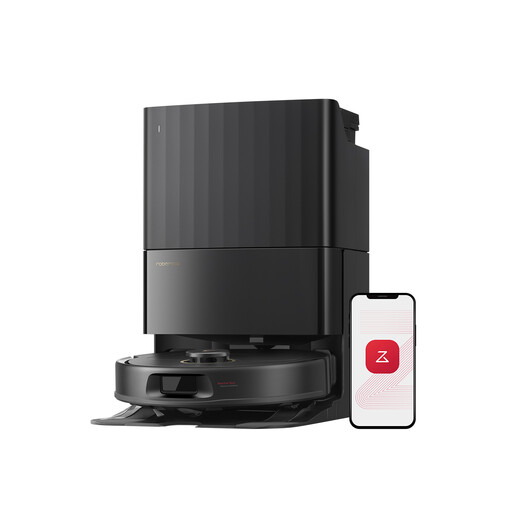 Image unavailable
Black Roborock Qrevo S5V, 12 000 Pa, with station
The product information describes schedules and no-go zones that can be set in the app, as well as a station that empties the robot and cleans and dries the mop pads. You’ll still need to maintain both the robot and the station.
The product details advise against mopping long-pile carpets and recommend setting no-go zones for thick rugs. They also state that only Roborock cleaning solutions should be used in the water tank. Check that you’re happy with this requirement before choosing.
View on Joybuy
Frequently asked questions
Can a robot mop replace mopping by hand?
No, don’t assume it can. UFC-Que Choisir reports mixed mopping results in its tests on tiled floors and advises against using the function in question on wooden floors, particularly solid wood. Check the test results for the model and your flooring care instructions before switching this function on.
Is a self-emptying station enough for a long time away?
No. It can mean you need to empty the robot’s dustbin less often, but the brushes, the station’s dust collection system and any water-related components still need maintenance. Plan for these tasks based on how often the robot runs.
Does the repairability index apply to robot vacuums in France?
France’s DGCCRF lists domestic robots among the vacuum cleaners covered by this index in France; economie.gouv.fr describes it as a score out of 10. Check the index for the model you’re considering, but don’t assume it tells you how long spare parts will be available.
How can I check whether spare parts are available?
Check the stated availability period for the exact model or ask the seller. Don’t assume that a period given for another model from the same brand applies to your robot.
What should I check if I need an app to schedule cleaning?
Check that it’s compatible with your phone, its update requirements, the account and permissions it asks for, and its connection settings. The CNIL notes that the data collected by a connected robot depends on its features, so check which ones you plan to enable.


