What should you look for?
Start with the rooms the robot will need to cover while you’re out. Then decide whether mopping or a docking station will genuinely reduce the amount of hands-on maintenance you want to avoid.
| Criterion |
What to check |
Relevant consumers |
| Scheduling and coverage |
Whether the app is compatible with your phone; whether the exact model lets you schedule cycles and select rooms or areas. |
I want to come home after a day out to find the rooms I chose have been cleaned, without having to start every cycle myself. Around 31% of consumers prioritise this kind of scheduled routine. |
| Floors, rugs and thresholds |
The height of key thresholds and how the model performs on your floor types; for mopping, the settings for rugs and no-mop zones. |
If a rug or threshold separates two rooms, I want to know whether the robot can continue without getting the rug wet. Around 25% of consumers prioritise moving seamlessly between rooms. |
| Items on the floor and pet hair |
Instructions for preparing the floor, obstacle handling and brush maintenance for the model you’re considering. |
With pet hair, cables or small items on the floor, my main concern is preventing blockages while I’m out. Around 25% of consumers put dealing with obstacles and hair first. |
| Emptying and maintenance |
What the docking station actually does, how much space it needs, which consumables it uses and what still needs to be done by hand. |
If I run several cycles between maintenance sessions, I’d rather not empty the bin after each one, but I’m happy to maintain the rest of the system. Around 19% of consumers put reducing these tasks at the top of their list. |
Brands to consider
These brands showcase features to compare on specific models, not performance shared by every product in their ranges.
iRobot
Worth considering if scheduling and managing rooms through an app are important to your routine.
- iRobot says that a Roomba connected to Wi-Fi can be scheduled using its app. The brand also features an AutoEmpty base on the Roomba Max 715 Vac.
- The obstacle detection features and maintenance intervals advertised for this model don’t automatically apply to other Roomba models, and won’t remove the need to prepare the floor.
ECOVACS
Worth considering if you want to combine vacuuming and mopping, while checking that the robot can move between the rooms in your home.
- ECOVACS features the DEEBOT T80 OMNI with a docking station and mopping system.
- ECOVACS support notes that rugs, thresholds and clutter can leave some areas untouched. The threshold-crossing limit given for one model doesn’t apply to the entire range.
Dreame
Worth considering if you want to schedule cleaning for specific rooms or set no-go zones, depending on the features of the model you choose.
- Dreame lists scheduling and no-go zones among the settings available in the Dreamehome app.
- Navigation and rug-related features vary by model. The mop-lifting feature advertised for the L10s Ultra Gen 3 Kit doesn’t prove that it’s suitable for every rug.
Joybuy models for scheduled cleaning
These robots combine vacuuming and mopping with a docking station. Compare their advertised features with your floors and the maintenance you’re happy to carry out. Check scheduling, threshold clearance and rug settings for the specific model you choose.
 Image unavailable
ECOVACS DEEBOT X9 PRO Omni robot vacuum and mop with station
Worth considering if you want to schedule vacuuming and mopping while you’re out, provided the station fits your space and you’re happy with the maintenance required by the mopping system.
The product name lists 16 600 Pa suction power, the OZMO Roller system and a station that washes the mop with hot water and dries it with warm air. Check that it can cross your thresholds and has suitable settings for your rugs.
View on Joybuy
 Image unavailable
Eureka E20 Plus robot vacuum with station
Worth considering if you want to empty the bin less often after scheduled cycles, and have room for the station.
The product name lists 8 000 Pa suction power, 3D obstacle avoidance and a runtime of 180 minutes. Before buying, check which consumables the station needs, whether it can cross your thresholds and how it performs on your rugs.
View on Joybuy
 Image unavailable
JONR T5 Pro robot vacuum and mop with station
Worth considering if you want to schedule vacuuming and mopping and have a docking station, provided its maintenance tasks suit your routine.
The product name mentions laser navigation, an anti-tangle side brush and warm-air drying. Check the settings for rugs, the height of thresholds it can cross and which consumables the station needs.
View on Joybuy
 Image unavailable
roborock Q7 L5+ robot vacuum and mop with emptying station
Worth considering if your priority is to schedule cycles while emptying the robot’s bin less often by hand.
The product name lists LiDAR navigation, an anti-tangle system and advertised suction power of 8 000 Pa. Check how it handles rugs while mopping, whether it can cross your thresholds and what maintenance the station needs.
View on Joybuy
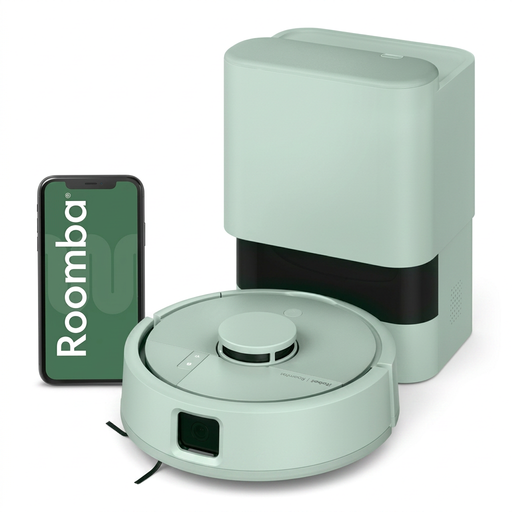 Image unavailable
iRobot Roomba Mini Mint F155440 robot vacuum
Worth considering if you want to choose which rooms to clean and schedule cycles, while allowing for maintenance of the robot and its base.
The product name identifies the Mini Mint F155440 variant. Before running it unattended, check how it handles rugs in mopping mode and whether it can cross your thresholds, then clear away cables and small items.
View on Joybuy
Frequently asked questions
Can you run a robot vacuum when nobody’s at home?
Yes, if the model lets you schedule cycles and you’ve cleared its path. iRobot says that a Roomba connected to Wi-Fi can be scheduled using its app. Check that this feature is available on the model you’ve chosen and run the first few tests while you’re at home.
Will a robot vacuum clean every room despite the thresholds?
Not necessarily: a threshold, rug or cluttered area can stop it from continuing. ECOVACS support gives a limit of 2 cm for the model it describes, but this doesn’t apply to every robot. Measure the thresholds in your home and compare them with the specifications for the model you’re considering.
Can you use the mopping function in a home with rugs?
Yes, as long as the model’s settings can handle the rugs in your home, for example by using no-mop zones or a suitable rug-avoidance feature. Check the routes between rooms too: a mopping function doesn’t guarantee that the robot can cross rugs or keep them dry.
Does an emptying station mean the robot needs no maintenance?
No. It can mean you need to empty the robot’s bin less often, but you’ll still need to check the brushes, sensors and station container, as well as water-related parts on a mopping model. Check the maintenance tasks for the model and station you choose.
What can you do in France if the robot you bought doesn’t match its description?
For an item bought by an individual from a professional seller, the legal guarantee of conformity applies, whether it’s new, second-hand or refurbished, according to the French Ministry of the Economy. Keep your proof of purchase and the product description so you can explain the issue to the seller. This remedy is separate from simply changing your mind.


