Which features should you prioritise?
Start with the task you want to hand over: vacuuming at set times, adding regular mopping or staying in control of every cleaning session. Then check whether the robot can move around your home and work with your connected devices.
Robot vacuum
Consider it: if you want to schedule floor cleaning, with room selection if the model offers it.
Bear in mind: you’ll still need another way to clean stairs and areas the robot can’t reach.
Robot vacuum-mop
Consider it: if you want to add regular wet cleaning on suitable floors.
Bear in mind: the water, mop pads and, depending on the model, the station mean extra maintenance.
Stick or cylinder vacuum
Consider it: for cleaning stairs, furniture or small messes whenever you need to.
Bear in mind: it won’t start a cleaning cycle by itself while you’re out.
| What matters to you |
What to check |
Consumers who share this priority |
| Scheduling cleaning sessions |
Check whether you can schedule cleaning by room or zone and, if needed, whether the robot returns to its dock and resumes after recharging. |
If I’m out during the day, I want my chosen rooms vacuumed without having to start every cycle myself. This is the top priority for around 36 % of consumers concerned. |
| Mopping and maintenance |
Check separately which emptying, washing and drying functions the station offers, as well as the maintenance tasks involved. |
On suitable hard floors, I’d like to hand over wet cleaning too, while knowing that the robot’s components will still need looking after. Around 27 % of consumers concerned rank mopping as their top priority. |
| Getting around your home |
Measure your thresholds and the clearance under your furniture; check the model’s guidance on rugs and stairs. |
With thresholds, rugs or multiple floors, I need to know where the robot can actually go before scheduling cleaning while I’m out. This is the priority for around 19 % of consumers concerned. |
| Manual control and connectivity |
Check the app requirements and which functions are available without a connection, or choose a manual vacuum if you want to take direct control. |
For stairs or occasional cleaning, I sometimes prefer to do the job myself. If I choose a connected robot, I also want to understand how its app works. Around 18 % of consumers concerned prioritise this control. |
Robot vacuum-mops on Joybuy
These models combine vacuuming and wet cleaning for everyday floor care. Compare their scheduling options and stations with your needs; check each model’s return-to-dock and threshold-clearing features individually.
 Image unavailable
Q8-Max robot vacuum-mop with auto-empty station
Worth considering if you want to schedule room-by-room cleaning while you’re out. The product name lists LiDAR navigation, an auto-empty station and advertised suction of 8 000 Pa. You’ll need a 2,4 GHz Wi-Fi network to use the app settings; measure your thresholds before choosing this model too.
View on Joybuy
 Image unavailable
Black Roborock Q7 L5+ robot vacuum-mop
Consider this model if you want to schedule vacuuming and wet cleaning in a home where no-go zones matter. Its name lists LiDAR navigation, automatic dust emptying and advertised suction of 8 000 Pa. Check the app requirements and whether it can cross your thresholds before buying.
View on Joybuy
 Image unavailable
Black Eureka E20 Plus robot vacuum with station
Worth considering if you want to schedule cleaning in a home with rugs too. The product name lists a station, 3D obstacle avoidance and suction of 8 000 Pa; check the product details for this model’s mopping settings and rug handling. If you’re relying on unattended cleaning, also check that it returns to its dock automatically.
View on Joybuy
 Image unavailable
ECOVACS Deebot X11 Pro Omni with Omni station
Worth looking at if zone cleaning and thresholds affect your choice. The product description lists an Omni station and a maximum threshold clearance of 4 cm, but this doesn’t guarantee it will cross thresholds of every shape. Check that you can select rooms and that it returns to the station automatically if you need these features while you’re out.
View on Joybuy
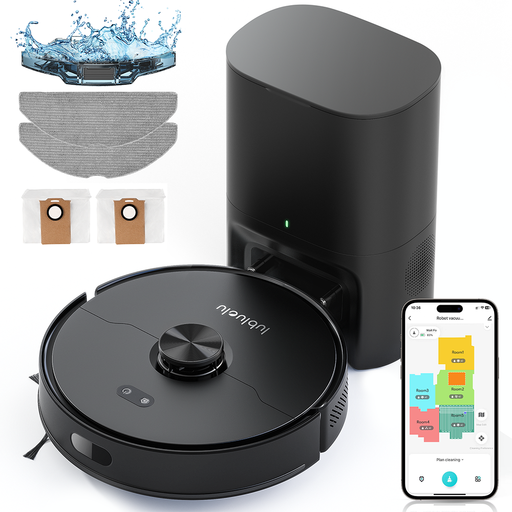 Image unavailable
Lubluelu L15 Max 3-in-1 robot vacuum-mop
Consider this model if you want to schedule room-by-room cleaning and use multiple maps, moving the robot between floors yourself. Its name lists laser navigation, storage for five maps and advertised suction of 4 000 Pa. The app uses 2,4 GHz Wi-Fi; check the exact model’s return-to-dock and threshold-clearing features.
View on Joybuy
Frequently asked questions
Can a robot clean every floor while I’m out?
No, not unless you move it between floors: according to Les Numériques, robot vacuums can’t go up or down stairs. You’ll need to move it for each floor and maintain the cliff sensors as instructed by the manufacturer.
Do you always need an app and an account to use a robot?
It depends on the model and which features you want to use. For Roomba Home-compatible series, iRobot requires a valid email address and a compatible mobile device to start setup. Check the robot’s manual to see which features work without the app.
What data should you check before connecting a robot?
Check the app permissions and what information the chosen model uses for your account, mapping and diagnostics. The CNIL points out that the data collected by a connected device depends on its features, so read its privacy policy before enabling connected services.
Does the repairability score matter for a robot vacuum in France?
Yes. In France, the Ministry of the Economy states that displaying a repairability score is compulsory for vacuum cleaners, and ADEME confirms that this category includes robot vacuums. Compare the score shown for the exact model and check that replacement wear parts are available.
Does a washing station mean you don’t need to maintain the robot?
No. Depending on the model, it may empty the dust or wash and dry the mop pads automatically, but the tanks, filters, brushes and consumables still need attention. Check the manual for your chosen model to find out what maintenance is required.


