A robot vacuum can take care of some routine cleaning while you’re out, provided the rooms are accessible, the route is clear and you’re happy with the maintenance involved. Compare how it performs on your floors and handles obstacles. Assess mopping separately, as it isn’t suitable for every floor type. Les Numériques notes that stairs, furniture and some skirting boards remain beyond a robot’s reach.
Who is a robot vacuum for?
People who are often out, with cluttered floors
If you want to run a cycle while you’re away, first look out for cables, small objects, doors and thresholds that could get in the way. Preparing your home and checking how well the model navigates matter just as much as its scheduling features.
Homes with a mix of floor types
If you have rugs and hard floors, or pet hair to pick up, compare test results for the surfaces and dirt you deal with before choosing a mopping function.
People looking to cut down on certain chores
A docking station can reduce how often you need to handle some tasks, but it won’t eliminate maintenance of the brushes, filters or mopping components. Check how much space you have and what you’ll need to do to maintain the station, too.
What should you check before buying?
Before scheduling a cycle while you’re out, check that the robot can reach the rooms you want it to clean. Then look at how it performs on your floors and what maintenance you’ll still need to do.
| What to consider |
What to check before buying |
Who it matters most to |
| Navigation and getting stuck |
Look out for cables, small objects and doors along the route. Compare navigation test results and check whether you can set no-go zones. |
When I schedule the robot while I’m out, I want to avoid an object or closed door interrupting the cycle. Around 28% of consumers prioritise navigation and avoiding obstacles. |
| Performance on different floors |
Compare test results on rugs and hard floors, as well as on fibres or pet hair if they’re relevant to your home. |
If my home has both rugs and hard floors, I want to know how the robot performs on each before choosing one. Around 22% of consumers prioritise performance on their floor types. |
| Maintenance and docking station |
Check the difference between the robot’s bin and the station. Depending on the model, find out what’s involved in maintaining the brushes, filters, water tank and mop pads. |
When I want to cut down on how often I need to do maintenance, I want to know which tasks will still be up to me. Around 22% of consumers prioritise reducing routine maintenance. |
| Areas the robot can’t reach |
Make a note of any stairs, furniture and corners to consider. Choose a complementary handheld vacuum based on how easy it is to use and the type of cleaning you need. |
If there are areas the robot can’t reach, I want to be able to clean them with another appliance. Around 17% of consumers put this complementary coverage first. |
| Mopping function |
Check that it’s suitable for your floors, review test results for stains and find out what maintenance the mopping system needs. |
If I also want to mop hard floors, I want to check the results and make sure the floor type is compatible. Around 11% of consumers prioritise the mopping function. |
Mistakes to avoid
-
Assuming obstacle detection prevents the robot from getting stuck
Cables or small objects can get in the way of the brushes or wheels, while a closed door could stop the robot from reaching its station. ECOVACS support lists these as possible reasons why a robot might get stuck or fail to return.
Run a test cycle while you’re at home, clear the route and set no-go zones if your model allows it.
-
Choosing mopping just because a mop is included
A mopping system doesn’t guarantee good results on stains or compatibility with every floor type. UFC-Que Choisir advises against the use it tested on wooden floors, particularly solid wood flooring.
Check the test results for the exact model and the guidance for your floor type before using the mopping function.
Remember to clean the mopping components, and be prepared to tackle any remaining stains by hand, depending on the results.
-
Confusing automatic emptying with zero maintenance
A station handles some tasks, but the brushes, filters and mopping components still need to be maintained, depending on the setup.
Check the manual for your model to find out what regular maintenance is required and which parts you’ll need.
Depending on the setup, you may need bags, filters, brushes, mop pads or replacement parts.
Brands to consider for your needs
Roborock
The Qrevo range shows why it’s important to check the full model reference if getting over thresholds is a priority.
- Roborock support states that the Qrevo Curv can climb thresholds up to 3 cm and the Qrevo Curv S5X up to 2 cm.
- These stated figures don’t guarantee the robot will cross every threshold in your home. Check your threshold and the exact model variant.
Rowenta
The X-Plorer models are worth comparing in terms of their station, navigation and model-specific features.
- For the X-Plorer Serie 75 S+ RR8595WH, Rowenta states that it has an emptying station and can cross thresholds up to 18 mm high.
- This specification applies to the RR8595WH model and doesn’t tell you how it will perform in your home.
Ecovacs
Compare DEEBOT models based on their navigation, station and mopping features for the model you’re considering.
- ECOVACS support recommends clearing away cables and small objects or setting virtual boundaries when the model allows it.
- A range name or obstacle-avoidance feature doesn’t mean the robot will avoid every object or never get stuck.
Mova
The P70 Pro Ultra is an example of a robot vacuum and mop assessed in a French review.
- In its review of this model, Les Numériques found its vacuuming performance satisfactory and maintenance easy.
- The same review notes that it keeps a wide distance from obstacles, could do better in corners and along skirting boards, and has a cluttered app. These comments apply to this specific model.
Narwal
For the Flow, compare how the station works and check the exact accessory setup.
- Les Numériques describes the Narwal Flow it reviewed as effective.
- The same guide describes it as relatively slow. A version with a water connection kit shouldn’t be confused with the setup that was reviewed.
Robot vacuums available on Joybuy
This selection features robot vacuums, including variants that combine vacuuming with a station and, depending on the model, a mopping function. Check the setup for each model and make sure mopping is suitable for your floors.
 Image unavailable
Eureka E20 Plus
Worth considering if you’re looking for a robot for regular cleaning cycles and want to compare its advertised navigation and emptying features.
Advertised suction: 8,000 Pa; self-emptying station; anti-tangle function; 3D obstacle avoidance; advertised battery life of up to 180 minutes.
The stated mop lift is 10 mm. No-mop zones are recommended for rugs.
Joybuy
 Image unavailable
Eureka J15 Pro Ultra
Worth considering if you want to compare a model that combines vacuuming and mopping for regular floor care.
Advertised suction: 16,200 Pa; mopping function; 75 °C hot-water cleaning stated in the product name.
Joybuy
 Image unavailable
Dreame X40 Ultra Complete, white
This model is worth comparing if you’re looking for automated, regular cleaning. Check the exact station setup and associated features.
The product information notes that the station uses hot water and recommends avoiding contact with residual water immediately after a cycle.
Joybuy
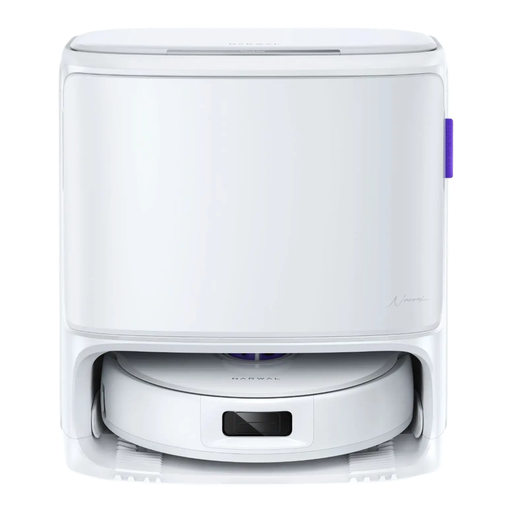 Image unavailable
Narwal Freo Z10 Pro, white
Worth considering if you’re comparing a robot vacuum and mop with a self-cleaning base for repeated cleaning cycles.
Advertised suction: 18,500 Pa; self-cleaning base.
The product information recommends clearing away cables and small objects. It also says you’ll need to fill the clean-water tank and empty the dirty-water tank as instructed.
Joybuy
 Image unavailable
Roborock Qrevo S5V, white
Worth comparing if you’re looking for a model that combines vacuuming, mopping and navigation with obstacle management.
Advertised suction: 12,000 Pa; FlexiArm mop pads; anti-tangle system; hot-air drying stated in the product name.
The product information recommends setting no-go zones for long-pile rugs when using the mopping function.
Joybuy
Frequently asked questions
How should I prepare my home before running a cycle while I’m out?
First, run a test cycle while you’re at home. Clear away cables and small objects, keep the route to the station clear and set no-go zones if the model allows it. ECOVACS support lists objects on the floor and closed doors as possible reasons why a robot might get stuck or fail to return.
Will a robot vacuum cross the thresholds in my home?
It depends on the model and the threshold. Roborock states different limits for the Qrevo Curv and Qrevo Curv S5X, while Rowenta states that the X-Plorer Serie 75 S+ RR8595WH can cross thresholds up to 18 mm high. Measure your thresholds and bear in mind that a stated figure doesn’t guarantee the robot will cross them in your home.
Does the station mean a robot mop needs no maintenance?
No. Depending on the model, the station handles some tasks, but containers, brushes, filters and mopping components may still need maintenance. Check the manual for the exact model to find out what tasks to expect.
What rights and information should I check when buying from a professional seller in France?
The statutory legal guarantee of conformity applies under the conditions set out by law, independently of any optional commercial guarantee. The DGCCRF states that claims must be brought within two years of delivery of the goods. It also says that the repairability index must be provided when the relevant robot vacuums are sold, including online.
What should I check if the robot uses a connected app?
Review the settings and terms of use, protect access to your account, phone and Wi-Fi, and check how you can access and delete your data. The CNIL recommends these precautions for connected devices; they don’t indicate what data a particular model collects.


