You’re often away
You’d like to schedule cleaning between manual cleans. Compare how often you’ll need to empty the dust container with the maintenance required for any docking station.


A robot vacuum on a schedule can keep your floors clean while you’re away, provided it can move around freely and you’re happy with the maintenance involved. Start by considering your flooring and the layout of your home. Mapping helps organise cleaning routes, while a docking station means you won’t need to empty the dust container as often, but it doesn’t eliminate maintenance altogether. Results vary depending on the floor, and you may still need to clean manually, as Que Choisir points out.
How useful a robot is depends as much on how easily it can move around your home as on how much maintenance you’re willing to do between cleaning cycles.
You’d like to schedule cleaning between manual cleans. Compare how often you’ll need to empty the dust container with the maintenance required for any docking station.
You want to organise cleaning by area while making sure the robot can get around. When testing the Qrevo Edge, Les Numériques noted limitations in its obstacle detection. Mapping doesn’t mean you can leave things lying on the floor.
Compare how well it performs on the floors in your home, including carpets, tiles and wooden flooring. Que Choisir assesses these surfaces separately, as well as edges and corners.
Start with your flooring and the routes the robot needs to cover, then check what scheduling and the docking station will actually save you from doing.
| Criteria | What to check | What I need |
|---|---|---|
| Results on different floors | Look for tests on your flooring and the types of dirt you need to tackle. Check performance along walls and in corners too: Que Choisir’s testing procedure assesses these separately. | I have carpets, tiles or wooden flooring; results on just one type of surface aren’t enough to help me choose. |
| Getting around | Compare the dimensions and stated obstacle-crossing ability of the exact model with your low furniture and door thresholds. Test the route before running a cycle while you’re away. | The robot needs to reach the rooms I want cleaned without me having to move things regularly to get it unstuck. |
| Navigation and scheduling | Check the scheduling features of the model you’re considering. If you want to clean by room or set no-go areas, confirm that these features are available in its app. Mapping won’t guarantee that every obstacle is detected. | I want to target certain rooms while I’m away, or simply schedule cleaning in an uncluttered space. |
| Docking station and maintenance | Distinguish between emptying the dust container and any washing or drying features. Check the maintenance required for the container, brushes, filters and any mopping components supplied with that model. | I’d find it inconvenient to empty a small dust container often, but I can keep up with maintenance for the station and robot. |
| App and data | Check that the app is compatible, how updates are handled and what data settings are available. Cybermalveillance.gouv.fr recommends installing security updates for connected devices and their apps. | I want to set the cleaning schedule I need using my phone and manage the settings of a connected device. |
Performance varies depending on the flooring. In its 2024 mopping tests, Que Choisir found that many of the models tested delivered unsatisfactory results.
Look for tests covering the surfaces and features you’ll actually use, rather than relying on a single stated figure.
You may still need to do some additional cleaning by hand.
When testing the Roborock Qrevo Edge, Les Numériques found that it missed some obstacles. Objects on the floor can limit the area it covers.
Clear the route and test it in your home before relying on a cycle while you’re away.
Transferring dust to the station means you won’t need to empty the robot’s container as often, but the station’s container still needs attention. Other automated tasks vary by model.
Compare the station’s features carefully, along with the parts and consumables you’ll need.
Depending on the model, you’ll also need to maintain the station and mopping components.
The scheduling features you want may depend on the app. Connected devices also require you to pay attention to updates and the data they collect.
Check the app’s compatibility and settings, and follow Cybermalveillance.gouv.fr’s recommendations for security updates.
These brand ranges can help you identify which features to look at. Check the specifications and results for each model and variant.
The Qrevo range gives you the chance to compare mapping and docking station features. A French review of the Qrevo Edge also provides a point of comparison for that specific model.
The X-Plorer range includes different configurations to compare model by model, particularly when it comes to mapping and the docking station.
The Roomba Combo range lets you compare vacuuming and mopping. The 105 Combo Y311040 is different from versions supplied with an AutoEmpty base.
DEEBOT covers several ranges, so check the mapping and docking station features of each model.
The L and D series include different configurations. The L40 Ultra AE is one example of a model supplied with a multifunctional station.
These robot vacuums are worth considering if you’re looking for regular cleaning and want to compare docking station features. Before choosing, check the scheduling options, what the station actually does for each model and how it performs on your floors.
 Image unavailable
If you want it to clean while you’re away, check the scheduling settings and which maintenance tasks this model takes care of. Its name indicates a stated suction power of 16200 Pa, brush lifting and hot-water cleaning at 75 °C. These figures don’t guarantee how well it will perform on your floors.
 Image unavailable
If edge cleaning and mop maintenance matter to you, look at the features listed for this version: TruEdge 2.0, an OMNI station and mops that are said to be washed at 75 °C. Its stated suction power is 25 000 Pa. Check its performance on your floors separately, along with the maintenance the station requires.
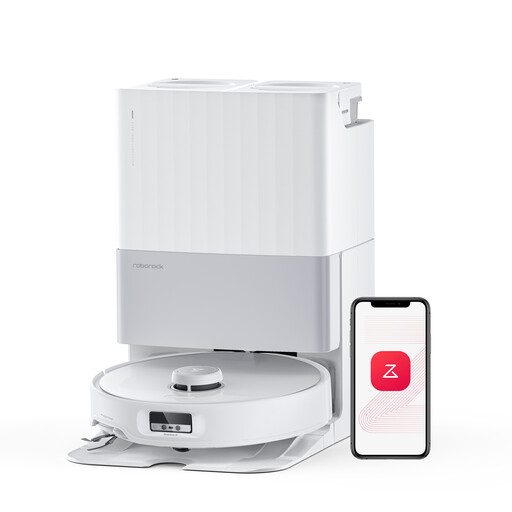 Image unavailable
If your home has a mix of hard floors and carpets, look at its liftable chassis and the stated 75 °C mop-washing feature. Its stated suction power is 18 500 Pa. Les Numériques found that the Qrevo Edge missed some obstacles in its test, so clear the route before running a cycle while you’re away.
 Image unavailable
If you’re looking for regular cleaning while you’re away, check the scheduling and docking station features of this Complete version. Also compare how it performs on your floors and what maintenance you’ll still need to do yourself.
 Image unavailable
If hair or pet fur makes brush maintenance a concern, look at the anti-tangle system stated for this model. Its name also indicates FlexiArm mops, hot-air drying and stated suction power of 12000 Pa. Check the station’s exact features and how well it performs on your floors.
Clear the way and test the route and schedule before leaving the robot to run a cycle while you’re away. Les Numériques’ Qrevo Edge test shows that obstacle detection doesn’t necessarily mean you can leave things lying on the floor.
No. It transfers dust to a larger container, which still needs to be emptied and cleaned. Also check what else needs maintaining on the model you’re considering: robot mop stations don’t all automate the same tasks.
Don’t assume so. Que Choisir’s mopping tests focus on tiles; the association advises against using this function on wooden floors, particularly solid wood. Check the instructions for your flooring and the robot you’re considering.
Check that it’s compatible with your phone and find out how updates work for the features you’ll use. Cybermalveillance.gouv.fr also recommends checking what data is collected, changing default login details where available and installing security updates.
Yes. The French government departments responsible for ecological transition state that the repairability index applies to vacuum cleaners, including robot vacuums. The index can help you assess how repairable a model is, but it doesn’t guarantee how long it will last.