A robot can take care of regular cleaning runs if the rooms are accessible and its performance suits the floors in your home. Mapping helps plan its route, but it won’t guarantee that it can cross thresholds or clean stairs and hard-to-reach areas. A dock can mean you need to empty the robot less often, but it takes up space and needs maintenance of its own.
Who is a robot vacuum for ?
Households looking to delegate weekday cleaning
If you’d rather schedule cleaning runs than get the vacuum out every time, first check how well it cleans your floors and which areas you’ll still need to do by hand. Que Choisir Ensemble notes that performance varies by floor type.
Households that want to empty the bin less often
A dock can reduce how often you empty the robot itself, but it takes up space and also needs maintenance. Les Numériques describes automatic emptying as transferring debris into a larger container.
Households with rooms that are hard to access
If thresholds, rugs or furniture could make it difficult to get around, measure the gaps and compare them with the stated capabilities of the exact model. Les Numériques notes that a robot can’t clean stairs or furniture.
What should you check before buying ?
First, check whether the robot can move around and clean the surfaces in question. Then decide whether scheduling and a dock will meet your needs without adding too much maintenance.
| What matters |
What to check |
Who it matters most to |
| Cleaning your floors |
Compare test results for your surfaces, including rugs, tiles or wooden floors, and distinguish vacuuming results from mopping results. Que Choisir Ensemble assesses these surfaces separately in its testing protocol. |
If you’re relying on weekday cleaning runs to pick up dirt around your home, around 31 % of consumers prioritise how well a robot cleans their floors. |
| Access and navigation |
Measure thresholds and clearances, then compare them with the model’s specifications and any available navigation test results. |
If thresholds or obstacles separate your rooms, you’ll want to know whether the robot can actually reach them ; around 25 % of consumers prioritise access to different rooms. |
| Emptying and the dock |
Check that the dock collects dust effectively, how much space it needs and which consumables are compatible with the model you’ve chosen. |
If frequently emptying the bin could disrupt your routine, you might prefer a dock despite the space it takes up and the maintenance it needs ; around 19 % of consumers prioritise reducing how often they empty the bin. |
| Scheduling |
Identify the controls you need and check the app’s compatibility, as well as the manufacturer’s terms for updates. |
If you want to plan cleaning runs around your weekly routine, scheduling features and compatibility are particularly important ; around 13 % of consumers prioritise scheduling. |
| Long-term maintenance |
Check the repairability rating for the model in question and look for the right spare part and consumable references. |
If you want to maintain or repair the appliance over time, check the information for the exact model ; around 12 % of consumers make this their priority. |
Pitfalls to avoid
-
Assuming mapping means the robot can reach every room
Scheduling a room doesn’t mean the robot can cross a threshold it can’t get over.
Measure your thresholds and compare them with the stated capability of the exact model. Assess navigation and cleaning separately.
-
Assuming a charging dock empties the robot without any maintenance
Charging, dust collection and mop maintenance are separate functions. A dock doesn’t eliminate all manual tasks.
Check which functions are included with the model, allow for the space it needs and factor in the recommended maintenance.
Depending on the model, you may also need compatible bags.
-
Assuming the robot replaces all manual cleaning
Stairs and some surfaces or hard-to-reach areas will still need to be cleaned by hand.
Choose a robot for regular cleaning runs in accessible areas, and keep a manual option for the rest.
Brands to know as a starting point
Rowenta
The X-Plorer range lets you compare models by their navigation, dock and maintenance requirements.
- For the X-Plorer Série 75S+ RR8585WH, Rowenta lists laser navigation, no-go zones and the ability to cross thresholds up to 18 mm high.
- Rowenta publishes a repairability rating of 9.3/10 for this model.
- These specifications don’t indicate how well it will clean your floors. Also check that spare parts and consumables are available for the model you’re buying.
Roborock
The Qrevo S is a useful model to compare for LiDAR navigation and a multifunction dock.
- Roborock says its dock empties dust, washes and dries the mop pads, and refills the water tank.
- Allow for the space the dock needs and the maintenance it requires. The advertised features don’t tell you how well it will clean the floors in your home.
Dreame
Dreame describes the X40 Ultra Complete as a robot vacuum and mop with an auto-empty dock and intelligent navigation.
- This model gives you the chance to explore a setup designed to automate several tasks.
- The manufacturer’s description doesn’t mean maintenance is eliminated. Check exactly what’s included in the pack and look for test results on your floors.
Eureka
The J15 Pro Ultra is a useful model to compare for a robot with a dock and technology the brand says helps prevent hair tangles.
- Eureka describes a self-cleaning dock and anti-tangle technology.
- These claims come from the manufacturer and don’t measure performance on your rugs. The support documentation also recommends maintaining the suction inlet and the dock’s contacts.
Robot vacuums on Joybuy
These models include robot vacuums for regular floor care, with mapping, scheduling or an auto-empty dock depending on the model.
 Image unavailable
EUREKA E20 Plus
Worth considering if you want to schedule cleaning runs and empty the robot less often.
The product description lists LiDAR mapping, app scheduling and a bagless dock with a 2 litre collection bin. The title lists suction power of 8 000 Pa.
The dock’s bin needs emptying, and the brushes and filters need cleaning periodically.
View on Joybuy
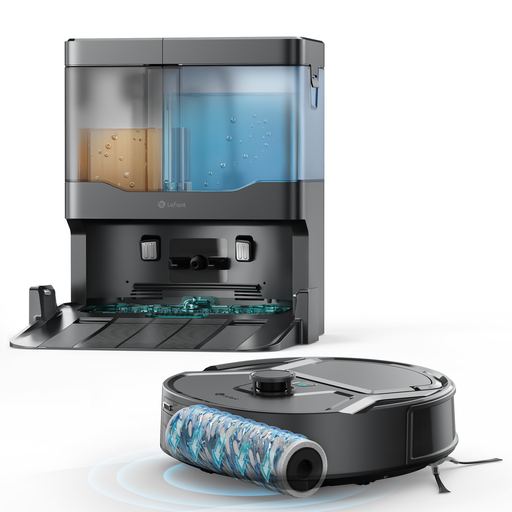 Image unavailable
Lefant M265
Worth a look if the multi-floor mapping mentioned in the title suits the layout of your home.
The title lists suction power of 20 000 Pa, a 20 cm cleaning width, a mopping function and anti-tangle technology.
View on Joybuy
 Image unavailable
Eureka J15 Pro Ultra
Worth considering if you want a dock that takes care of some tasks after the robot has finished cleaning.
The title lists suction power of 16 200 Pa, a mopping function and anti-tangle technology. It also mentions mop washing with water at 75 °C and a self-cleaning dock.
Eureka’s support information also covers maintenance of the suction inlet and the dock’s contacts.
View on Joybuy
 Image unavailable
Roborock Qrevo S5V White
Worth a look if you want to combine scheduled cleaning runs with a dock that empties the bin.
The title lists suction power of 12 000 Pa, FlexiArm mop pads, anti-tangle technology, hot-air drying and intelligent navigation with obstacle avoidance.
The dock reduces some of the manual tasks, but still needs maintenance.
View on Joybuy
 Image unavailable
ECOVACS DEEBOT X9 PRO Omni
Worth considering if you want to schedule cleaning runs using mapping and an all-in-one dock.
The title lists suction power of 16 600 Pa, an OZMO Roller mop and a dock with auto-emptying, hot-water washing and hot-air drying. The product description specifies a 2.4 GHz Wi-Fi connection.
The product description also says to refill the water tank and clean the brushes and filters regularly.
View on Joybuy
Frequently asked questions
How can I tell if the robot will clean my rugs as well as my hard floors ?
Compare test results for the different surfaces in your home. Que Choisir Ensemble assesses rugs, tiles, wooden floors, edges and corners, among other things ; an advertised feature alone won’t tell you how well the robot will perform on every type of floor.
What should I prepare before scheduling the first cleaning runs ?
Measure your thresholds and identify any areas to avoid, then compare them with the specifications for the model you’ve chosen. If you plan to use an app, check that it’s compatible with your phone and ask the manufacturer about its update policy.
Does a dock eliminate emptying and maintenance ?
No. An auto-empty dock collects dust in a larger container, but the container, mop pads or tanks may still need attention, depending on the model. Check the recommended maintenance for the model you’ve chosen.
What should I check about spare parts and after-sales service in France ?
Look for spare parts and consumables that match the exact model. In France, for new, second-hand or refurbished goods bought from a professional seller, the statutory guarantee of conformity applies through the professional seller, according to information from the Ministry of the Economy dated 9 September 2026. A repairability commitment advertised by a brand is separate.


